Business Email Contract Template 2026

Get Form
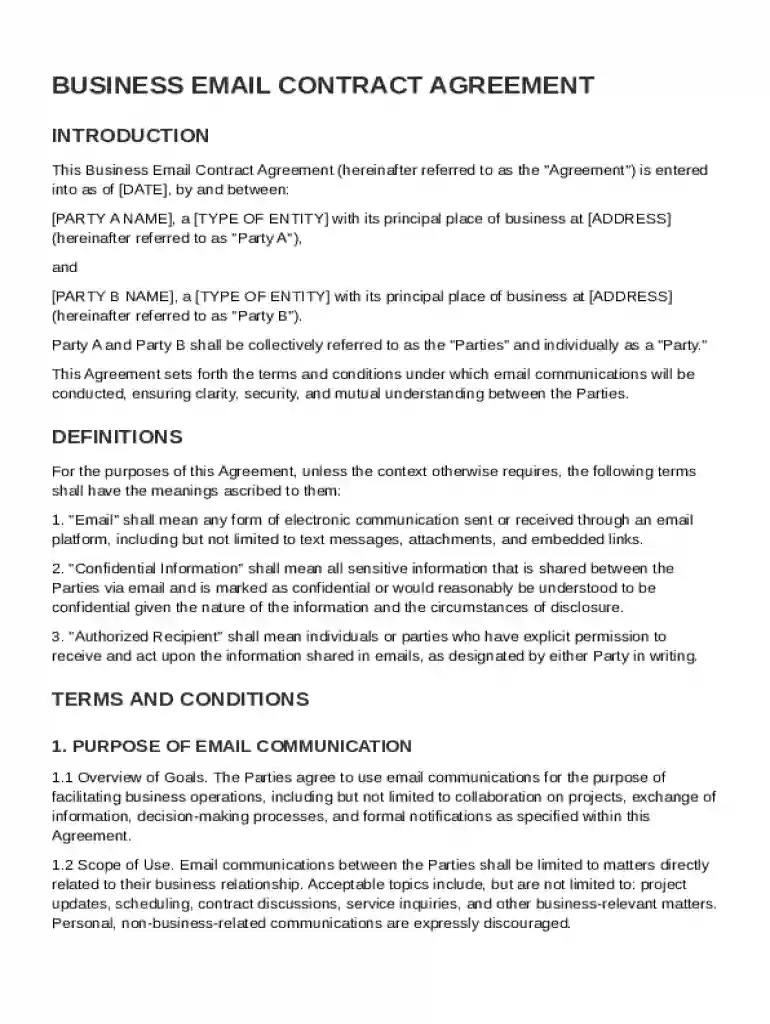
Business Email Contract Template Preview on Page 1

Here's how it works

01. Edit your form online
Type text, add images, blackout confidential details, add comments, highlights and more.

02. Sign it in a few clicks
Draw your signature, type it, upload its image, or use your mobile device as a signature pad.

03. Share your form with others
Send it via email, link, or fax. You can also download it, export it or print it out.

Definition and Purpose

A Business Email Contract Template serves as a structured agreement outlining the terms and conditions for email communications between two parties in a business setting. This template ensures that both parties understand and agree on rules regarding professional communication, response times, handling of confidential information, and more. Properly defining these elements helps prevent misunderstandings and provides a clear framework for resolving potential disputes. It includes crucial details about record-keeping requirements, compliance with relevant laws, and procedures for amendments or termination.

How to Use the Business Email Contract Template

Using a Business Email Contract Template involves several steps designed to tailor the document to specific business needs:

  1. Customization: Begin by filling in basic details such as the names of the involved parties and the specific scope of email communication.
  2. Terms and Conditions: Outline clear protocols regarding response times and handling of confidential information.
  3. Legal Compliance: Include sections ensuring that both parties comply with relevant legal and regulatory requirements.
  4. Review and Approval: Have both parties review the document to ensure mutual understanding before signing.

Modifying the template to accommodate specific business circumstances aids in maintaining relevance and effectiveness.

Steps to Complete the Business Email Contract Template

To effectively complete the Business Email Contract Template, follow this detailed process:

  1. Initial Identification: Enter the names and contact information of all involved parties.
  2. Define Communication Guidelines: Specify acceptable formats, response times, and expected tone.
  3. Confidentiality Agreements: Clearly outline what constitutes confidential information and how it should be protected.
  4. Amendment Procedures: Include detailed procedures for making changes to the agreement.
  5. Signing and Storing: Ensure both parties sign the document and store copies in a secure and accessible location.

Each of these steps is critical in tailoring the contract to meet both parties' needs while providing a legal safety net.

Key Elements of the Business Email Contract Template

A well-structured Business Email Contract Template comprises several key elements:

  • Identification of Parties: Clearly states the involved entities and their relationship.
  • Scope of Communication: Defines the extent and nature of email interactions covered.
  • Confidentiality Clause: Protects sensitive information exchanged via email.
  • Response Expectations: Establishes timelines for replies to ensure timely communication.
  • Amendment and Termination: Details processes for modifications or ending the contract.

Including these elements ensures the contract covers all potential areas of disagreement or confusion in email communications.

Examples of Use Cases for the Business Email Contract Template

Businesses across various sectors can benefit from implementing a Business Email Contract:

  • Consulting Firms: To streamline communication between advisors and clients regarding project progress.
  • Legal Practices: Ensures clients understand response times and confidentiality in attorney-client communications.
  • Technology Companies: Protects proprietary information shared via routine email exchanges.
  • Retail Businesses: Manages vendor-client communications efficiently.

These examples highlight the versatility and necessity of employing such a template in different business contexts.

Who Typically Uses the Business Email Contract Template

Various professionals and entities find this template beneficial:

  • Freelancers & Consultants: To formalize communication terms with clients.
  • Corporate Departments: Such as HR or legal teams requiring structured communications.
  • Small Business Owners: For consistent and formal email exchanges.
  • Educational Institutions: Ensuring clear terms between faculty and administrative bodies.

Identifying the typical users of this template provides context on its applicability in various professional settings.


decoration image ratings of Dochub

Who Issues the Template and Its Legal Use

Typically, legal or administrative departments within a business issue the Business Email Contract Template. Its proper use involves ensuring that all terms comply with national and state communication laws and regulations. This adherence guarantees that all email exchanges covered under the contract are legally binding and enforceable. Consulting legal professionals when drafting or using the template is advised to align with current legal standards.

Digital vs. Paper Version: Choosing the Right Format

Organizations must decide between digital and paper versions based on various factors:

  • Digital Advantages: Ease of access, modification, and sharing across platforms like DocHub.
  • Paper Benefits: Often preferred where digital signature validation is questioned.

While both formats hold their place, digital versions usually offer more flexibility and convenience, especially in tech-savvy environments where seamless workflows are prioritized.

be ready to get more

Complete this form in 5 minutes or less

Get form

Got questions?

We have answers to the most popular questions from our customers. If you can't find an answer to your question, please contact us.
Contact us
Write the contract in six steps Start with a contract template. Open with the basic information. Describe in detail what you have agreed to. Describe how the contract will end. Say which laws apply and how disputes will be resolved. Include space for signatures.
Tips for Writing Sending Contract Emails Use a clear subject line. No need to be clever. Summarize the key details. Briefly restate the project scope, timeline, and total cost in the body of your email. Outline the next steps. Dont leave them guessing. Make signing simple. Set a polite deadline.
How to write an email to a potential client? Write a subject line. Include a salutation. Write an introduction. Evaluate the prospects position in the buyers journey. Ensure the email includes your value proposition. Close the email with a salutation. Sign your name in the email and include contact information.
Contracts arent that complicated. All you need is offer, acceptance, consideration, intent, legality and capacity. If all those requirements are meant, everything else in it just has its plain English meaning so just write out the terms you want such as price and the specific services you provide.
Use a professional email address. Add a concise, informative subject line. Greet the recipient with a proper salutation. Write the body of your email. End emails with a sign-off and signature. Proofread your email. Check your recipient fields. Schedule your email and send.

Security and compliance

At DocHub, your data security is our priority. We follow HIPAA, SOC2, GDPR, and other standards, so you can work on your documents with confidence.
Learn more
ccpa2
pci-dss
gdpr-compliance
hipaa
soc-compliance

People also ask

All electronic communications can constitute legally binding contracts. This even includes emails and text messages if written correctly.
How to send an online contract for signing Register or download a contract program. Create a contract in a writing or word processor program. Upload the contract file to the program. Add the names and email addresses of the contract signers to the program. Select the locations where you want eSignatures, initials and dates.

Related links