






Definition & Meaning
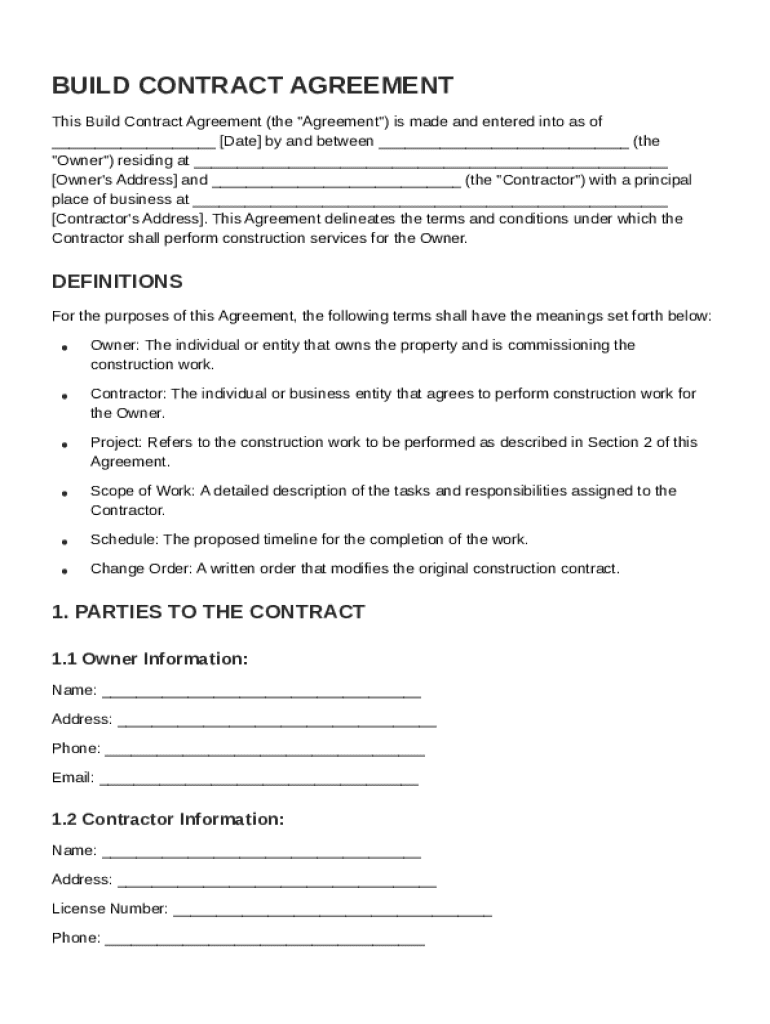
A Build Contract Template is a formal document that outlines the terms and conditions of an agreement between an Owner and a Contractor for construction services. It serves as the foundational framework to ensure both parties are clear on their responsibilities and rights throughout the construction project. Key components of this template include project details, scope of work, timelines, payment schedules, and legal stipulations, making it essential for managing expectations and mitigating disputes in construction projects.
- Project Description: An overview of what the construction project entails, including specifications and intended outcomes.
- Scope of Work: Detailed breakdown of tasks, deliverables, and responsibilities the Contractor must fulfill.
Key Elements of the Build Contract Template
The Build Contract Template encompasses several crucial components to facilitate effective construction agreements. These elements are designed to provide clarity and structure for both parties involved.
- Compensation Details: Specifies how and when the Contractor will be compensated, including payment terms and any bonuses or penalties tied to project milestones.
- Termination Clauses: Conditions under which the contract can be terminated, protecting both the Owner and Contractor from unforeseen circumstances.
- Indemnification and Liability Provisions: Outlines the responsibilities for risk, liability, and damage claims, ensuring each party understands their obligations in the event of a mishap.
Legal Use of the Build Contract Template
This template ensures that the construction agreement is compliant with applicable laws and regulations, safeguarding the interests of both parties. Understanding the legal implications is critical for enforcing the contract terms and resolving disputes that may arise during the project.
- Dispute Resolution Methods: Includes processes such as mediation or arbitration for resolving disagreements without resorting to litigation.
- Compliance with Building Codes: Ensures that the construction adheres to state and local regulations, mitigating risks of fines or project delays.
Steps to Complete the Build Contract Template
Completing the Build Contract Template involves several steps to ensure all pertinent information is captured accurately and comprehensively. Follow these guidelines to prepare a robust contract:
- Fill in Project Details: Enter the names and contact details of both the Owner and Contractor.
- Define the Scope of Work: Detail the specific tasks and responsibilities required for the project.
- Set the Compensation Terms: Specify the payment structure, including any deposits or phased payments.
- Include Legal Provisions: Add necessary clauses covering indemnity, liability, and termination.
- Review and Sign: Both parties should thoroughly review the completed template before signing to confirm mutual understanding and agreement.
Who Typically Uses the Build Contract Template
The Build Contract Template is widely used by various stakeholders in the construction industry. Each group leverages the template differently based on their role and responsibilities.
- Construction Companies: Utilize the template to formalize agreements with subcontractors or clients.
- Property Owners and Developers: Engage Contractors with a clear legal framework outlining project expectations and payment terms.
- Contractors and Subcontractors: Ensure they have a detailed contract that protects them legally and specifies the scope of work.


State-Specific Rules for the Build Contract Template
Construction laws and requirements can vary significantly between states, affecting how a Build Contract Template should be drafted and executed. Being aware of these regional differences is crucial for legal compliance:
- Licensing Requirements: Certain states may mandate specific licenses or certifications for Contractors involved in building projects.
- Environmental Regulations: State-level environmental laws may require additional assessments or permits before commencing construction.
Important Terms Related to Build Contract Template
Understanding the terminology used within the Build Contract Template is essential for ensuring accurate interpretation and execution of the contract.
- Force Majeure: Refers to unforeseeable circumstances that may prevent contract fulfillment, such as natural disasters.
- Substantial Completion: The point at which the construction project is deemed complete enough for the Owner to occupy or utilize the building.
Examples of Using the Build Contract Template
To illustrate the practical application of the Build Contract Template, consider the following examples in real-world scenarios:
- Residential Development: A homeowner uses the template to contract a builder for a new home, specifying design features and ensuring clarity on completion timelines.
- Commercial Construction: A business contracts a construction firm to build a retail space, utilizing the template to establish phased payments and performance incentives.
Digital vs. Paper Version
Transitioning to digital versions of the Build Contract Template offers significant advantages over traditional paper formats, facilitating better management and efficiency.
- Access and Portability: Digital templates allow easy access and editing from any device, enabling real-time updates and communication.
- Security and Storage: Digital documents can be securely stored with encryption and accessed through cloud services, ensuring data protection and disaster recovery options.