
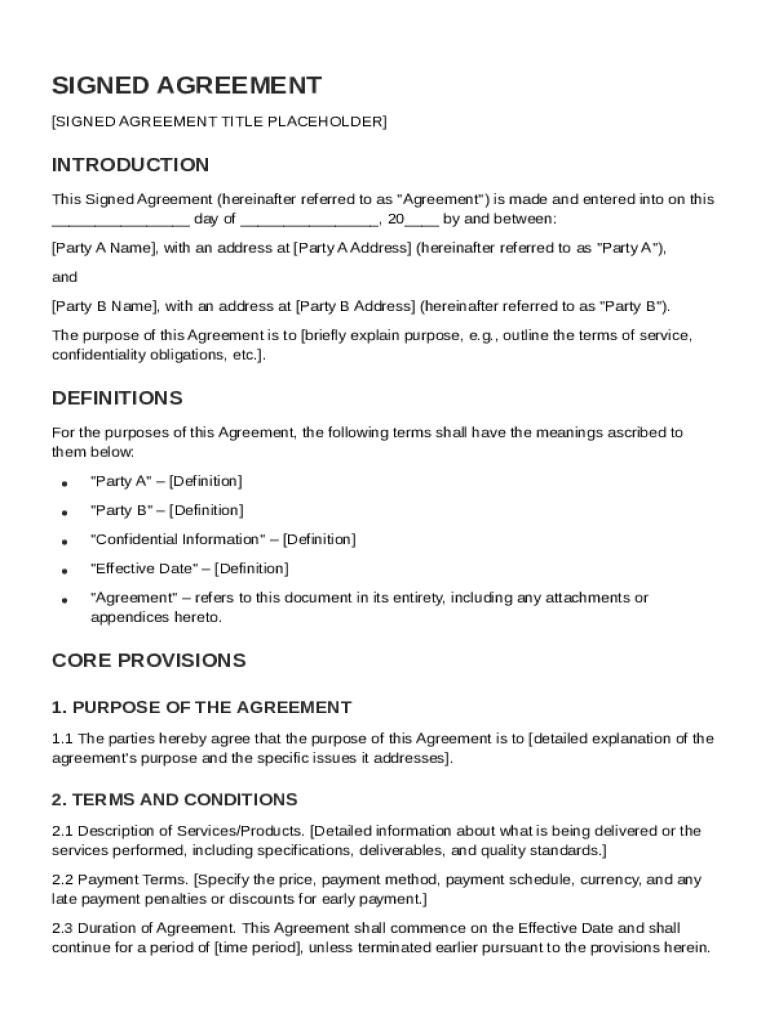







Definition and Meaning
A "Signed Agreement Template" is a standardized document designed to facilitate the formalization of agreements between two or more parties. The template provides a structured format that includes essential sections such as terms and conditions, responsibilities, confidentiality clauses, and more. This form is crucial for delineating the expectations and obligations of each party, ensuring that all involved parties have a clear understanding of their roles and commitments. It serves as an authoritative source that guides the lawful conduct of agreements and serves as evidence in case of disputes.
Purpose of the Template
- Clarifies the terms and expectations for all parties involved.
- Provides a legal framework that defines the rights and obligations of each signatory.
- Helps prevent misunderstandings by having a written record of the agreement.
- Offers protection by providing dispute resolution mechanisms.
Practical Example
Consider a freelance consultant and a company entering a service agreement. Both parties can use a Signed Agreement Template to outline the scope of services, payment terms, deadlines, and confidentiality agreements, ensuring mutual understanding and commitment.
How to Use the Signed Agreement Template
Using a Signed Agreement Template involves several critical steps to tailor the document to the specific needs of the parties involved. This ensures that the agreement is both legally sound and fully applicable to the situation at hand.
Steps for Customization
- Select Relevant Sections: Begin by reviewing the template and selecting sections relevant to your agreement.
- Detail Specific Terms: Customize sections to specify terms such as payment schedules, deliverables, deadlines, and responsibilities.
- Add Additional Clauses: Include any additional clauses that may be necessary for your particular agreement, such as non-compete or arbitration clauses.
- Review Legal Requirements: Ensure that all terms comply with local legal requirements to uphold enforceability.
Example Scenario
In a business purchase agreement, the template can be used to specify details such as the purchase price, asset description, and closing date, tailored to the specifics of the transaction.
Steps to Complete the Signed Agreement Template
Completing a Signed Agreement Template requires a methodical approach to ensure accuracy and comprehensiveness.
Detailed Process
- Gather Information: Collect all necessary information from each party, including contact information and relevant legal names.
- Fill in the Template: Enter the gathered information into the designated fields of the template, ensuring all sections are complete.
- Review for Accuracy: Carefully review the filled template for accuracy and completeness.
- Consult Legal Counsel: It's advisable to have a legal expert review the agreement to confirm its validity.
- Finalize and Distribute: Once finalized, distribute the agreement to all parties for review and signatures.
Common Pitfalls
- Omitting essential terms or clauses.
- Failing to specify conditions clearly, leading to potential disputes.
- Overlooking legal formalities that could void the agreement.
Key Elements of the Signed Agreement Template
A well-structured Signed Agreement Template includes several key components that provide a comprehensive framework for any contractual relationship.
Essential Sections
- Parties Involved: Identification of all parties.
- Terms and Conditions: Detailed description of the terms governing the agreement.
- Confidentiality: Clauses to protect sensitive information.
- Termination and Amendments: Conditions under which the agreement can be terminated or modified.
- Dispute Resolution: Mechanisms for resolving disagreements.
Importance of Each Section
These elements ensure that the agreement is legally sound and protective of each party's interests. Without these components, the agreement may become ambiguous or unenforceable.
Legal Use of the Signed Agreement Template
Utilizing a Signed Agreement Template in a legally appropriate manner is crucial for maintaining its enforceability.
Legal Considerations
- Ensure compliance with relevant federal and state laws.
- All parties must be of legal age and have the requisite capacity to sign.
- The agreement must be executed freely without duress or undue influence.
Jurisdictional Requirements
Different states may have specific legal requirements regarding agreements, such as witness signatures or notarization, which must be incorporated into the template.
Who Typically Uses the Signed Agreement Template
The versatility of the Signed Agreement Template makes it useful to a wide array of users across various industries and sectors.

Common Users
- Businesses: Companies use templates for employment, partnership, and service agreements.
- Freelancers: Independent contractors benefit from templates to outline service terms with clients.
- Individuals: Personal agreements, such as leases or loan agreements, often utilize templates.

Industry-Specific Examples
In the entertainment industry, templates are commonly used for contracts between artists and producers, while in real estate, templates are frequently used for lease agreements between landlords and tenants.
State-specific Rules for the Signed Agreement Template
Each U.S. state may impose unique rules or regulations affecting the enforceability and content of agreement templates.
Notable Variations
- Witness and Notary Requirements: Some states require a witness or notary public for certain agreements.
- Enforceability Clauses: Varying state laws may affect which terms are considered valid or enforceable.
- Termination Provisions: State-specific regulations might dictate how termination clauses should be structured.
State Examples
In California, more stringent laws govern non-compete clauses, whereas Florida may have specific witness requirements for real estate agreements.
Examples of Using the Signed Agreement Template
Signed Agreement Templates can be applied in various scenarios, each requiring careful customization to fit unique needs.
Real-world Scenarios
- Employment Agreement: A company uses the template to detail employee responsibilities, salary, and benefits.
- Service Contract: A web developer enters into a contractual agreement with a client specifying project deliverables and payment terms.
- Partnership Agreement: Two businesses utilize a template to define the terms of their collaboration, including profit sharing and decision-making protocols.
Customization for Effective Outcomes
These examples underscore the importance of tailoring every template to address specific facets of the agreement, ensuring clarity and mutual understanding.




