Type text, add images, blackout confidential details, add comments, highlights and more.
02. Sign it in a few clicks
Draw your signature, type it, upload its image, or use your mobile device as a signature pad.
03. Share your form with others
Send welding wps software free via email, link, or fax. You can also download it, export it or print it out.
How to use or fill out wpsamerica with our platform
Ease of Setup
DocHub User Ratings on G2
Ease of Use
DocHub User Ratings on G2
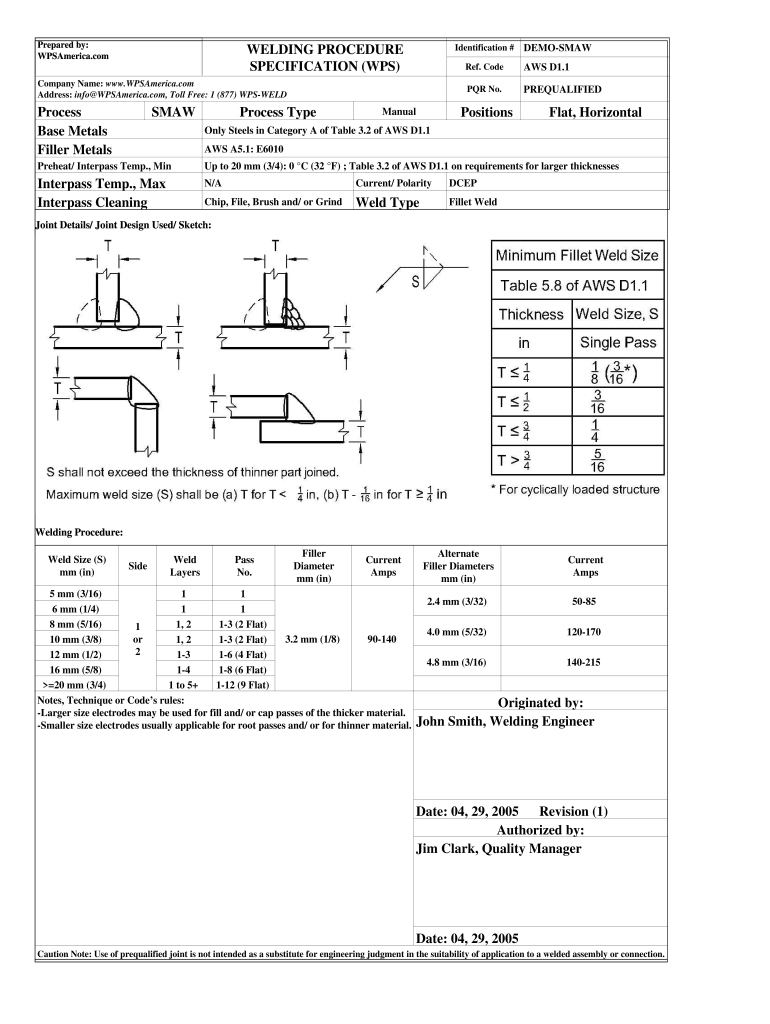
Click ‘Get Form’ to open the WPSAmerica document in the editor.
Begin by entering your company name and contact information in the designated fields. This ensures that your details are accurately represented.
Fill in the identification number and reference code as required. These identifiers are crucial for tracking and compliance purposes.
In the 'Process' section, select SMAW from the dropdown menu to specify the welding process you will be using.
Complete the sections for base metals and filler metals by entering relevant specifications according to AWS standards.
For each weld size, input details such as current amps, pass numbers, and any notes regarding techniques or codes. Ensure accuracy for optimal results.
Review all entries for completeness and correctness before saving or exporting your filled form.
Start using our platform today to streamline your document editing and form completion!
Groove weld on plate qualifies pipes equal to or greater than 24 in [600 mm] nominal outer diameter. Vertical uphill to downhill or vice versa is essentialRead more
Cookie consent notice
This site uses cookies to enhance site navigation and personalize your experience.
By using this site you agree to our use of cookies as described in our Privacy Notice.
You can modify your selections by visiting our Cookie and Advertising Notice.