






Definition and Purpose of the Admin Assistant Contract Template
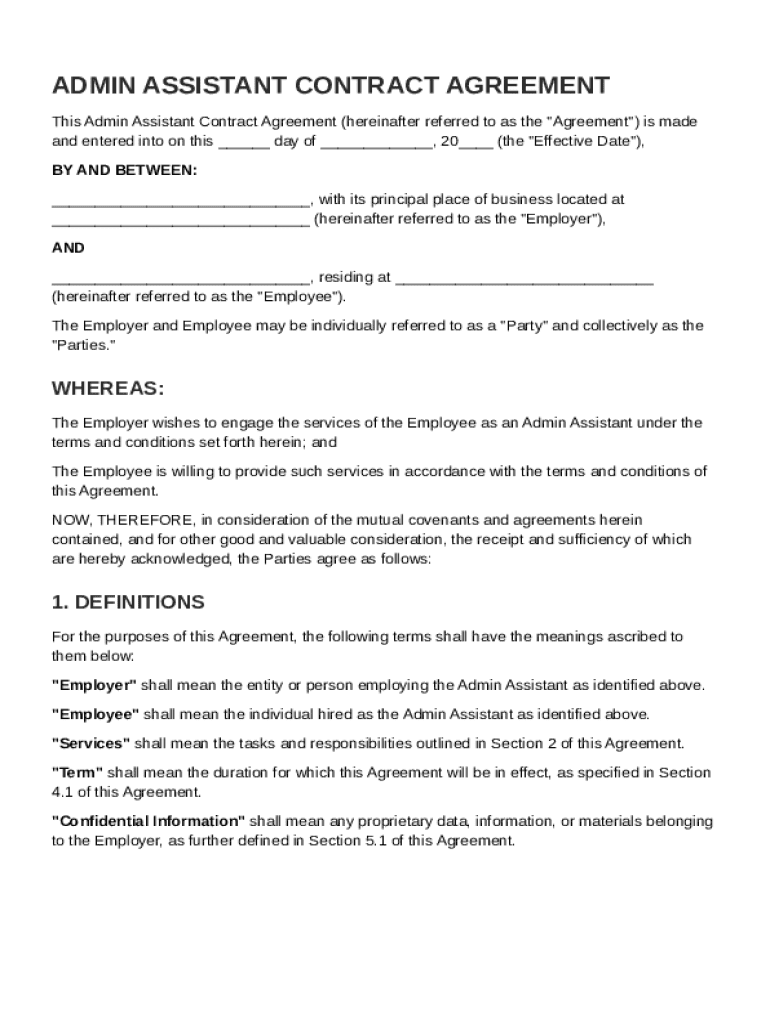
The Admin Assistant Contract Template is designed to formalize the employment relationship between an employer and an administrative assistant. The document outlines key employment terms including the scope of work, compensation, and confidentiality obligations. By establishing the roles and responsibilities, this template helps ensure both parties are aligned on expectations from the outset. For example, the template clearly states job duties such as scheduling meetings, managing correspondence, and maintaining records, providing a comprehensive overview of what is expected from the administrative assistant.
Examples of Contractual Elements
- Scope of Work: Duties might include managing communications, handling organizational tasks, and ensuring office administration functions smoothly.
- Compensation and Benefits: Details salary, bonuses, health insurance options, and other benefits.
- Confidentiality Obligations: Specifies data protection responsibilities and the importance of safeguarding company information.
Key Elements in an Admin Assistant Contract Template
When crafting an Admin Assistant Contract, several critical components must be included to ensure clarity and legal compliance. These elements safeguard both the employer and the employee by delineating expectations and obligations.
Compensation Structure
This section must specify the salary or hourly rate and schedule for payment. It should include provisions for overtime pay, if applicable. Additional benefits such as health insurance, retirement plans, and bonuses are also detailed here.
- Base Salary: This could be specified as a monthly or yearly salary, or an hourly wage for part-time roles.
- Benefits Package: Could include health insurance, dental and vision plans, as well as retirement savings plans like a 401(k).
Terms of Employment
This outlines whether the employment is at-will or contract-based, specifying the employment duration. It must cover the probation period, if any, performance reviews, and grounds for termination.
Confidentiality and Non-Disclosure
Employees must understand their responsibility to protect confidential company information. This section includes non-disclosure agreements that prevent sharing sensitive information without consent.
- Sensitive Information: Could include client databases, financial records, and proprietary business strategies.
Steps to Complete the Admin Assistant Contract Template
Filling out the Admin Assistant Contract Template correctly is crucial for ensuring its validity and comprehensiveness. A step-by-step approach can help streamline this process:
-
Personal Information: Begin by entering the employer's and employee's full names and contact details. This ensures clarity about who the contract applies to.
-
Define Job Responsibilities: Clearly list duties expected from the Administrative Assistant to avoid future misunderstandings. This may include managing emails, organizing meetings, or maintaining filing systems.
-
Set Compensation Terms: Input salary, payment frequency, and any additional financial incentives or benefits. Ensure these details are clear to prevent disputes.
-
Outline Employment Conditions: Specify work hours, location, and overtime conditions. Include probationary periods and review schedules if applicable.
-
Include Confidentiality Clauses: Ensure sections on confidentiality obligations and non-disclosure are complete and understood by the employee.
Legal Implications of the Admin Assistant Contract Template
The Admin Assistant Contract Template is not just a formalization of the employment agreement, but a legal tool that can have significant implications in potential disputes. Ensuring its legality requires careful attention to its content.
Compliance with Labor Laws
The template must adhere to federal and state labor laws, covering areas such as minimum wage, overtime pay, and anti-discrimination policies. Non-compliance can result in legal penalties for the employer.
Dispute Resolution Clauses
Including a procedure for addressing disputes can prevent escalation to legal action. This might involve mediation or arbitration mechanisms to resolve disagreements amicably.
- Arbitration Agreement: Often included to commit both parties to resolve disputes out of court, potentially saving time and resources.
Security Measures
From a legal standpoint, the inclusion of confidentiality and non-compete clauses helps protect intellectual property and company secrets.
Who Typically Uses the Admin Assistant Contract Template
Various entities might employ an Admin Assistant Contract Template, reflecting the versatile role of administrative assistants across industries.


Businesses and Corporations
Large companies often require the services of administrative assistants to ensure smooth internal operations. The template helps standardize employment agreements within such organizations.
Non-Profit Organizations
Non-profit entities also employ administrative assistants to handle tasks such as donor communications and event planning, using tailored contract templates to reflect specific needs.
Small and Medium Enterprises (SMEs)
SMEs benefit from employing administrative assistants to manage day-to-day operations, relying on contract templates to formalize employment terms.
Digital vs. Paper Versions of the Template
Choosing between a digital or paper version of the Admin Assistant Contract Template depends on several factors, including ease of access and compliance needs.
Digital Benefits
Digital versions offer easy storage, retrieval, and sharing. They enable quick edits and enable the use of e-signatures, which are legally binding under the ESIGN Act.
- E-signatures: Allow for quicker approval processes and are eco-friendly compared to paper-based signatures.
Paper Usage
Paper contracts might be preferred for records requiring wet signatures or where digital literacy is low. They can be stored physically and serve as tangible proof of an agreement.
Understanding these differences can guide employers in choosing the most practical format for their needs.