
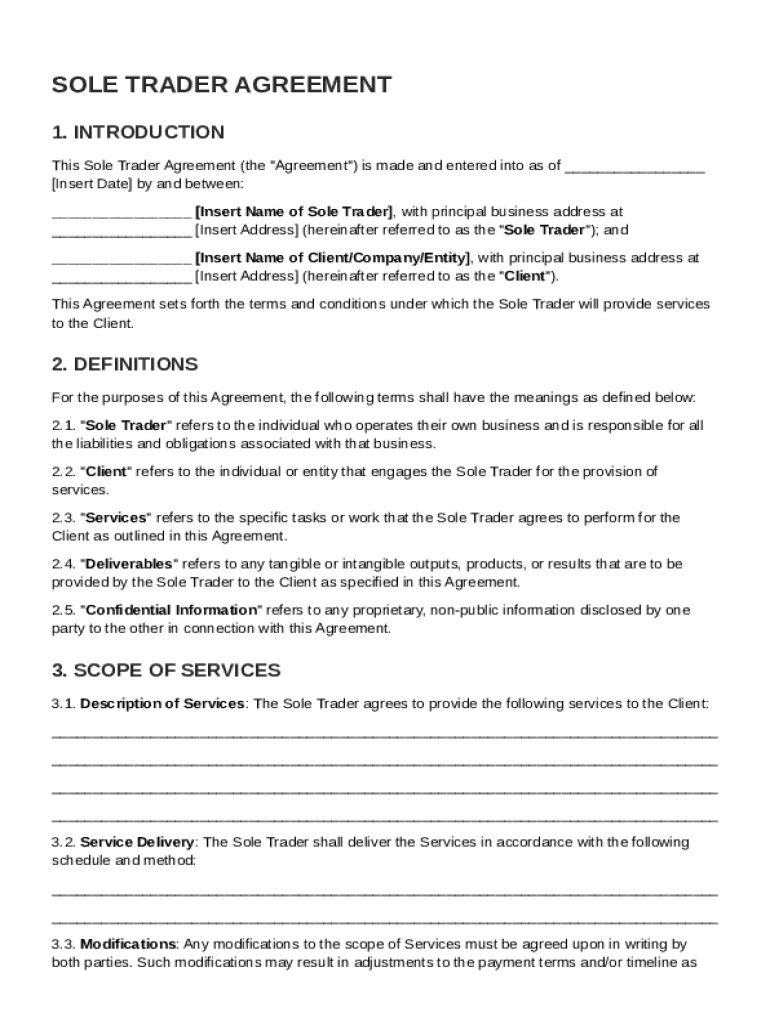







Definition and Purpose of a Sole Trader Agreement
A Sole Trader Agreement serves as a legal document that outlines the terms and conditions under which a Sole Trader provides services to a Client. This agreement is crucial because it defines the relationship between the Sole Trader and the Client, ensuring both parties understand their roles, responsibilities, and expectations. The document typically includes sections on the scope of services provided, payment terms, confidentiality obligations, and liability clauses, offering a comprehensive framework for professional engagements.
Key Terminologies
- Sole Trader: An individual who owns and runs a business independently.
- Client: The person or organization receiving services from the Sole Trader.
- Scope of Services: Specific tasks and responsibilities that the Sole Trader agrees to perform.
- Confidentiality Obligations: Terms that protect sensitive information shared between the parties.
How to Use the Sole Trader Agreement Template
The Sole Trader Agreement Template is designed to streamline the process of documenting the terms of a business relationship. Users can customize the template to reflect their specific needs and requirements. The template ensures all essential elements are considered and addressed before formalizing the agreement.
- Download the Template: Obtain the template from a reputable source such as DocHub, ensuring it aligns with U.S. regulations.
- Edit for Specific Needs: Customize sections to reflect the nature of the services offered, incorporating precise details like service timelines and remuneration.
- Review with Stakeholders: Involve both parties in reviewing the draft to ensure mutual understanding and agreement.
Practical Example
If a graphic designer is engaging with a company to create marketing materials, the Sole Trader Agreement can outline deliverables, payment terms (e.g., hourly rate or fixed price), deadlines, and usage rights.
Steps to Complete the Sole Trader Agreement Template
To effectively complete the Sole Trader Agreement Template, follow these structured steps:
- Gather Necessary Information: Collect details about the parties involved, including full names, contact information, and business identifiers.
- Define the Scope of Services: Clearly articulate the services to be provided, specifying deliverables, deadlines, and standards of performance.
- Set Payment Terms: Decide on payment structures, such as rate of pay, payment schedule, and methods of payment, to avoid misunderstandings.
- Address Legal Requirements: Integrate clauses for indemnity, dispute resolution, and termination conditions in accordance with applicable laws.
- Finalize and Sign: Both parties should thoroughly review the completed agreement, make necessary adjustments, and sign to acknowledge mutual commitment.
Considerations for Completion
- Customization: Each agreement should be tailored to accurately represent the nature of the business relationship.
- Legal Review: It is advisable to have the finalized document reviewed by legal counsel to ensure compliance with local laws.
Legal Use of the Sole Trader Agreement Template
The Sole Trader Agreement Template is legally binding once both parties have signed it. It serves as a legal contract that can be enforced in a court of law if disputes arise. Understanding the legal implications of each clause is vital to prevent future conflicts.
Important Legal Provisions
- Indemnity and Liability: Provisions that determine how potential losses or damages are handled and who bears responsibility.
- Governing Law: The jurisdiction under which any legal issues will be resolved, typically aligned with the client's location.
Real-World Scenario
A freelance consultant using this template to contract services with a tech startup must ensure all regulatory requirements are outlined to protect their interests legally.
Key Elements of the Sole Trader Agreement Template
Understanding the key components of the agreement template is essential for effectively documenting business arrangements.
- Service Description: Detailed explanation of the services, including methods and any limitations.
- Payment Terms: Clear guidelines on how and when payments will be made.
- Duration and Termination: Timeframe for the agreement and conditions under which it can be ended.
Insights for Key Elements
- Confidentiality Clauses: These are critical in scenarios involving proprietary information or intellectual property.
- Modification Rules: Conditions under which the agreement can be amended, promoting flexibility in adjusting terms as necessary.
Important Terms Related to Sole Trader Agreement Template
Understanding the terminologies often found in the Sole Trader Agreement is crucial to avoid misunderstandings.
- Force Majeure: Circumstances under which parties are excused from their obligations due to events beyond their control.
- Non-Compete Clauses: Limiting a Sole Trader’s ability to engage with competitors during and after the term of the agreement.
- Performance Metrics: Defined criteria to evaluate the effectiveness and quality of the services provided.
Comprehensive Coverage of Terms
Familiarize with these terms to ensure each party's interests are protected while fostering a transparent business relationship.
State-Specific Rules for the Sole Trader Agreement Template
Different states may have unique requirements or stipulations that affect the Sole Trader Agreement Template. While the primary structure of the agreement remains consistent, understanding state-specific nuances is essential.
Factors to Consider
- Tax Implications: How services are taxed can vary from state to state, impacting the financial terms of the agreement.
- Employment Laws: Compliance with state-specific labor laws is necessary, especially regarding contractor status versus employee classification.
Example of State Variance
In California, there are strict labor laws regarding freelancers and independent contractors, requiring careful definition of service elements to ensure compliance.
Digital Versus Paper Version
The digital format of the Sole Trader Agreement offers distinct advantages over its paper counterpart.
Benefits of a Digital Format
- Convenience: Easily shareable and accessible by both parties, avoiding physical meeting requirements.
- Security: Digital signatures can enhance security and provide an audit trail, ensuring authenticity.
- Efficiency: Quick edits and updates can be made to digital versions, allowing for more dynamic communication and adjustment.
By integrating these topics into the Sole Trader Agreement Template, users ensure a comprehensive, legally sound document tailored to meet their partnership needs.




