






Definition & Meaning
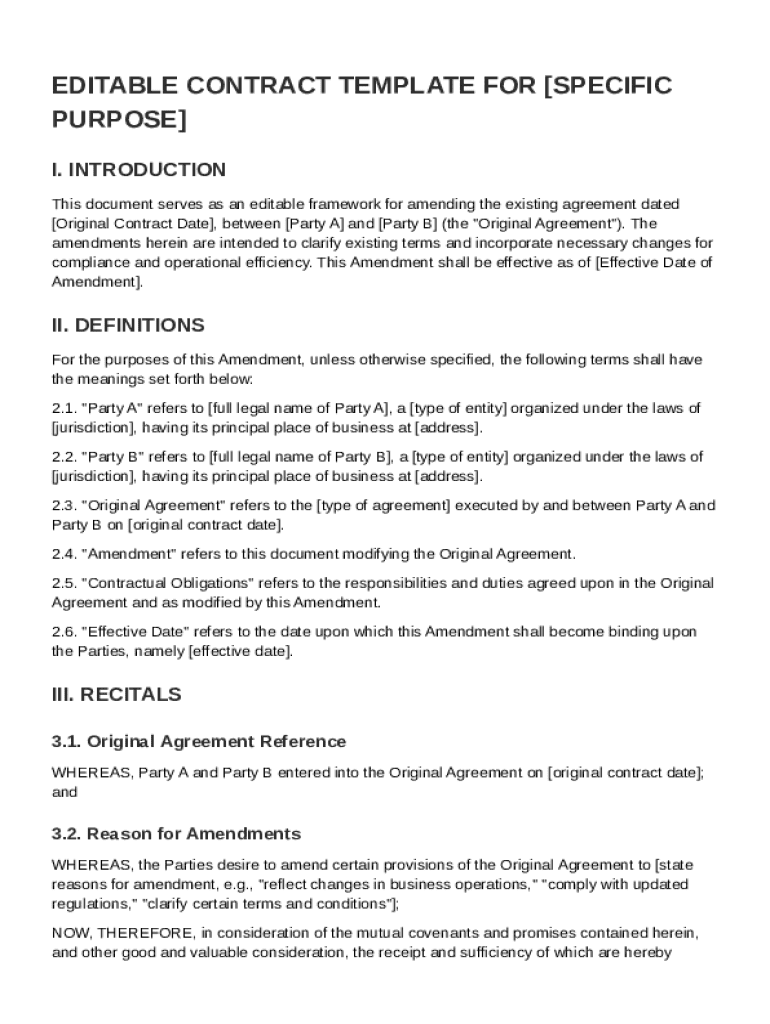
The Edit Contract Template is a legal document designed to facilitate changes or amendments to an existing agreement between two or more parties. It serves to outline modifications, update terms, and ensure the contract remains compliant with current regulations while maintaining its original intent and validity. The template typically includes sections such as definitions of key terms, details of modifications, new clauses, governing law, dispute resolution mechanisms, and miscellaneous provisions. It enables parties to clearly document adjustments without drafting a new agreement entirely, providing a structured format for legal clarity and efficiency.
How to Use the Edit Contract Template
To effectively use the Edit Contract Template, follow a series of structured steps to ensure all necessary changes are documented accurately:
-
Identify Sections to Amend: Start by reviewing the original contract and identify which sections require modification. Common areas include pricing, delivery terms, or responsibilities.
-
Draft Amendments: Use the template to draft clear and concise amendments. Specify precisely what changes are to be made to the original terms.
-
Review with All Parties: Share the draft amendments with all involved parties to ensure agreement on the proposed changes. This step is crucial to avoid future disputes.
-
Finalize the Amendment: Once agreed, finalize the amendment document by filling out all necessary fields in the template, including sections for signatures and dates.
-
Legal Consultation: Consider consulting with a legal professional to ensure that the amendments comply with relevant laws and reflect the agreement accurately.
-
Sign and Distribute: After all parties sign the amendment, distribute copies to each party. Retain a signed copy for your records to ensure enforceability.
Steps to Complete the Edit Contract Template
Completing the Edit Contract Template involves a detailed process designed to ensure accuracy and legal compliance:
-
Preparation: Gather all documents relevant to the original contract and note any terms or clauses needing alteration.
-
Access the Template: Open the template using a compatible editing tool, such as DocHub, which supports various file formats for ease of use.
-
Enter Basic Information: Input key details such as the contract's original date, involved parties' names, and the reason for amendments.
-
Detail Specific Changes: Precisely describe the changes to be made. Use clear language to amend existing clauses or add new ones.
-
Review for Compliance: Ensure the amendments conform to applicable laws and standards. Verify that terminology aligns with legal definitions to prevent ambiguity.
-
Collect Signatures: Use electronic signature tools to gather signatures from all parties. DocHub allows for legally binding e-signatures, maintaining the integrity of the document.
-
Maintain Records: Save and distribute the signed amendment to relevant parties, ensuring everyone holds a copy for reference and enforcement.
Key Elements of the Edit Contract Template
The Edit Contract Template consists of several critical components that ensure comprehensive and clear amendments to an agreement:
-
Amendment Details: Specifies the purpose of the amendment, including what changes are necessary and why.
-
Definitions: Provides clear definitions of any key terms included in the amendments, reducing the risk of misinterpretation.
-
Modification Clause: Details the exact changes to original contractual terms or introduces new clauses for clarity or compliance.
-
Governing Law: Specifies the legal jurisdiction applicable to the amendment, crucial for resolving disputes.
-
Signatures: Includes sections for authorized representatives of each party to sign, signifying consent to the amendments.
-
Dates: Records the date of amendment creation and the dates when each party signed, establishing a timeline for the changes.
Legal Use of the Edit Contract Template
The Edit Contract Template's legal use involves understanding the implications of each amendment and ensuring compliance with existing laws and regulations:
-
Contractual Validity: Amendments are legally binding only if all parties consent and the changes adhere to the governing laws of the original contract.
-
Regulatory Compliance: Ensure the amendments reflect any legal changes or updates in regulations that might affect the original agreement.
-
Enforceability: Properly executed amendments, including necessary signatures and dates, are enforceable in legal proceedings, providing clarity and security to the contractual relationship.
-
Dispute Resolution: If a dispute arises, the amendment's terms and clarity will play a crucial role in legal interpretations and resolutions, emphasizing the importance of precise language and complete records.
Software Compatibility
The Edit Contract Template is designed for compatibility with various digital platforms to facilitate easy editing, sharing, and signing:
-
DocHub: Offers direct editing and signing without the need to convert file formats, ensuring efficiency and ease of use.
-
Google Workspace: Integrates seamlessly with Google Drive and Gmail, allowing users to import documents, make changes, and export them back to their cloud storage system.
-
PDF and DOC Formats: Supports standard file types like PDF and DOC for compatibility with most word processors and digital contract management systems.
-
Mobile and Desktop Access: Accessible via both mobile and desktop browsers, offering flexibility and convenience for users needing to edit on-the-go.
Who Typically Uses the Edit Contract Template
A variety of individuals and entities utilize the Edit Contract Template to manage contractual amendments:
-
Business Owners: Regularly amend contracts with vendors, suppliers, or clients to adjust terms related to products, services, or pricing.
-
Legal Professionals: Use templates to efficiently draft reputable amendments, ensuring compliance and clarity in legal documents.
-
Human Resources Departments: Amend employee contracts or agreements to reflect changes in roles, responsibilities, or compensation.
-
Partners and Shareholders: Adjust partnership agreements or shareholder contracts to reflect changing business landscapes or roles.
-
Freelancers and Contractors: Amend work agreements with clients for scope changes or extensions.
Understanding who uses these templates can aid businesses and individuals in effectively applying them to their unique contractual needs.