






Definition & Meaning
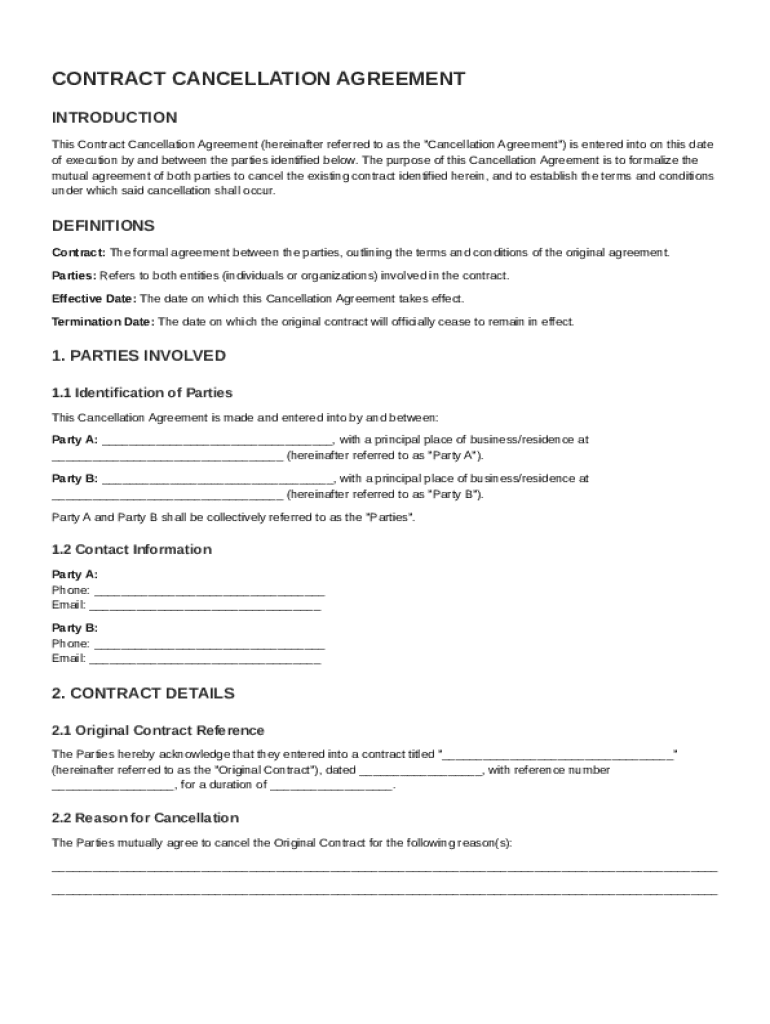
The Cancel Contract Template is a formal document that outlines the mutual decision of two parties to terminate an existing agreement. This template ensures that the termination process is clearly defined, including the identification of the parties involved, reasons for cancellation, and terms under which the cancellation occurs. Essentially, it provides a structured approach to void a previously binding agreement without leaving any loose ends.
The importance of having such a template lies in its ability to standardize cancellations across various scenarios. It serves as a legal safeguard by documenting the mutual understanding and consent of both parties. By outlining the specific terms, including the release of liabilities, it minimizes the risk of disputes that could arise post-cancellation.
How to Use the Cancel Contract Template
Using the Cancel Contract Template involves several critical steps to ensure effectiveness and legality. Firstly, both parties must agree to the terms of termination. This requires open communication and negotiation to settle any differences or outstanding obligations.
-
Review Existing Contract: Before proceeding, carefully examine the original contract to identify any clauses concerning cancellation. This provides a framework for constructing the cancellation agreement.
-
Draft the Cancellation Terms: Utilize the template to clearly define cancellation terms, ensuring it encompasses all necessary elements such as liabilities, confidentiality, and effective date.
-
Legal Consultation: It is advisable to consult with a legal advisor to ensure that the cancellation terms comply with applicable laws and regulations, particularly if the contract covers complex matters.
-
Execution of the Agreement: Both parties should sign the final agreement to confirm their understanding and acceptance of the terms.
-
Document Archival: Keep a copy of the signed cancellation agreement for record-keeping and future reference.
Key Elements of the Cancel Contract Template
The Cancel Contract Template typically includes several essential components to facilitate a clear and lawful termination process. These elements ensure comprehensive coverage of the necessary details involved in canceling a contract.
-
Parties' Information: Full names and contact details of both parties involved in the contract.
-
Original Contract Details: Reference to the initial agreement, including the date, parties involved, and key terms that are being annulled.
-
Reason for Cancellation: A detailed explanation of why the contract is being canceled. This section helps prevent misunderstandings and potential disputes.
-
Terms of Cancellation: Outlines the conditions under which the cancellation occurs, including the time frame and any financial settlements or obligations to be fulfilled.
-
Release of Obligations: A statement releasing both parties from their duties under the original contract, ensuring no further liabilities exist.
-
Confidentiality Clauses: If necessary, these clauses protect any proprietary or sensitive information disclosed during the contract's term.
Steps to Complete the Cancel Contract Template
Completing a Cancel Contract Template requires attention to detail and adherence to the established process to ensure the agreement is effective and enforceable.
-
Gather Information: Collect all relevant details, including the original contract, parties’ information, and specific reasons for cancellation.
-
Fill Out the Template: Using the template, enter the gathered information systematically. Ensure that each section is completed comprehensively.
-
Review by Both Parties: Allow both parties to review the completed document, making changes or additions as necessary to ensure mutual satisfaction.
-
Legal Verification: Seek legal review to confirm that the document meets legal standards and protects the interests of both parties.
-
Signed Agreement: Once both parties are in agreement, sign the document to formalize the cancellation. This often requires witnesses or notarial acknowledgment to enhance its legal standing.
-
Implement the Termination: Follow through with the agreed terms to implement the cancellation, such as settling any final payments or returning property.
Legal Use of the Cancel Contract Template
The Cancel Contract Template serves a critical legal function by formalizing the termination process. It provides a clear written record that both parties have agreed to the cancellation terms, ensuring that the termination is legally sound.
-
Adhering to Contractual Clauses: Ensure that the template aligns with any cancellation clauses present in the original contract. If these clauses do not exist, negotiate terms that are acceptable to both parties.
-
State and Federal Compliance: The template should comply with both state and federal laws governing contracts. This ensures that the cancellation is recognized legally, safeguarding against potential legal challenges.
-
Dispute Resolution: Including provisions for dispute resolution can prevent future legal disputes, establishing a method for handling disagreements that may arise.
Examples of Using the Cancel Contract Template
Real-world applications of the Cancel Contract Template illustrate its utility in various scenarios:
-
Employment Contract Termination: When an employer and employee mutually agree to terminate an employment contract before its end date, the template helps define severance terms and confidentiality obligations.
-
Lease Agreement Cancellation: Landlords and tenants use the template to settle rental agreement disputes, specifying deposit returns and property conditions without resorting to legal action.
-
Business Partnership Dissolution: Partners in a business venture can formally end their collaboration by agreeing upon the distribution of assets and liabilities through the template.
State-Specific Rules for the Cancel Contract Template
Legal requirements for contract cancellation can vary significantly between states. Being aware of these differences is crucial when drafting and executing a Cancel Contract Template.
-
Jurisdiction-Specific Clauses: Certain states may have specific laws regarding enforceability, mandatory provisions, or implications of a cancellation, which must be incorporated into the template.
-
Notarization Requirements: Some jurisdictions may require that the agreement be notarized to be legally binding.
-
Consumer Protection Laws: In contracts involving consumers, additional protections may exist that affect the cancellation process, such as cooling-off periods.
Understanding these state-specific nuances helps ensure that the template is both effective and legally compliant across different jurisdictions.