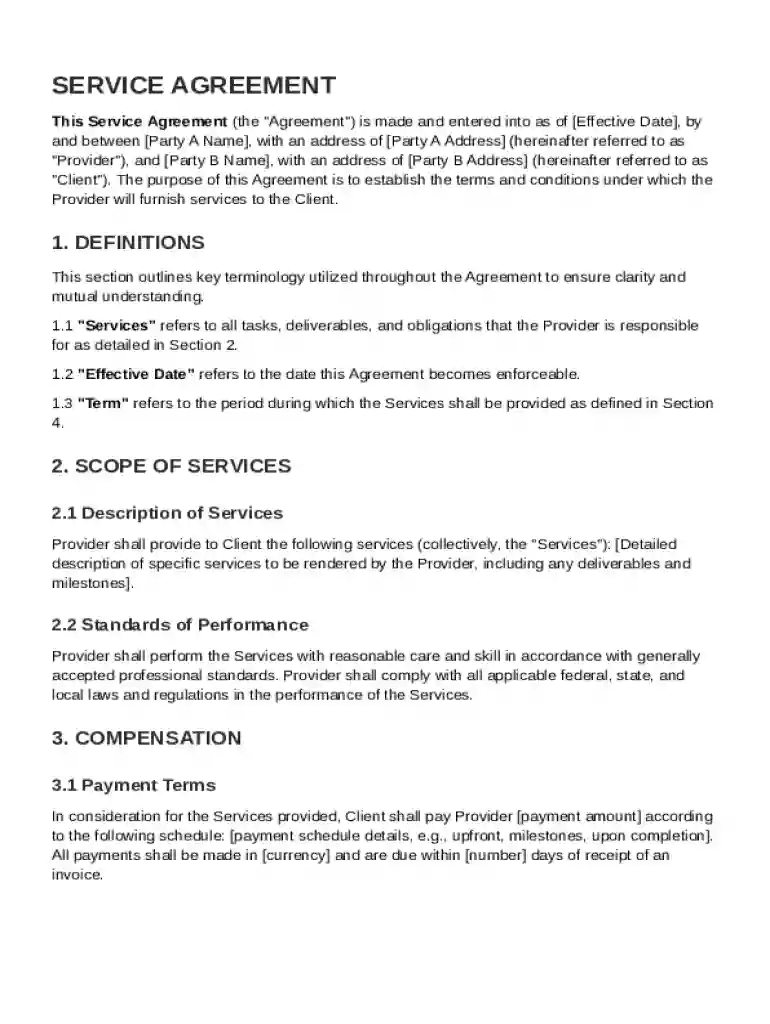
Service Between Two Parties Agreement Template 2026

Get Form
Service Between Two Parties Agreement Template Preview on Page 1

Here's how it works

01. Edit your form online
Type text, add images, blackout confidential details, add comments, highlights and more.

02. Sign it in a few clicks
Draw your signature, type it, upload its image, or use your mobile device as a signature pad.

03. Share your form with others
Send it via email, link, or fax. You can also download it, export it or print it out.

Definition and Meaning

A Service Between Two Parties Agreement Template is a pre-drafted document that outlines the terms and conditions under which services will be exchanged between a service provider and a client. This template serves as a legal foundation to detail the rights, obligations, and expectations of each party involved in the service transaction. It includes specific elements like the scope of services, payment terms, confidentiality clauses, and dispute resolution mechanisms, ensuring both parties have a mutual understanding and a point of reference should any issues arise.

How to Use the Service Between Two Parties Agreement Template

To effectively utilize the Service Between Two Parties Agreement Template, start by downloading the template compatible with your preferred document format. Customize the template with the necessary details related to your specific service transaction:

  1. Enter Parties' Information:

    • Include full names and contact information for both the service provider and the client.
  2. Define the Scope of Services:

    • Clearly describe the services being provided and any deliverables.
  3. Specify Compensation Details:

    • Outline the payment structure, including rates, schedules, and methods of payment.
  4. Set Confidentiality Obligations:

    • State any need for confidentiality and safeguards for sensitive information.
  5. Include Governing Laws and Dispute Resolution:

    • List applicable laws and preferred methods for resolving disputes or breaches of contract.

Steps to Complete the Service Between Two Parties Agreement Template

Completing the Service Between Two Parties Agreement Template involves several key steps to ensure all aspects of the service relationship are clearly defined:

  1. Review the Entire Template:

    • Read through the template to understand the sections and decide on any modifications necessary for your specific agreement.
  2. Fill Out Required Fields:

    • Populate fields with specific details about the parties, services, compensation, and other conditions applicable to your agreement.
  3. Proofread:

    • Check for errors or omissions in the filled template and ensure clarity.
  4. Obtain Necessary Signatures:

    • Ensure both parties sign the agreement electronically or physically to validate the contract.
  5. Distribute Copies:

    • Provide each party with a signed copy for their records and future reference.

Key Elements of the Service Between Two Parties Agreement Template

The template comprises crucial components that ensure a comprehensive understanding between parties:

  • Introduction and Definitions:

    • Sets the stage for the agreement with clear definitions of terms used throughout the document.
  • Service Description:

    • Detailed outline of what services are provided, including limitations and exclusions.
  • Payment and Billing Terms:

    • Exact payment terms, including amount, method, and timing of payments.
  • Confidentiality Agreement:

    • Provisions for the protection of sensitive information shared between parties.
  • Governing Law and Jurisdiction:

    • Specifies which state laws govern the agreement and preferred legal jurisdiction for any disputes.

Legal Use of the Service Between Two Parties Agreement Template

The Service Between Two Parties Agreement Template offers a legally binding framework, ensuring compliance with relevant laws such as contract law principles recognized in the United States. Many businesses rely on such templates to:

  • Formalize business arrangements and mitigate the risk of disputes.
  • Clearly define the services, obligations, and expectations of both parties.
  • Offer legal protection by outlining procedures for potential breaches of agreement.

Important Terms Related to the Template

Key terminologies in the context of this template include:

  • Indemnification:

    • A promise by one party to compensate the other for any losses or damages incurred due to service performance.
  • Force Majeure:

    • Clauses that relieve parties from obligations due to events beyond their control, such as natural disasters.
  • Term and Termination:

    • Duration of the agreement and conditions under which it may be terminated prior to its scheduled completion.

Who Typically Uses the Service Between Two Parties Agreement Template

This template is versatile and widely used by various entities:

  • Freelancers and Consultants: To formalize service arrangements with clients.
  • Small to Medium Enterprises (SMEs): To establish agreements with service contractors.
  • Large Corporations: To standardize service agreements across departments or subsidiaries.
decoration image ratings of Dochub

Software Compatibility and Integration

The Service Between Two Parties Agreement Template is designed to integrate smoothly with popular document editing and management software. Users can:

  • Utilize platforms like DocHub for editing and electronic signing.
  • Import and export in formats like DOC, PDF, or TXT, ensuring compatibility with office software like Microsoft Word or Google Docs.
  • Benefit from cloud integrations with services such as Google Drive or Dropbox for streamlined document management.
be ready to get more

Complete this form in 5 minutes or less

Get form

Security and compliance

At DocHub, your data security is our priority. We follow HIPAA, SOC2, GDPR, and other standards, so you can work on your documents with confidence.
Learn more
ccpa2
pci-dss
gdpr-compliance
hipaa
soc-compliance
be ready to get more

Complete this form in 5 minutes or less

Get form