
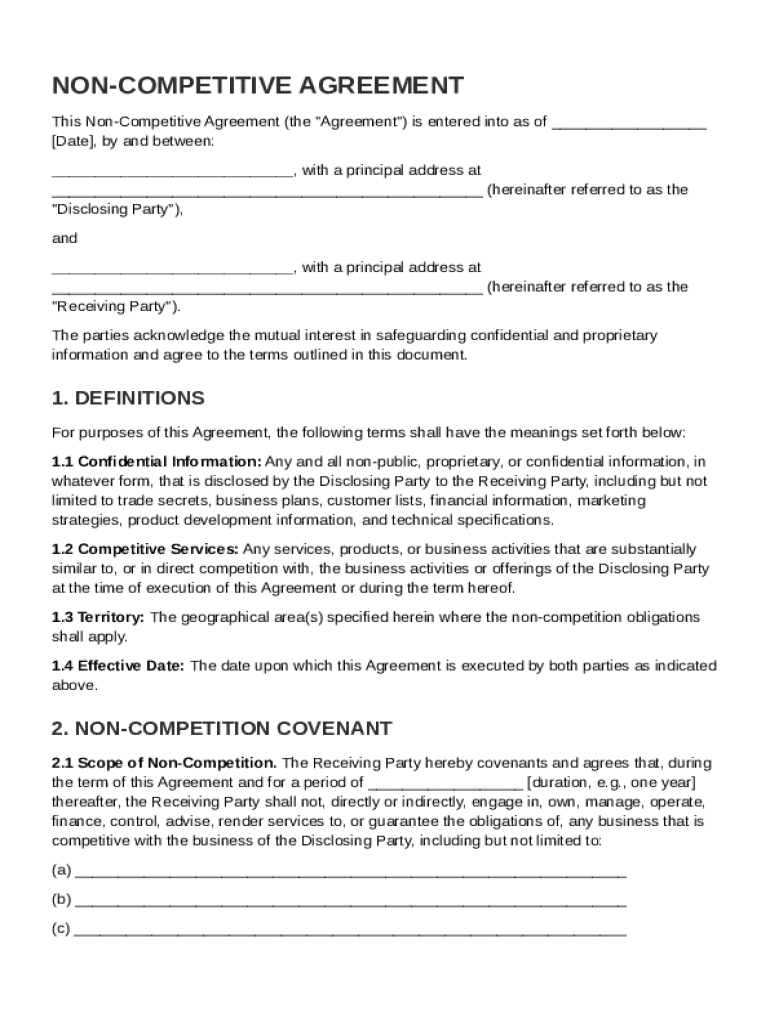







Definition & Meaning
A Non-Competitive Agreement Template, often known as a non-compete agreement, is a legal contract between two parties: the Disclosing Party and the Receiving Party. This agreement is designed to protect confidential information shared by the Disclosing Party, preventing the Receiving Party from engaging in competitive behaviors during and after their business relationship. This agreement includes clauses that outline confidentiality obligations, define key terms, restrict competitive activities, and establish the duration and geographical scope of these restrictions. It's a critical document for businesses looking to safeguard their trade secrets and maintain a competitive edge in their industry.
How to Use the Non-Competitive Agreement Template
Using a Non-Competitive Agreement Template involves several steps to ensure its legality and effectiveness. First, the Disclosing Party should clearly identify the type of information considered confidential. Specify any non-competition covenants, such as the scope of activities and locations where the Receiving Party cannot operate. Identify the duration of these restrictions and include any exceptions allowed under the agreement. Before finalizing, both parties should review the terms to ensure mutual understanding and compliance with applicable laws. It's also advisable to consult a legal professional to tailor the agreement to your specific business needs, ensuring it aligns with local regulations.
Key Elements of the Non-Competitive Agreement Template
The Non-Competitive Agreement Template includes several key elements.
- Definitions: This section clarifies essential terms, such as "confidential information" and "competitive activities," helping both parties understand what is being protected.
- Non-Compete Clauses: These are the heart of the agreement, detailing the restrictions on the Receiving Party's business activities within certain regions and timeframes.
- Confidentiality Obligations: Here, the obligations to protect the discussed information are clearly specified, often including how the information can be used or shared.
- Remedies for Breach: This outlines the consequences if either party violates the terms of the agreement, which may include legal action or financial penalties.
- Governing Law: This specifies the state's laws that will oversee the agreement, which is vital for resolving any disputes that may arise.
Important Terms Related to Non-Competitive Agreement Template
Understanding the terminology used within a Non-Competitive Agreement Template is crucial for its effective implementation.
- Disclosing Party: The entity sharing confidential information.
- Receiving Party: The party bound by the agreement not to disclose or misuse confidential information.
- Duration: The time period during which the restrictions of the agreement apply.
- Geographical Scope: The specific regions where the competitive restrictions are applicable.
- Confidential Information: Any data, knowledge, or material deemed private or proprietary and covered under the agreement's terms.
Legal Use of the Non-Competitive Agreement Template
Legally, a Non-Competitive Agreement Template is used to restrict the Receiving Party from engaging in business practices that could harm the Disclosing Party's competitive position. For it to be enforceable, the agreement must be reasonable in scope, duration, and geographic reach. It must not unduly restrict an individual's ability to work or violate antitrust laws. Typically, these agreements are utilized in employment contracts, business sales, and partnerships to ensure fair competition and the protection of trade secrets. It's important that the agreements are compliant with state and federal laws, emphasizing the need for legal guidance.
Steps to Complete the Non-Competitive Agreement Template
- Identify the Parties: Clearly label the Disclosing and Receiving Parties.
- Define Confidential Information: Explicitly describe what constitutes confidential information.
- Set Non-Compete Terms: Establish the geographical scope and duration of the non-competition obligations.
- Draft the Confidentiality Clause: State how confidential information should be handled and any potential use cases.
- Detail Breach Consequences: Outline the remedies and penalties for violations of the agreement.
- Consult Legal Expertise: Verify that the draft adheres to relevant laws and consider a legal review.
- Sign and Archive: Both parties sign the agreement, storing a copy in a secure location with access as needed.
Who Typically Uses the Non-Competitive Agreement Template
The Non-Competitive Agreement Template is widely used across various industries and sectors where sensitive information exchange is common.
- Employers and Employees: To prevent employees from joining competitors or starting similar ventures.
- Businesses and Consultants: Ensures that consultants do not leverage proprietary knowledge for competing firms.
- Mergers and Acquisitions: Safeguards business secrets during due diligence and post-acquisition phases.
- Franchisors and Franchisees: Protects brand-specific information and operating methods from unauthorized competition.


State-Specific Rules for the Non-Competitive Agreement Template
Each state within the United States has unique legal requirements and constraints regarding non-competitive agreements. For example, California generally prohibits non-compete clauses in employment relationships except in specific situations like the sale of a business. In contrast, Texas and Florida allow these agreements if they are reasonable in scope and necessary to protect legitimate business interests. Businesses must tailor their templates to reflect the rules governing non-compete agreements in their specific state, which may involve adjusting the duration, geography, or scope. Consulting with a legal expert familiar with local laws is critical in ensuring compliance.




