






Definition and Purpose of the Negotiated Risk Agreement Template
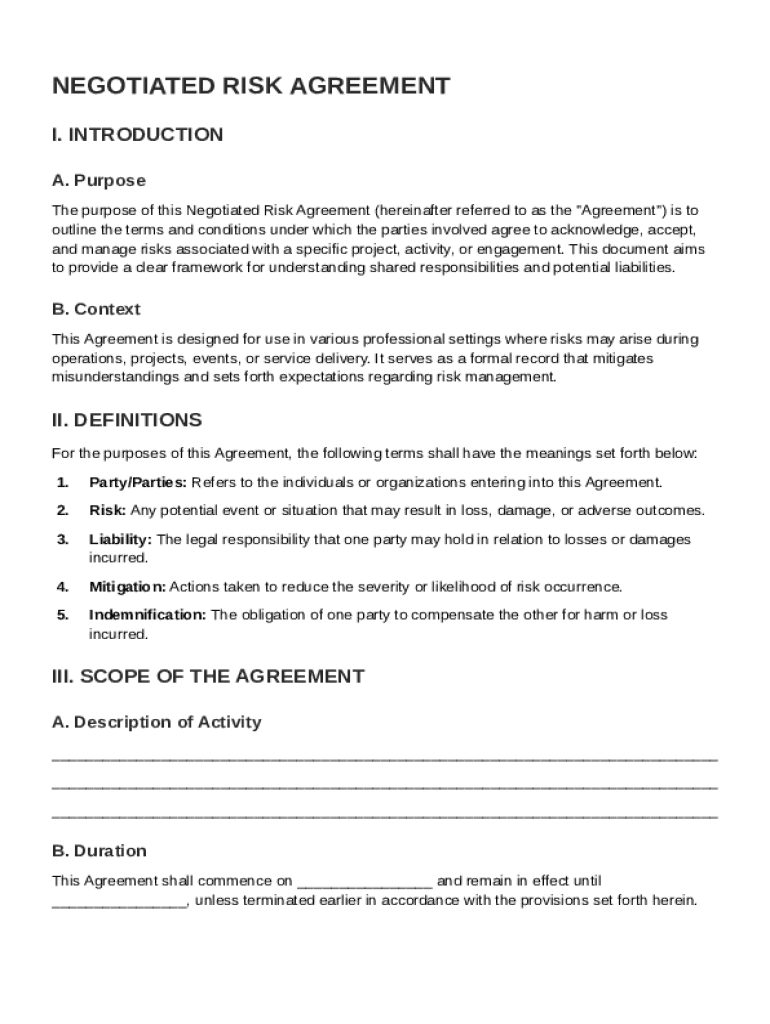
The Negotiated Risk Agreement Template is a crucial document for formalizing the acknowledgment, acceptance, and management of risks related to specific projects or activities. It serves as an official record delineating responsibilities and liabilities among involved parties. This document typically includes definitions of pertinent terms, identifies possible risks, establishes strategies for managing these risks, and elaborates on liability and indemnification clauses. It also specifies reporting procedures, conditions for termination, amendment processes, governing law, and methods for dispute resolution.
Core Components of the Template
- Definitions of Key Terms: The template begins with an exhaustive list of terms crucial for understanding and interpreting the agreement, ensuring all parties have a common understanding.
- Identification of Potential Risks: This section highlights risks associated with the project or activity, allowing parties to assess and plan for possible contingencies.
- Risk Management Strategies: Detailed strategies are outlined to mitigate or manage identified risks, promoting proactive rather than reactive approaches.
- Liability and Indemnification Clauses: These clauses specify the liabilities of each party and the extent to which they indemnify or hold harmless the other parties in the agreement.
How to Use the Negotiated Risk Agreement Template
Initial Steps in Using the Template
- Identifying Involved Parties: Begin by clearly specifying all parties involved in the agreement.
- Defining Scope and Objectives: Clearly outline the scope and objectives of the project or activity to ensure mutual understanding and agreement.
- Listing and Defining Risks: Collaboratively identify potential risks, ensuring all parties contribute to the dialogue for a comprehensive risk profile.
Practical Application
- Tailoring Clauses: Modify template clauses to reflect the specific circumstances of the project, including unique risks and mitigations relevant to the particular environment.
- Collaborative Revision: Encourage all parties to review and suggest amendments, ensuring the agreement is collectively acceptable and inclusive of all perspectives.
Steps to Complete the Negotiated Risk Agreement Template
Comprehensive Completion Guide
- Gather Necessary Information: Collect all relevant data and documentation to inform the identification and analysis of risks and decisions regarding responsibilities.
- Complete Preliminary Sections: Fill out sections regarding project objectives, involved parties, and definitions of key terms.
- Detail Risk Management Strategies: Populate the template with identified risks and associated management strategies, ensuring they align with the project’s goals.
Finalization Process
- Review and Approval: Once complete, distribute the finalized document to all parties for review, ensuring any ambiguities are addressed.
- Signatures and Execution: Collect signatures from all parties to execute the agreement, ensuring its legality and enforceability.
Who Typically Uses the Negotiated Risk Agreement Template


Typical Users and Their Contexts
- Project Managers: Utilize the template to establish a clear framework for managing risks during the lifecycle of a project.
- Legal Advisors: Leverage the template to ensure all legal elements are covered, protecting their clients from unforeseen liabilities.
- Business Owners: Employ the agreement to delineate responsibilities and manage risks when engaging in partnerships or joint ventures.
Industry-Specific Applications
- Construction Sector: Commonly utilizes these templates to manage risks associated with large-scale building projects.
- Healthcare Facilities: Employ this template to navigate patient-centered risks, ensuring compliance with regulations and standards.
Key Elements of the Negotiated Risk Agreement Template
Fundamental Components
- Risk Assessment: A thorough evaluation of potential risks, including probability and impact, is a central component.
- Mitigation Plans: Specific actions to reduce or eliminate risks are detailed, providing a roadmap for managing unexpected events.
- Roles and Responsibilities: Clearly defined roles ensure each party understands their obligations and contributions to risk management.
Supporting Elements
- Dispute Resolution Mechanisms: Outlines methods for resolving conflicts, maintaining project continuity, and protecting relationships.
- Governing Law Clauses: Specifies which state or federal law guides interpretation and enforcement of the agreement.
Legal Use of the Negotiated Risk Agreement Template
Ensuring Compliance with Legal Standards
The template adheres to established legal standards and practices, supporting its validity and enforceability. By formalizing risk management practices, it offers legal protection to all parties, mitigating the potential for disputes.
Importance of Legal Review
- Professional Guidance: Engaging legal professionals during the drafting process ensures that the agreement satisfies all legal requisites and effectively protects interests.
Examples of Using the Negotiated Risk Agreement Template
Case Studies and Scenarios
- Large-Scale Construction Projects: An agreement is used to manage risks associated with material supply and weather conditions.
- IT Development Initiatives: Templates help mitigate risks related to data security and software integration, ensuring project milestones are met.
Practical Outcomes
- Risk Reduction in Healthcare: Templates are deployed to navigate risk with patient care protocols, enhancing compliance and service delivery.
State-Specific Rules for the Negotiated Risk Agreement Template
Importance of State-Specific Considerations
Some elements of the template may need adjustment according to state laws, which can influence aspects such as indemnification clauses and dispute resolution processes.
State-by-State Variability
- Different Legal Requirements: Variations in state laws necessitate careful review and modification to align with local legal frameworks.
- Customizing Agreements: Professionals often adapt templates to reflect these nuances to ensure validity and compliance in various jurisdictions.