
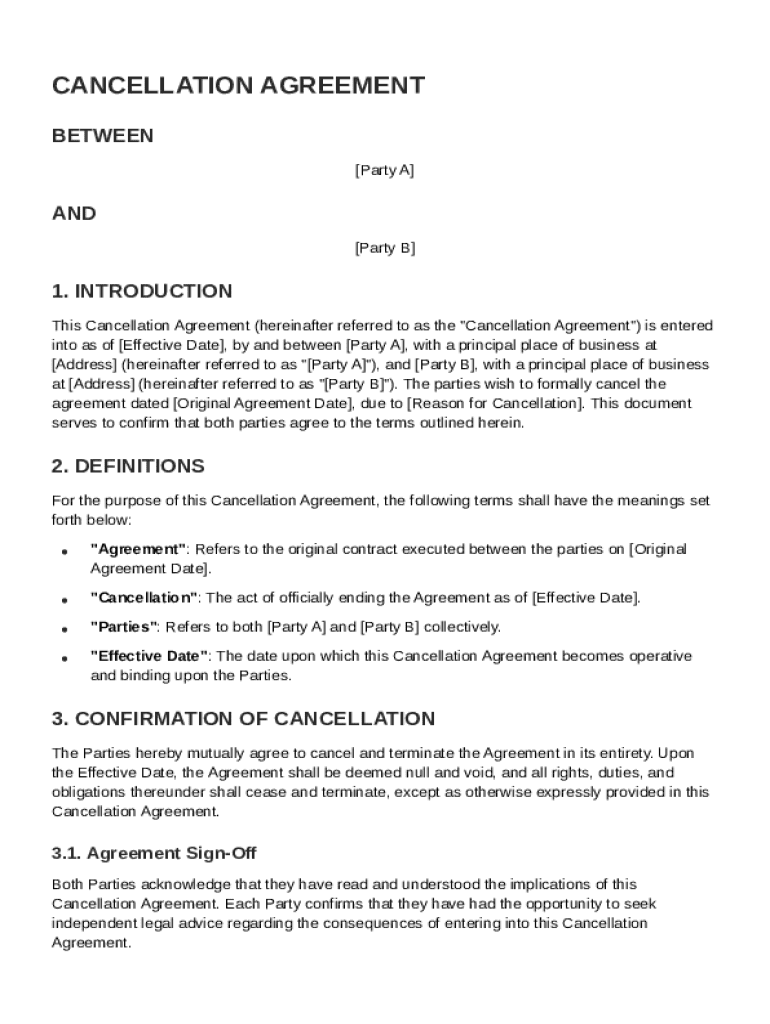







Definition and Meaning of the Cancel Agreement Template
The Cancel Agreement Template is a formalized document used to legally terminate an existing contract between two parties. The essence of this template is to ensure that both parties mutually agree to the termination and release each other from any future claims related to the original contract. It serves as a crucial tool to document and acknowledge the cancellation of obligations, responsibilities, or agreements specified in the original contract. Typically, the template outlines key aspects such as the identification of the parties involved, the reason for cancellation, and any residual obligations such as refunds or credit adjustments.
Components of a Cancel Agreement Template
- Parties Involved: Identifies both parties who are part of the original contract.
- Original Agreement Details: Includes the date and nature of the original agreement.
- Reason for Cancellation: Specifies why the agreement is being canceled.
- Terms and Conditions: Details any remaining obligations or responsibilities.
- Release Clause: Confirms that neither party holds claims against the other post-cancellation.
Steps to Complete the Cancel Agreement Template
Executing the Cancel Agreement Template accurately is essential to ensure the termination is effective and binding. Detailed steps help clarify how this form should be filled out:
- Identify the Parties: Clearly state the full legal names of both parties involved in the original agreement. Verify the identification details to avoid any disputes later on.
- State the Original Contract Details: Include the original agreement date and any reference numbers associated with it. This links the termination to the correct document.
- Explain the Reason for Cancellation: Articulate why the cancellation is taking place. Common reasons might include breach of contract, mutual consent, or fulfillment of objectives.
- Outline Remaining Obligations: If there are any outstanding obligations, such as payments or service completions, ensure these are documented.
- Incorporate the Release Clause: Confirms that all parties agree to release each other from future claims or lawsuits.
- Finalize with Signatures: Obtain signatures from both parties. This can be done electronically or through physical means, depending on party preference.
Key Elements of the Cancel Agreement Template
The Cancel Agreement Template should meticulously include several core elements to ensure it fulfills its purpose effectively.
- Definitions: Establishes specific terminology used within the agreement to prevent misunderstandings.
- Confirmation of Cancellation: Explicitly states that both parties agree to the cancellation and understand its implications.
- Refunds and Credits: Addresses any financial adjustments necessary as a result of the agreement termination.
- Governing Law: Specifies the jurisdiction under which any disputes will be resolved, aligning with U.S. legal standards.
- Confidentiality Clauses: Ensures that sensitive information pertaining to the original agreement is not disclosed post-cancellation.
Legal Use of the Cancel Agreement Template
The Cancel Agreement Template is a legal instrument that requires careful consideration and adherence to specific legal standards to be effective.
Ensuring Legality
- Compliance with Laws: The template should comply with federal and state laws pertinent to contract and agreement cancellations.
- Legal Consultation: While the template is designed to be user-friendly, consulting with a legal professional can prevent potential legal pitfalls, especially for complex agreements.
- Binding Nature: Once completed and signed, the template serves as a legally binding document, recognizing the mutual termination of the contract.
Examples of Using the Cancel Agreement Template
Real-World Scenarios
- Business Partnerships: A small business decides to dissolve its partnership with a supplier due to frequent delivery issues. The Cancel Agreement Template records the termination amicably, outlining final payments and confidentiality agreements.
- Service Contracts: An organization hired a consultant for a project that, upon review, is slated for termination due to budget constraints. The template is used to document the cancellation terms and outline any pending deliverables.
- Lease Agreements: Tenants and landlords use the template when a lease agreement is terminated prior to the original end date, detailing the return of security deposits and conditions for property turnover.
Who Typically Uses the Cancel Agreement Template
The Cancel Agreement Template is versatile, serving individuals and entities across various sectors who need to legally terminate binding agreements.


Common Users
- Business Owners: Utilize it to formalize the end of vendor contracts, service agreements, or employment terms.
- Legal Professionals: Draft and review cancellation documents as part of settlement discussions or contract negotiations.
- Individuals: May use the template when terminating personal service contracts or agreements involving significant financial transactions.

Important Terms Related to the Cancel Agreement Template
Understanding the terminology associated with the Cancel Agreement Template is crucial for ensuring clarity and effectiveness.
- Breach of Contract: Refers to any violation of terms outlined in the original agreement, potentially serving as a basis for cancellation.
- Mutual Consent: Both parties agree to the termination voluntarily, often leading to a smoother cancellation process.
- Release Clause: A provision that frees both parties from future claims related to the original contract.
- Severability: Ensures that if any part of the template is declared unenforceable, the remainder still holds legal weight.
Software Compatibility and Integration
Modern tools, such as DocHub, facilitate the creation, editing, and signing of the Cancel Agreement Template digitally.
Integration with Other Platforms
- Cloud Services: Templates can be saved and shared through platforms like Google Drive or Dropbox, ensuring accessibility and ease of use.
- DocHub Features: Allows for real-time editing, collaboration, and secure storage of agreement documents directly within its interface.
- Electronic Signatures: Provides legally binding electronic signatures, enhancing the template's utility and efficiency in digital environments.




