






Definition and Meaning
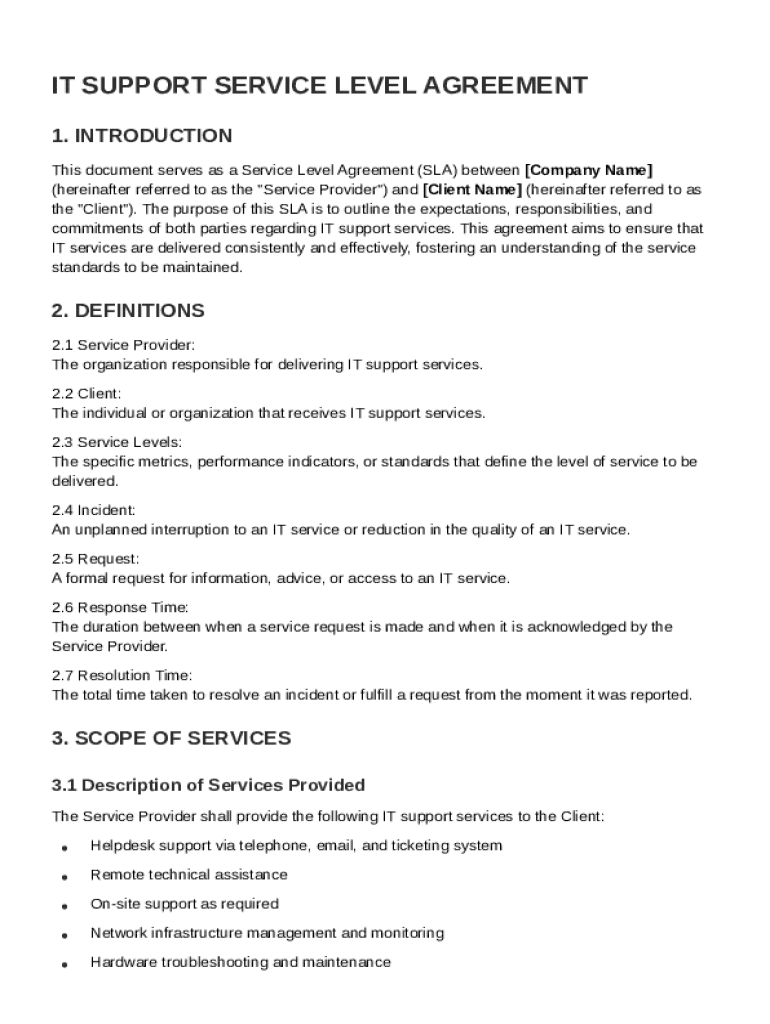
An IT Support Service Level Agreement (SLA) Template is a pivotal document that lays out the terms and conditions between an IT service provider and a client regarding the delivery of IT support services. Within this template, you will find explicit definitions of key terminologies such as "service provider," "incident," "response time," and "resolution time." These definitions set the foundation for a mutual understanding between both parties on what each term signifies in the context of the agreement. The SLA is designed to clearly articulate the expectations regarding performance metrics, such as the time it takes to respond to and resolve issues. This document serves as a framework to ensure that both parties have aligned their expectations, thereby mitigating potential disputes over service delivery.
Key Elements of the IT Support Service Level Agreement Template
The IT Support Service Level Agreement Template encompasses several critical components, which are essential for ensuring comprehensive IT service management:
- Scope of Services: Details the specific IT support services to be provided, such as help desk support, hardware maintenance, and software updates.
- Performance Metrics: Outlines measurable goals, including response and resolution times, to assess service effectiveness.
- Roles and Responsibilities: Specifies the duties of both the service provider and the client, ensuring clarity in their respective roles.
- Incident Management Procedures: Describes the steps for logging, tracking, and resolving incidents, emphasizing procedures to minimize downtime.
- Confidentiality and Data Protection: Covers obligations concerning data security, confidentiality, and compliance with relevant laws.
- Liability and Governing Law: Dictates the limitations of liability and the applicable laws governing the agreement, often tailored to U.S. legal standards.
How to Use the IT Support Service Level Agreement Template
Utilizing the IT Support Service Level Agreement Template effectively involves several key steps:
-
Customization: Tailor the template to reflect the specific needs of your business and the scope of services. Adjust terms and clauses as necessary to fit the particular context of the IT support arrangement.
-
Review and Agreement: Both parties should thoroughly review the document to ensure mutual understanding and acceptance of the terms. It's advisable to have legal counsel examine the document to accommodate any legal nuances specific to your state or business sector.
-
Implementation: Once agreed upon, the SLA should be formally signed and implemented. Regular monitoring and reviews should be scheduled to ensure compliance with the terms.
-
Documentation: Keep a signed copy of the SLA accessible for referral during any dispute resolution or performance review meetings.
Steps to Complete the IT Support Service Level Agreement Template
Completing the template involves a structured approach to ensure accuracy and compliance:
-
Input Service Details: Start by filling in the specific IT services to be provided. Be explicit about what is included and excluded to prevent future ambiguities.
-
Define Performance Metrics: Clearly define what constitutes satisfactory performance, including specific response times and resolution thresholds.
-
Outline Communication Protocols: Detail how and when communication will occur, specifying points of contact for incident escalation.
-
Establish Review Mechanisms: Integrate scheduled performance reviews to assess compliance with the SLA and adjust targets as business needs evolve.
-
Finalize and Sign: Conclude by obtaining signatures from authorized representatives of both parties, formalizing the agreement.
Who Typically Uses the IT Support Service Level Agreement Template
The IT Support Service Level Agreement Template is predominantly used by:
-
Businesses and Organizations: Both small businesses and large corporations rely on SLAs to outsource IT services efficiently while retaining control over service quality.
-
IT Service Providers: Vendors use SLAs to define their service commitments and manage client expectations, ensuring a structured approach to service delivery.
-
Legal and Compliance Teams: These teams utilize SLAs to uphold contractual obligations and ensure compliance with regulatory requirements.


Important Terms Related to IT Support Service Level Agreement Template
To effectively navigate the SLA, familiarity with key terms is essential:
- Service Provider and Client: The respective roles and responsibilities of each party in the agreement.
- Incident and Escalation: Definitions and protocols for addressing service interruptions and escalating them for resolution.
- Response and Resolution Time: The time frames within which specific levels of service are to be met.
- Uptime and Downtime: Measures of service reliability and periods of non-operational status.
Legal Use of the IT Support Service Level Agreement Template
In the U.S., the legal enforceability of an IT Support Service Level Agreement is contingent on several factors:
- Compliance with State Laws: The SLA must adhere to the legal statutes specific to the state in which it is executed.
- Good Faith and Fair Dealing: Both parties are expected to act honestly and not undermine the purpose of the agreement.
- Confidentiality and Data Protection: Legal requirements for data protection, such as those outlined by GDPR or CCPA, must be explicitly addressed in the SLA.
Examples of Using the IT Support Service Level Agreement Template
Consider some real-world scenarios where an SLA can be applied effectively:
-
Small Business: A local retail shop uses an SLA for outsourcing its IT needs, ensuring their point-of-sale systems remain operational and any issues are promptly addressed to minimize business disruption.
-
Large Corporation: In an expansive corporation, an SLA might be used to manage third-party IT services for multiple office locations, guaranteeing coordinated support and standardized service levels across all sites.
-
Remote Workforce: Companies with remote teams depend on SLAs to maintain robust tech support, ensuring their distributed workforce has reliable access to company IT services regardless of location.