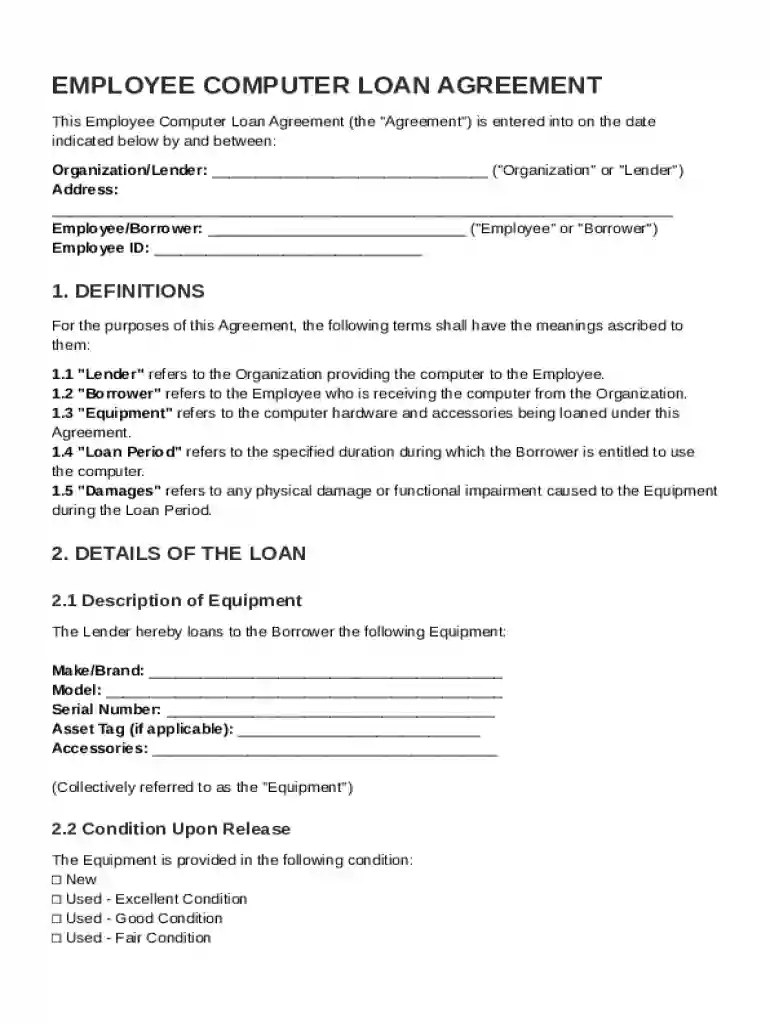
Employee Computer Loan Agreement Template 2026

Get Form
Employee Computer Loan Agreement Template Preview on Page 1

Here's how it works

01. Edit your form online
Type text, add images, blackout confidential details, add comments, highlights and more.

02. Sign it in a few clicks
Draw your signature, type it, upload its image, or use your mobile device as a signature pad.

03. Share your form with others
Send it via email, link, or fax. You can also download it, export it or print it out.

Definition and Meaning

The Employee Computer Loan Agreement Template is a formal document utilized by organizations to outline the conditions under which they loan computer equipment to their employees. This template specifies the obligations and responsibilities of both parties, ensuring clear communication and understanding. The agreement typically includes details such as the description of the equipment, loan duration, borrower responsibilities for maintenance, and procedures regarding the return or replacement of the equipment. By using this document, both employers and employees can ensure accountability and prevent misunderstandings about the terms of the loan.

How to Use the Employee Computer Loan Agreement Template

To effectively use the Employee Computer Loan Agreement Template, you should first gather all necessary information pertaining to the loan. This includes the employee’s full name, position, and department, as well as details about the equipment being loaned such as brand, model, and serial number. Once collected, these details can be input into the appropriate fields within the template. It's crucial to review the document thoroughly after completing it to ensure accuracy and comprehensiveness. Following this, both parties should read through the agreement to understand their rights and responsibilities, making amendments if necessary. Once finalized, signatures from both the employer and employee are required to formalize the agreement.

Key Elements of the Employee Computer Loan Agreement Template

The Employee Computer Loan Agreement Template comprises several key elements that establish a comprehensive understanding between the lender and the borrower. These include:

  • Equipment Description: Detailed information about the computer being loaned, including the make, model, and any included accessories.
  • Loan Duration: The period for which the equipment will be loaned to the employee, with specific start and end dates.
  • Liability and Maintenance: The borrower’s responsibility for maintaining the equipment in good condition and reporting any damages or losses immediately.
  • Return Procedures: Clear instructions on how and when the equipment should be returned at the end of the loan period.
  • Financial Obligations: Terms governing any financial responsibilities for damages, loss, or repairs that might be incurred during the loan period.

Steps to Complete the Employee Computer Loan Agreement Template

Completing the Employee Computer Loan Agreement Template involves several steps to ensure it is filled out correctly:

  1. Gather Essential Information: Collect all necessary information about the employee and the computer equipment to be loaned.
  2. Input Data: Enter this information into the respective sections of the template.
  3. Review and Verify: Double-check all entered details for accuracy and comprehensiveness.
  4. Amend If Necessary: Make any changes or additions based on specific agreements or organizational policies.
  5. Read Thoroughly: Both parties should read the document in full to ensure they understand the terms and conditions outlined.
  6. Sign and Date: Ensure signatures from both the employer and employee are on the document, along with the date of signing, to finalize the agreement.

Legal Use of the Employee Computer Loan Agreement Template

The legal use of the Employee Computer Loan Agreement Template requires adherence to applicable regulations and organizational policies. The template is designed to ensure that the loaning of equipment is conducted in a legally binding manner, protecting both the organization's assets and the employee's usage rights. It's essential for the agreement to clearly define:

  • Terms of Use: Limitations or permissions regarding how the equipment can be used.
  • Privacy Policies: Adherence to data privacy laws if the equipment contains or accesses sensitive information.
  • Liability Clauses: Statements that outline responsibilities and liabilities in instances of damage or loss.

Important Terms Related to Employee Computer Loan Agreement Template

Understanding certain key terms is crucial when dealing with an Employee Computer Loan Agreement Template:

  • Lessee/Borrower: The employee who receives the computer equipment.
  • Lessor/Lender: The organization that loans the computer equipment.
  • Depreciation: The reduction in an asset's value over time, especially concerning equipment.
  • Warranty: Assurance or guarantee regarding the equipment's condition and functionality.
  • Indemnification: The act of compensating for harm or loss.
  • Termination Conditions: Circumstances under which the loan agreement may be prematurely ended.

Who Typically Uses the Employee Computer Loan Agreement Template

The Employee Computer Loan Agreement Template is primarily utilized by organizations and businesses that provide technological equipment to their employees for work purposes. Common users include:


  • Corporations and Enterprises: In sectors such as technology, finance, or design, where employees frequently require specialized computer equipment.
  • Educational Institutions: For staff who need computers for administrative or teaching purposes.
  • Nonprofit Organizations: Facilitating employees or volunteers with necessary technology for their roles.
decoration image ratings of Dochub

Creating and Managing Fillable Forms for Employee Computer Loan Agreement

DocHub provides robust tools for creating and managing fillable forms related to the Employee Computer Loan Agreement. This allows organizations to develop personalized templates that include interactive elements such as:

  • Text Boxes: For entering names, dates, and other relevant details.
  • Checkboxes and Dropdowns: For selecting options related to equipment type or loan terms.
  • Signature Fields: For electronic signing, allowing the agreement to be completed and stored digitally.

These elements facilitate efficient data collection, ensuring all necessary information is captured systematically.

be ready to get more

Complete this form in 5 minutes or less

Get form

Security and compliance

At DocHub, your data security is our priority. We follow HIPAA, SOC2, GDPR, and other standards, so you can work on your documents with confidence.

Learn more
ccpa2
pci-dss
gdpr-compliance
hipaa
soc-compliance
be ready to get more

Complete this form in 5 minutes or less

Get form