Type text, add images, blackout confidential details, add comments, highlights and more.
02. Sign it in a few clicks
Draw your signature, type it, upload its image, or use your mobile device as a signature pad.
03. Share your form with others
Send it via email, link, or fax. You can also download it, export it or print it out.
How to use or fill out NITS Form fillable PDF - Fordham University - fordham with DocHub
Ease of Setup
DocHub User Ratings on G2
Ease of Use
DocHub User Ratings on G2
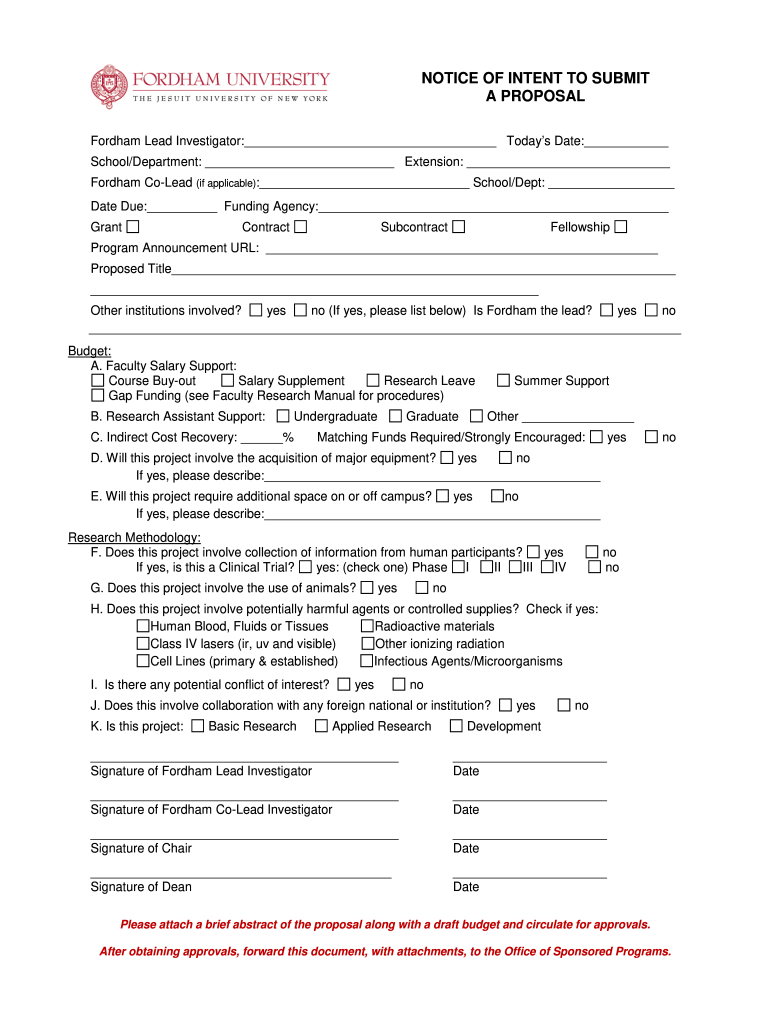
Click ‘Get Form’ to open the NITS Form in our editor.
Begin by filling in the 'Fordham Lead Investigator' section with your name, today's date, and your school/department. Ensure all fields are completed accurately.
Proceed to the 'Funding Agency' section and select the appropriate funding type (Grant, Contract, Subcontract, Fellowship).
In the 'Budget' section, specify details regarding faculty salary support and research assistant support. Check relevant boxes for additional funding requirements.
Complete the 'Research Methodology' section by answering questions about human participants, animals involved, and any potential conflicts of interest.
Finally, ensure all signatures are obtained from necessary parties before submitting. Attach any required documents as specified.
Start using our platform today to streamline your form completion process for free!
Fill out NITS Form fillable PDF - Fordham University - fordham online It's free
Please download the Transfer College Report editable pdf and send it via email to your school administrator. Students who begin their studies at a college orRead more
Applications for New Awards; Investing in Innovation Fund-
May 16, 2016 This document has been published in the Federal Register. Use the PDF linked in the document sidebar for the official electronic format.Read more
Cookie consent notice
This site uses cookies to enhance site navigation and personalize your experience.
By using this site you agree to our use of cookies as described in our Privacy Notice.
You can modify your selections by visiting our Cookie and Advertising Notice.