






Definition & Meaning
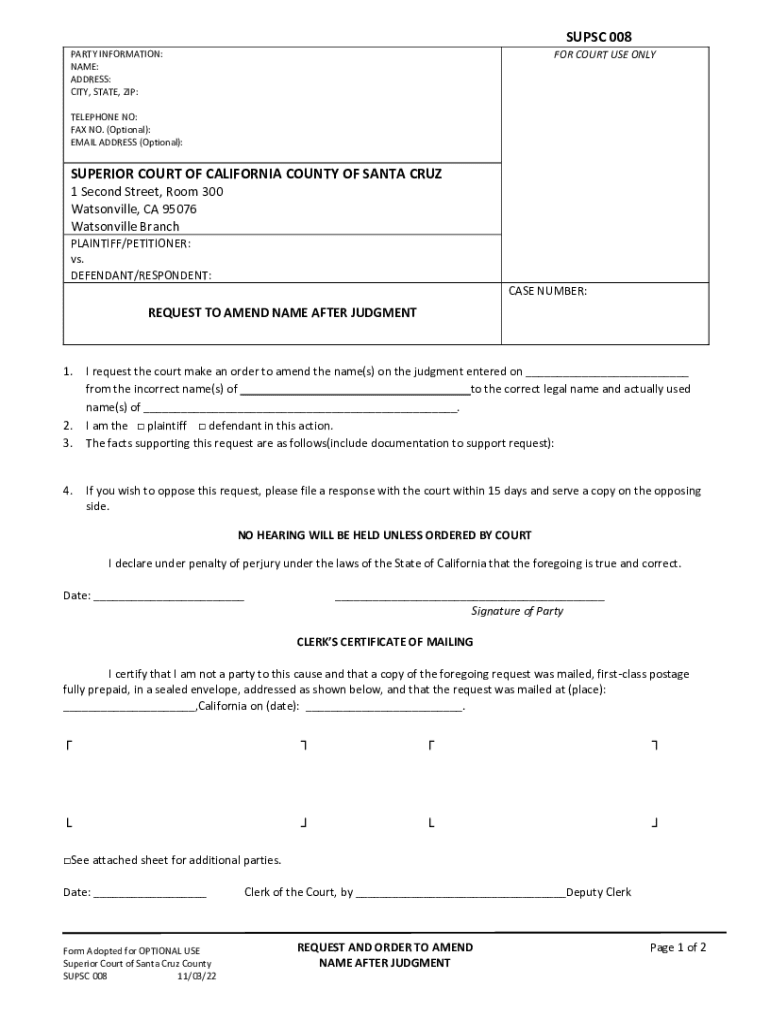
The "Request to Amend Name After Judgment" is a legal form utilized by parties involved in a court proceeding to make official changes to the names listed on a judgment. This form is crucial when inaccuracies in the recorded names need correction to ensure that all legal documents reflect accurate information. Inaccuracies can arise from clerical errors or changes such as legal name changes due to marriage or divorce.
How to Use the REQUEST TO AMEND NAME AFTER JUDGMENT
To effectively use the "Request to Amend Name After Judgment" form, the requesting party must provide detailed information about both the incorrect and the correct names. The form serves to formalize the request to a court to amend the names listed on an existing judgment. It is essential to complete the form accurately to avoid any further legal discrepancies and to ensure that all official records and further legal actions are based on the correct identifiers.
- Identify the Incorrect Name: Clearly state the name as it is currently recorded.
- Provide the Correct Name: Supply the accurate name that should be reflected in legal documents.
- Justification for Amendment: Explaining the reason for this request, such as typographical errors, legal name changes, etc.
Steps to Complete the REQUEST TO AMEND NAME AFTER JUDGMENT
Completing the "Request to Amend Name After Judgment" form involves a series of detailed steps to ensure accuracy and completeness. These steps guide you through the process from collecting necessary information to submitting the form for judicial consideration.
- Gather Relevant Information: Collect all necessary details about the case including case number, court location, and current identity details.
- Fill Out Party Information: Enter personal information for the requesting party, including contact details and current address.
- Detail Incorrect and Correct Names: Carefully complete sections detailing both erroneous and correct identifiers.
- Explain Amendment Reason: Provide a concise explanation of why an amendment is warranted.
- Submit Supporting Documents: Attach relevant documentation that supports the claim for the amendment.
- File the Form: Pay attention to guidelines for submission; this may vary by jurisdiction.
Why Should You REQUEST TO AMEND NAME AFTER JUDGMENT
Amending the name after a judgment is crucial for several reasons. An accurate legal document prevents potential legal challenges in future interactions related to the judgment, such as enforcing or appealing decisions. It also ensures that legal responsibilities and rights are accurately enforced and protected.
- Prevent Miscommunication: Avoid confusion both in legal and personal interactions.
- Ensure Legal Integrity: Secure the enforceability of the judgment with correct identifiers.
- Facilitate Legal Transactions: Accurate records aid in seamless legal processes.
Legal Use of the REQUEST TO AMEND NAME AFTER JUDGMENT
The request to amend name after judgment holds significant legal standing. It ensures all parties interact under correct legal identities, reducing the risk of misrepresentation in the enforcement of court decisions. Submitting this form is a necessary step to rectify errors that could otherwise undermine the validity of a judgment.
- Rectifies Clerical Errors: Ensures that judgments are enforceable.
- Facilitates Legal Compliance: Aligns with legal standards to maintain reliability in legal proceedings.
State-Specific Rules for the REQUEST TO AMEND NAME AFTER JUDGMENT
Rules for using the "Request to Amend Name After Judgment" can vary significantly from one state to another. It is essential to consult state-specific guidelines to ensure adherence to local procedural requirements and filing processes.
- Filing Requirements: Some states may require additional documentation or signatures.
- Submission Methods: Options might include in-person, mail, or online submission, varying by jurisdiction.
- Notices to Opposing Parties: Certain states require that the opposing parties be notified of the amendment request.
Required Documents
To complete the "Request to Amend Name After Judgment," you may need to provide several key documents. These documents corroborate the identity claims and the reasons for the name amendment.
- Proof of Identity: Valid ID such as a driver’s license or passport.
- Legal Documentation of Name Change: Court order, marriage certificate, or other proof of name change.
- Case Records: Existing judgment documents reflecting the incorrect name.
Form Submission Methods (Online / Mail / In-Person)
Various methods exist for submitting the "Request to Amend Name After Judgment." The method chosen often depends on state regulations and individual preferences.
- Online Submission: Many jurisdictions offer online filing options that streamline the process.
- Mail Submission: Traditional mail is suitable where electronic submission is not available or preferred.
- In-Person Submission: Provides a chance to ensure the form is correctly submitted and any immediate questions are addressed.
Who Typically Uses the REQUEST TO AMEND NAME AFTER JUDGMENT
This form is commonly used by individuals or entities involved in legal proceedings who discover that their name is incorrectly recorded in a judgment. Legal representatives may also file on behalf of their clients.
- Individuals with Name Changes: Due to marriage, divorce, or other legal reasons.
- Legal Professionals: Ensuring their client's particulars are accurately reflected.
- Entities Correcting Errors: Businesses or organizations needing to update inaccurately recorded names.