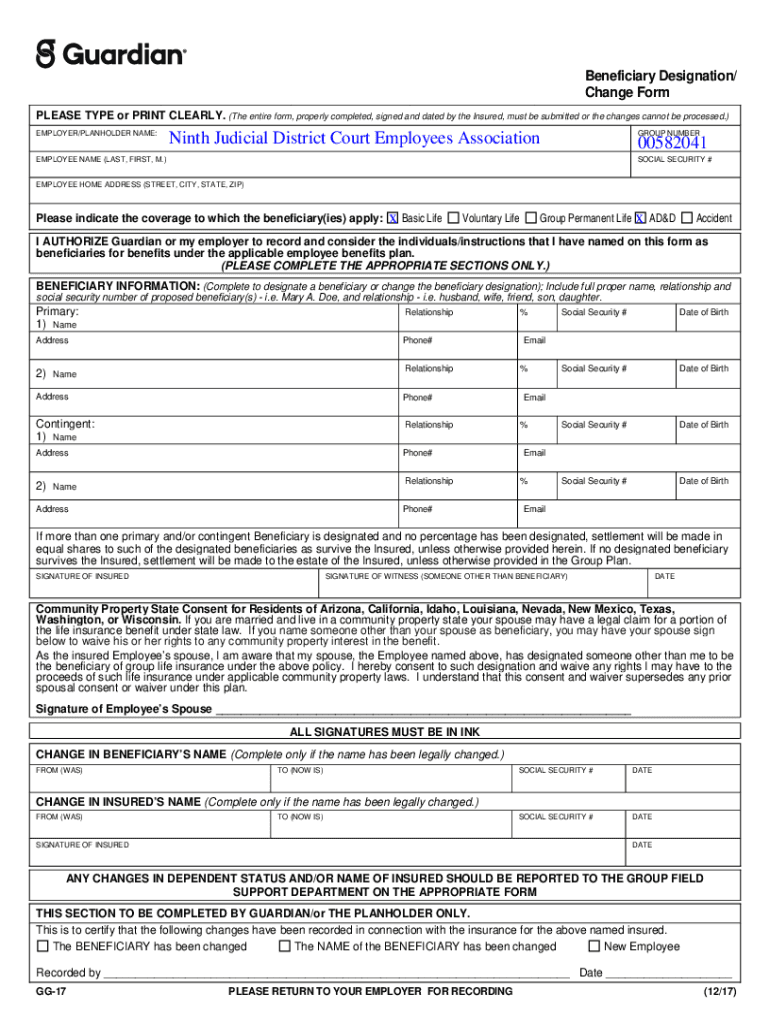







Definition and Meaning of the Guardian-Beneficiary-Designation-Change-Form
The Guardian-Beneficiary-Designation-Change-Form is a crucial document utilized for designating or modifying beneficiaries associated with specific insurance coverages. This form is primarily relevant for employees under certain employment agreements, such as those in the Ninth Judicial District Court Employees Association. It allows an employee to update beneficiary details for coverages like Basic Life and Accidental Death & Dismemberment (AD&D). Understanding the nuances and application of this form is essential for ensuring that intended beneficiaries are accurately recorded and adhered to in the event of an employee's death or injury covered by the policy.
How to Use the Guardian-Beneficiary-Designation-Change-Form
-
Gather Necessary Information: Before filling out the form, collect all relevant personal and beneficiary details. This includes the names, contact information, and relationship to the insured.
-
Complete Personal Details: Clearly fill in your personal information, including your full name, social security number, and employment details.
-
Designate Beneficiaries: Input the names of your chosen beneficiaries. Ensure their names match their legal documentation to avoid discrepancies.
-
Obtain Signatures: Secure the required signatures from the insured and, if applicable, witnesses to validate the changes.
-
Submit the Form: Depending on the guidelines provided by your employer or insurance provider, submit the completed form either online, in person, or via mail.
Steps to Complete the Guardian-Beneficiary-Designation-Change-Form
-
Download the Form: Obtain the form from the DocHub platform or your employer’s HR department.
-
Fill Out the Form: Enter your personal and beneficiary information. Double-check for any inaccuracies.
-
Review for Accuracy: Verify that all sections are fully completed, and details such as names, dates, and addresses are correct.
-
Sign and Date the Form: Both the insured and a required witness should sign and date the form to ensure its validity.
-
Submit to Relevant Department: Send the form to the appropriate department—typically HR or benefits administration.
Important Terms Related to Guardian-Beneficiary-Designation-Change-Form
- Beneficiary: The person or entity designated to receive benefits.
- Insured: The individual whose life is covered by the insurance policy.
- AD&D: Accidental Death and Dismemberment insurance coverage.
- Witness Signature: A third-party signature required to validate the authenticity of the document.
Legal Use of the Guardian-Beneficiary-Designation-Change-Form
The form ensures legal recognition of your chosen beneficiaries and complies with U.S. insurance regulations. It also includes provisions for spousal consent in community property states, aligning with legal requirements to protect spousal rights in asset distribution.
Key Elements of the Guardian-Beneficiary-Designation-Change-Form
- Personal Information Section: Captures details about the insured.
- Beneficiary Designation: Provides spaces for listing multiple beneficiaries with specific benefit percentages.
- Signature Block: Contains spaces for required signatures from the insured and witnesses.
State-Specific Rules for the Guardian-Beneficiary-Designation-Change-Form
In community property states, additional consent from a spouse may be required to designate or change a beneficiary. This ensures compliance with state matrimonial property laws and prevents disputes over asset distribution.
Form Submission Methods: Online, Mail, and In-Person
- Online Submission: Use platforms like DocHub to fill and submit the form digitally.
- Mail: Send physical copies via certified mail to ensure receipt.
- In-Person: Deliver the completed form directly to the administrative office for immediate processing and confirmation.