







Definition and Meaning
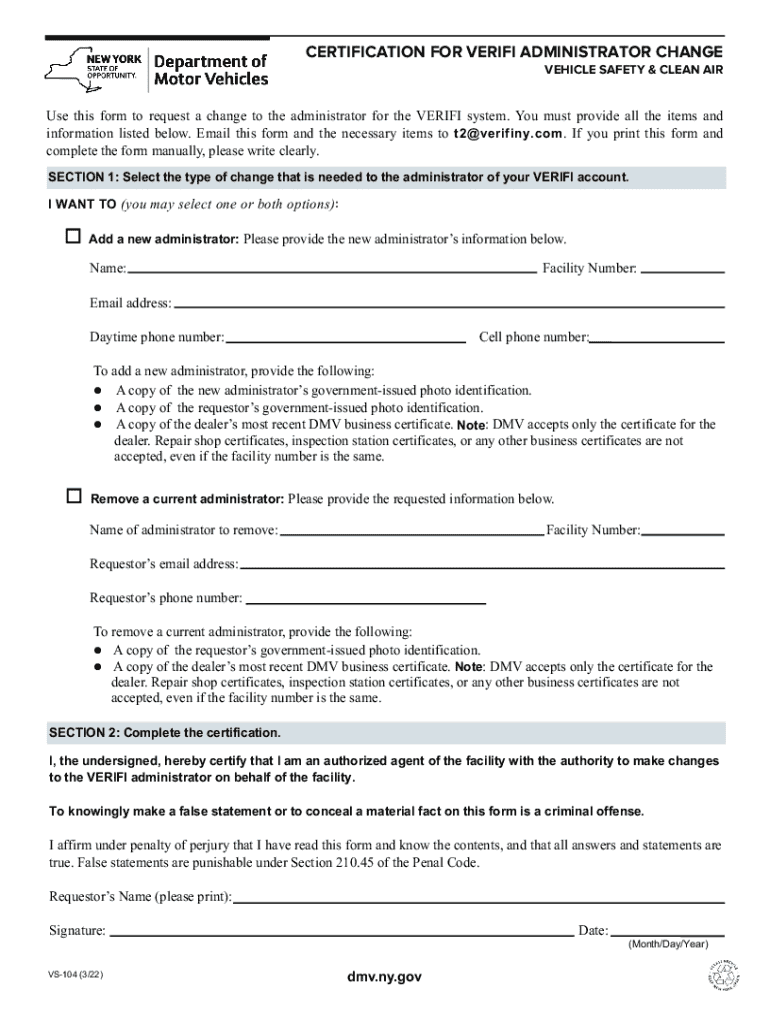
The "Certification for Verifi Administrator Change" form is a formal document used to request changes in the administration of the VERIFI system. It is specifically designed for situations where an organization needs to add or remove an administrator. By submitting this form, the requestor certifies their authority to make these changes and confirms the accuracy and truthfulness of the information provided. This form is crucial for maintaining accurate records within the VERIFI system and ensuring that only authorized individuals have administrative access.
How to Use the Certification for Verifi Administrator Change
To use the Certification for Verifi Administrator Change effectively, follow these steps:
- Review the form carefully to understand the information required.
- Gather all necessary documentation, including identification and business certificates.
- Fill out the form accurately, providing all requested information.
- Certify your authority to request the changes as outlined on the form.
- Submit the completed form through the specified method (online, mail, or in-person).
This process ensures that your request for administrative changes is processed smoothly and accurately.
Steps to Complete the Certification for Verifi Administrator Change
Completing the Certification for Verifi Administrator Change involves several key steps:
-
Personal and Organizational Details:
- Provide your full name, title, and contact information.
- Include the name and details of your organization.
-
Administrator Change Details:
- Specify whether you are adding or removing an administrator.
- Provide the names and roles of current administrators and those being added or removed.
-
Supporting Documentation:
- Attach the necessary documents that verify your authority and the reasons for the change, such as ID proofs and business certificates.
-
Certification Statement:
- Sign the form to certify the truthfulness of the information submitted and your authority to request these changes.
-
Submission:
- Submit the form using the pre-specified method.
Each step should be completed with accuracy to avoid delays in processing your request.
Required Documents
When completing the Certification for Verifi Administrator Change, you will need to provide several documents:
- Identification: A government-issued ID of the requestor and the administrators being added or removed.
- Business Certificates: Documents proving the legal standing of your business.
- Proof of Authority: A document, such as a power of attorney or notarized letter, confirming your authority to request these changes.
Submitting these documents along with the form helps verify the legitimacy of the request.
Key Elements of the Certification for Verifi Administrator Change
The form includes several critical components:
- Contact Information: Details of the requestor and organization.
- Change Details: Clear indication of whether the request is to add or remove an administrator.
- Certification and Signature: A section where the requestor certifies their authority and the accuracy of the information provided.
- Submission Instructions: Guidelines on how and where to submit the completed form.
Understanding these elements ensures that all necessary areas are addressed correctly.
Penalties for Non-Compliance
Failure to comply with the requirements for submitting the Certification for Verifi Administrator Change can result in several penalties:
- Revocation of Administrative Access: Unauthorized access may be revoked until compliance is met.
- Legal Consequences: Potential legal actions if fraudulent information is submitted or if changes are made without proper authority.
- Fines and Fees: Possible financial penalties for failing to adhere to the submission guidelines and deadlines.
Understanding and complying with the form's requirements helps avoid these penalties.
Digital vs. Paper Version
The Certification for Verifi Administrator Change is available in both digital and paper versions:
- Digital Version: Offers the convenience of online submission and integration with cloud-based storage. Ideal for organizations using digital workspace tools.
- Paper Version: Suitable for those who prefer or require hard copies for documentation and filing purposes.
Both versions are equivalent in terms of legal standing but may differ in submission procedures.
Software Compatibility
The form is compatible with various document management software, such as DocHub, which supports a wide range of formats including PDF and DOC. This compatibility facilitates easy filling, signing, and submission of the form electronically. Additionally, integration with platforms like Google Workspace allows for seamless management of the form within an organization's existing digital framework.




