




Here's how it works



How to use or fill out palmetto general pgy1 form with our platform

- Click ‘Get Form’ to open the palmetto general pgy1 form in the editor.
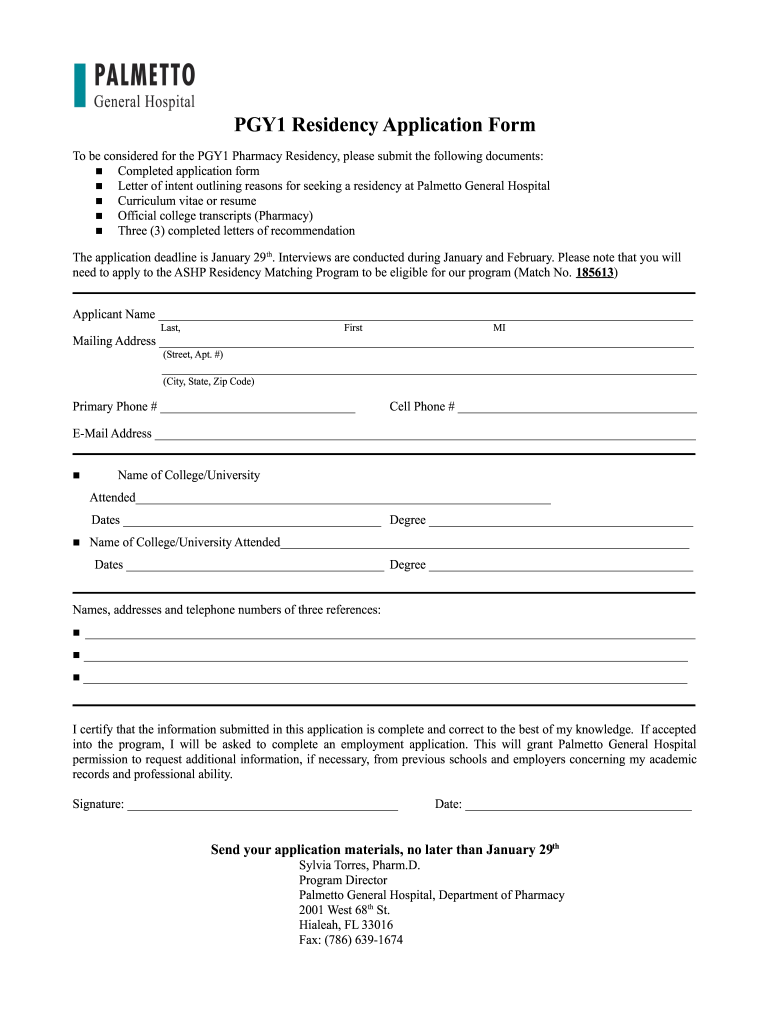
- Begin by entering your personal information. Fill in your name, mailing address, primary phone number, cell phone number, and email address in the designated fields.
- Next, provide details about your educational background. List the names of colleges or universities attended along with the dates and degrees obtained. Ensure accuracy for a smooth application process.
- In the references section, input the names, addresses, and telephone numbers of three references. This is crucial for your application; make sure to choose individuals who can vouch for your qualifications.
- Finally, review all entered information for completeness and correctness. Sign and date the application at the bottom before submitting it through our platform.
Start filling out your palmetto general pgy1 form today for free using our platform!
It's free
Got questions?
Can I draw my eSignature to approve my palmetto general hospital program internal medicine residency?
Sure, electronically drawing your signature is acceptable, but only if you use a tool that complies with industry laws and regulations. Consider DocHub, which ensures eSignature validity under ESIGN and UETA requirements. All you need to eSign your palmetto general hospital program internal medicine residency is an account with DocHub and an internet connection. Once you open your document in our editor, click Sign and choose the Draw option.
Do I need to set up software to edit my palmetto general hospital family medicine residency?
If you edit your palmetto general hospital family medicine residency with DocHub, you merely require a steady web connection and virtually any browser installed on your device. No need to set up any third-party software or study guides. Simply open a tab with DocHub, drag and drop your file, and modify it immediately.
Security and compliance
At DocHub, your data security is our priority. We follow HIPAA, SOC2, GDPR, and other standards, so you can work on your documents with confidence.
Learn more




