




01. Edit your form online
Type text, add images, blackout confidential details, add comments, highlights and more.

Type text, add images, blackout confidential details, add comments, highlights and more.

Draw your signature, type it, upload its image, or use your mobile device as a signature pad.

Send it via email, link, or fax. You can also download it, export it or print it out.
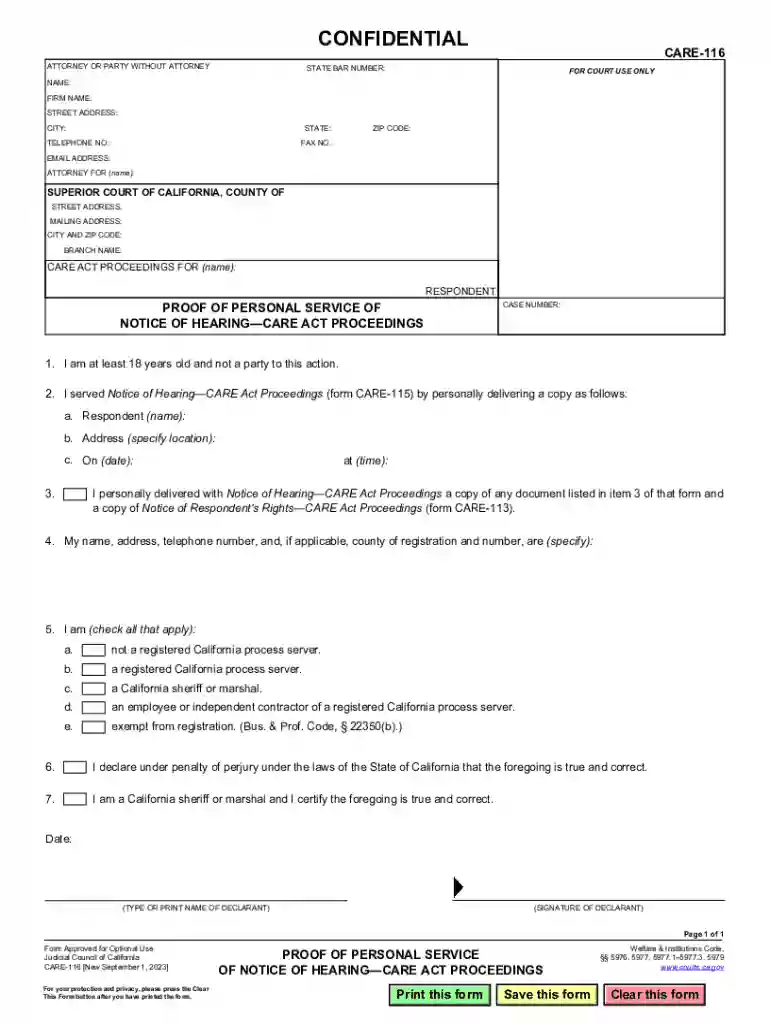
The Care-116 form serves as a legal documentation tool used specifically within the jurisdiction of California. It is primarily designed to provide proof of personal service of a Notice of Hearing related to CARE Act proceedings. These proceedings often involve complex legal processes, where delivering notices to involved parties is crucial to ensure that all individuals are informed and can participate accordingly. As part of legal protocols, the form documents the service details, ensuring transparency and compliance with legal standards.
Utilizing the Care-116 form requires a step-by-step approach to ensure accuracy. Firstly, the individual responsible for completing the form, known as the declarant, must accurately record their personal information. This includes name, address, and contact details. Next, the declarant must detail the specific service performed, which involves providing a Notice of Hearing to the required party. It is essential to include the date, time, and method of service, as well as the recipient's details. This thorough documentation supports the legal requirement of notifying involved parties.
Completing the Care-116 form involves several key steps. Begin by filling out the declarant’s information accurately. This section typically requires the declarant's full name, address, and contact information. Next, clearly indicate the date, time, and method of service, selecting from options such as personal delivery or certified mail. It is critical to note the complete details of the person served, including their name and address. A declaration under penalty of perjury confirms the truthfulness and accuracy of the provided information, adding a layer of legal validity.
The Care-116 form contains several pivotal elements that must be diligently completed. These include the declarant's identification details, service specifics—such as the exact date and method of service—and the recipient's information. The form also features a section for declarations under penalty of perjury, which is vital for authenticating the information provided. Understanding these core components is essential for ensuring compliance with legal requirements and the validity of the form.
The primary users of the Care-116 form are attorneys and parties directly involved in CARE Act proceedings. Legal professionals utilize this form to document and verify that a Notice of Hearing has been appropriately served, which is a critical step in maintaining due process. Similarly, any individual or entity involved in these legal proceedings may need to use the form to ensure verifiable communication of hearing notices.
California’s unique legal framework dictates specific rules and requirements for the Care-116 form. The form must comply with state statutes and regulations regarding the service of legal documents. Notably, the completion of this form needs to be accompanied by an understanding of the CARE Act's particular procedural rules applicable within California. Observing these state-specific guidelines is essential for ensuring the legal acceptability of the form.
The Care-116 form carries significant legal weight as it establishes proof of service of a Notice of Hearing, integral to ensuring all parties in a legal proceeding are duly informed. Failure to properly serve such notice can result in delays or dismissals of hearings, underscoring the importance of this form. By filling out the form and declaring its accuracy under penalty of perjury, users contribute to upholding the integrity of judicial processes.
Imagine a scenario where a legal assistant is tasked with serving a Notice of Hearing to a respondent in a CARE Act case. This assistant would complete the Care-116 form, detailing the personal delivery of the notice to the respondent, including the date, time, and location of the service. Such meticulous documentation ensures compliance and aids in smooth legal proceedings. Another example could involve a lawyer who uses certified mail to serve the notice, again documenting all pertinent details on the Care-116 form to provide proof of the action.
Understanding the terminology associated with the Care-116 form is crucial. Terms like “declarant,” “proof of service,” and “penalty of perjury” are integral to the form's context. The declarant is the person completing the form, and proof of service is a legal requirement to demonstrate that a notice has been delivered. The penalty of perjury declaration underscores the legal obligation to provide truthful information, reinforcing the form's legal validity and significance in CARE Act proceedings.
We've got more versions of the Care-116 form. Select the right Care-116 version from the list and start editing it straight away!
| Versions | Form popularity | Fillable & printable |
|---|---|---|
| 2023 | 4.8 Satisfied (26 Votes) |
At DocHub, your data security is our priority. We follow HIPAA, SOC2, GDPR, and other standards, so you can work on your documents with confidence.




May 5, 2026 The household and personal care sector encompasses a wide range of products used for cleaning, hygiene, and grooming. These products areRead more
CARE-116 Proof of Personal Service of Notice of HearingCARE Act Proceedings. RINGCARE ACT PROCEEDINGS Form Approved for Optional Use Judicial Council of


