






Definition and Meaning of Photography Invoice Template
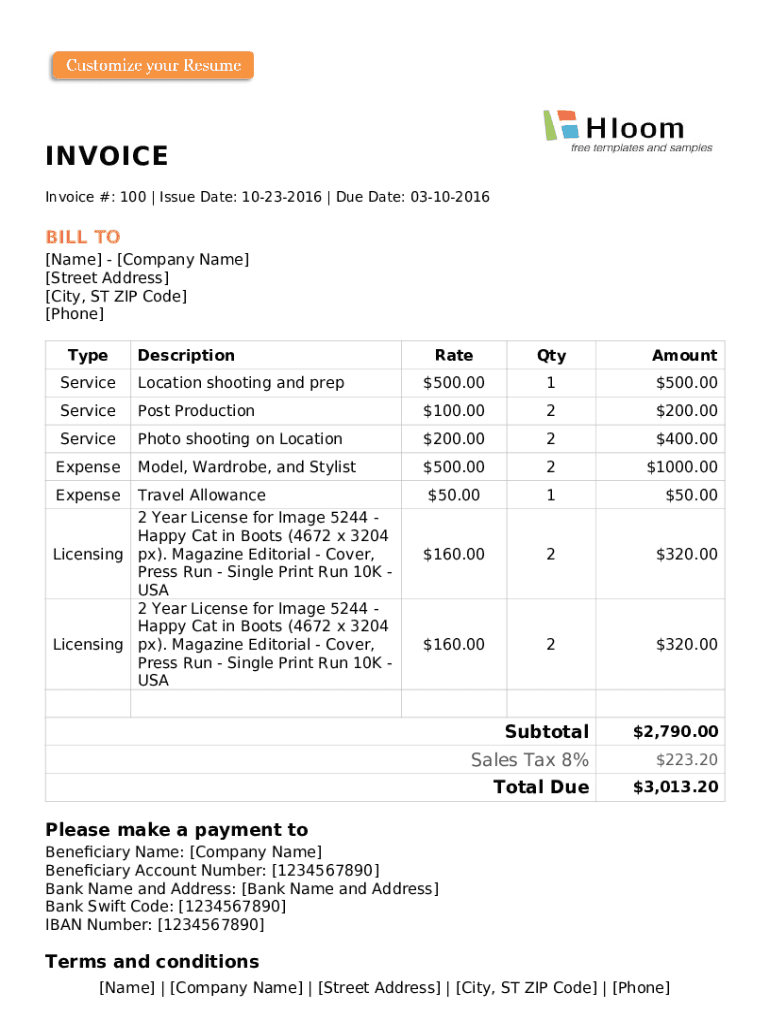
A Photography Invoice Template serves as a standardized document primarily used by photographers to itemize and bill their clients for photography services rendered. This form typically includes crucial details such as the services provided, costs incurred, applicable taxes, and payment terms. Templates are available in various formats such as Word, Excel, PDF, and Google Docs, allowing photographers versatile options based on their editing preferences and software accessibility.
How to Use the Photography Invoice Template
Utilizing a Photography Invoice Template effectively involves several key steps:
-
Select Format: Choose the format that best suits your needs, whether it’s Word for text-heavy invoices, Excel for detailed calculations, PDF for secure and consistent formatting, or Google Docs for easy collaboration.
-
Customize Header: Insert your business name, logo, and contact information at the top of the invoice to personalize it.
-
Populate Client Details: Add the client's name, contact info, and, if applicable, the project name and dates.
-
Itemize Services: Clearly list the photography services provided, including location shoots, post-production work, or licensing fees, alongside their respective costs.
-
Calculate Totals: Use Excel or Google Sheets to automate calculations of totals, taxes, and discounts, ensuring an accurate final amount.
-
Specify Payment Terms: Detail payment conditions, such as a 30-day payment window, accepted payment methods, and any late fee policies.
Steps to Complete the Photography Invoice Template
Completing the Photography Invoice Template involves detailed attention to each section:
-
Project Information: Start with basic identification details, such as invoice number and date.
-
Billing Details: Fill in both your billing information and that of the client.
-
Detailed Description: Provide a breakdown of all services rendered with clear descriptions.
-
Cost Per Service: Assign costs to each service, maintaining transparency and allowing clients to understand charges.
-
Tax and Additional Fees: Calculate and include any applicable sales tax and additional fees.
-
Subtotal and Total: Ensure your template correctly adds all items to present the subtotal, apply taxes/fees, and showcase the grand total.
-
Terms and Conditions: Conclude with your terms and conditions, emphasizing aspects such as copyright of images and usage rights.
Key Elements in a Photography Invoice Template
Essential components of a Photography Invoice Template include:
- Invoice Header: Consists of professional branding and invoice identification.
- Client Information: Ensures clear and correct billing to the intended client.
- Service Details: Maintains transparency by listing services with descriptions and dates.
- Payment Instructions: Encourages prompt payment by outlining payment methods and deadlines.
- Notes Section: Adds custom notes for specific client instructions or repeat business incentives.
Legal Use of the Photography Invoice Template
Invoicing in the U.S. involves adherence to specific legal standards to be compliant and enforceable:
-
Clear Service Documentation: The invoice should explicitly document services provided and terms agreed upon, forming a legal agreement.
-
Copyright Notices: Include necessary copyright statements to protect intellectual property rights over photographs.
-
Tax Implications: Abide by IRS regulations regarding sales tax collection and reporting, which varies by state.
Who Typically Uses the Photography Invoice Template
While primarily designed for professional photographers, others who might benefit include:
- Freelancers: Those offering related services such as photo editing or graphic design.
- Photo Studios: Business entities producing commercial photography on a large scale.
- Event Planners: Professionals who regularly contract photographers for events and require standard invoicing practices.


Software Compatibility
The Photography Invoice Template’s software compatibility ensures seamless usage across devices and platforms:
- Microsoft Word and Excel: Highly suitable for documents requiring text-heavy elements and detailed calculations.
- Adobe PDF: Offers secure file presentations that facilitate consistent printing and sharing.
- Google Workspace: Enhances collaborative editing and real-time updates among team members, especially beneficial when input from multiple contributors is required.
Versions and Alternatives to the Photography Invoice Template
Options beyond the fundamental template include:
- Specialized Templates for Wedding Photography: Address specific event photography needs.
- Sports/Event Photography Forms: Cater to unique requirements of fast-paced, repetitive service sessions.
- International Invoice Templates: Adjust elements to meet global transaction standards for overseas clients.