




01. Edit your form online
Type text, add images, blackout confidential details, add comments, highlights and more.

Type text, add images, blackout confidential details, add comments, highlights and more.

Draw your signature, type it, upload its image, or use your mobile device as a signature pad.

Send it via email, link, or fax. You can also download it, export it or print it out.
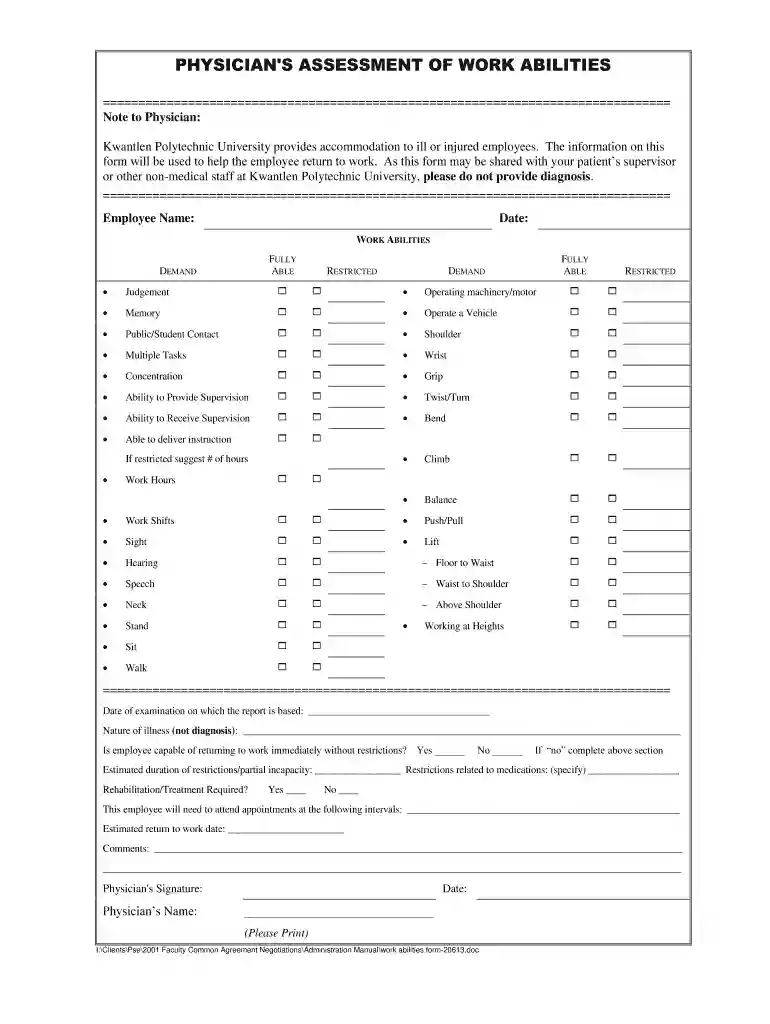
The Physician's Assessment of Work Abilities Form developed by Kwantlen Polytechnic University is engineered to facilitate the evaluation of an employee's work capabilities in the context of illness or injury. Primarily designed for medical professionals, the form seeks to assist in navigating an employee's return to work by providing an objective overview of their functional capacities without delving into specific medical diagnoses. By outlining their physical and cognitive abilities, this form aims to identify potential work limitations and set a clear path for any necessary rehabilitation or adjustments needed in their workplace roles.
Using this form is crucial in ensuring a structured approach to reintegrating employees back into their work environment. It helps maintain legal compliance with workplace safety and health regulations while supporting an employee's transition by tailoring their duties to match their current abilities. In addition to protecting the rights of employees by providing necessary accommodations, this form is also a critical tool for employers aiming to maintain productivity and morale within their teams.
Obtain the Form: Start by acquiring the form from Kwantlen Polytechnic University's HR department or their official website. Ensure you have the latest version.
Employee Information: Fill out demographic details, including name, employee ID, and department.
Physician Assessment: The healthcare professional should provide an assessment of the employee's physical and cognitive abilities.
Estimated Duration: Provide timeframes for restrictions, if any, lasting beyond standard recovery times.
Required Treatment: Suggest any treatment or therapy needed to improve the employee's work capabilities.
Review and Sign: Both the physician and employee must review the form for accuracy and completeness before signing.
The form is typically distributed through Kwantlen Polytechnic University's administrative channels or their official website. Employees are encouraged to consult their HR representatives or visit the university's portal to access the form, ensuring a seamless process from request to receipt. Digital access allows immediate download, whereas paper forms might require contacting the HR department directly.
The form is primarily utilized by physicians tasked with providing work capability assessments for employees affiliated with Kwantlen Polytechnic University. Human Resource departments and managers are also integral users, as they apply the form in decision-making about an employee's return to work and any accommodations necessary for a safe and effective transition back to the workplace.


The form enforces legal compliance with regional labor laws and occupational safety standards. By documenting work capabilities accurately, employers safeguard against potential liabilities, such as workplace injuries due to insufficient accommodations. Physicians must ensure their assessments align with both ethical standards and legal obligations, ensuring that recommendations are fact-based and non-discriminatory.
Case Study Example: An administrative assistant returning after a wrist surgery used the form to outline restrictions on typing and recommended ergonomic tools which her employer accommodated with specialized software and equipment.
Scenario Analysis: A faculty member, post-rehabilitation for a back injury, utilized the form to detail limitations on lifting. With this insight, their department reassigned non-essential physical tasks to other staff, allowing the individual to perform their role effectively.
These examples underscore the form's practical value in individual cases, highlighting successful reintegrations into the workplace.
At DocHub, your data security is our priority. We follow HIPAA, SOC2, GDPR, and other standards, so you can work on your documents with confidence.



by SA Rusticus 2021 Cited by 52 This paper provides evidence of the applicability of the HELES for evaluating the learning environment across four health using an anonymous online survey.
Resource Center with tools, policies, and forms to help you manage your service obligation. 503-494-4450 | toll-free 866-674-4376


