Type text, add images, blackout confidential details, add comments, highlights and more.
02. Sign it in a few clicks
Draw your signature, type it, upload its image, or use your mobile device as a signature pad.
03. Share your form with others
Send c63 declaration of parentage via email, link, or fax. You can also download it, export it or print it out.
How to use or fill out c63 form with our platform
Ease of Setup
DocHub User Ratings on G2
Ease of Use
DocHub User Ratings on G2
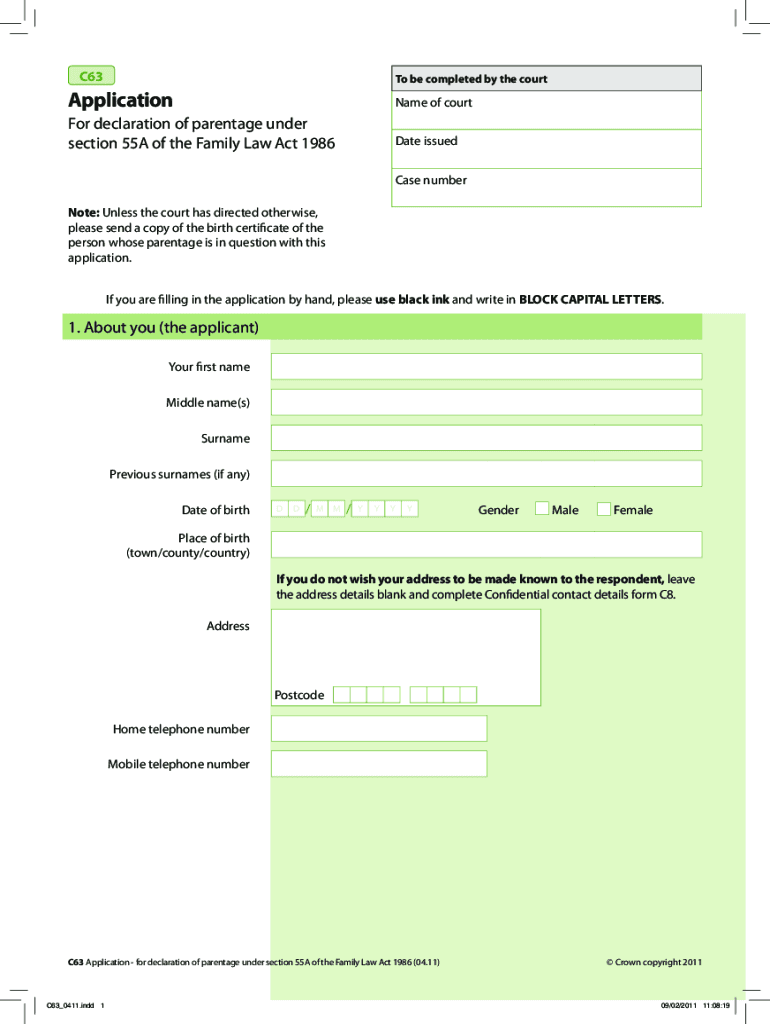
Click ‘Get Form’ to open the c63 form in the editor.
Begin by filling out your personal information in Section 1, including your first name, middle name(s), surname, and date of birth. Ensure you write in BLOCK CAPITAL LETTERS for clarity.
Provide your contact details, including your address and phone numbers. If you prefer confidentiality, leave the address blank and complete the Confidential contact details form C8.
In Section 2, list the respondents involved in the case. Fill in their names, dates of birth, and any previous surnames if applicable.
Section 3 requires a brief explanation of why you are making this application. Summarize the facts that justify your request without going into excessive detail.
Complete Sections 4 through 7 as necessary, providing information about any other court cases related to parentage and confirming connections with England and Wales.
Finally, review all sections for accuracy before signing the statement of truth at the end of the form. Ensure all required documents are attached before submission.
Start using our platform today to fill out your c63 form easily and efficiently!
Declaration of non parentageSection 55A Family Law ActDeclaration of parentage case lawWhat is Declaration of ParentageC100 formDeclaration of parentage for an adultFamily Law Act 1986Who can apply for a declaration of parentage
Security and compliance
At DocHub, your data security is our priority. We follow HIPAA, SOC2, GDPR, and other standards, so you can work on your documents with confidence.
University Handbook, Section C: Identity, Employment
C63.2 Comments may be solicited from other faculty members and department heads/chairs in the college or university. In the case of extension faculty members orRead more
Cookie consent notice
This site uses cookies to enhance site navigation and personalize your experience.
By using this site you agree to our use of cookies as described in our Privacy Notice.
You can modify your selections by visiting our Cookie and Advertising Notice.