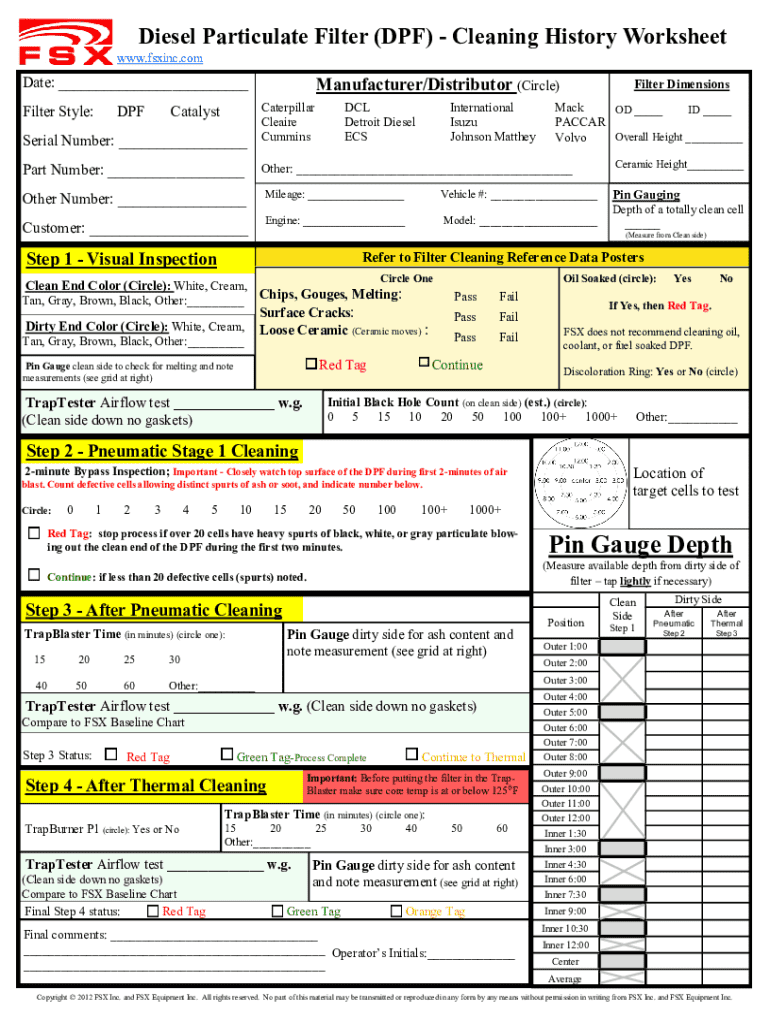
Fsx baseline 2026

Get Form
fsx baseline Preview on Page 1

Here's how it works

01. Edit your fsx baseline online
Type text, add images, blackout confidential details, add comments, highlights and more.
02. Sign it in a few clicks
Draw your signature, type it, upload its image, or use your mobile device as a signature pad.
03. Share your form with others
Send fsx dpf cleaning machine via email, link, or fax. You can also download it, export it or print it out.

How to use or fill out fsx baseline with our platform

Form edit decoration
9.5
Ease of Setup
DocHub User Ratings on G2
9.0
Ease of Use
DocHub User Ratings on G2
  1. Click ‘Get Form’ to open the fsx baseline in the editor.
  2. Begin by entering the date at the top of the form. Next, select the manufacturer/distributor by circling one of the options provided, and fill in the serial number and part number.
  3. Specify the filter style by selecting from DPF, Catalyst, or DCL. Then, input filter dimensions including outer diameter (OD), inner diameter (ID), and overall height.
  4. Fill in vehicle details such as mileage, vehicle number, customer name, engine type, and model. Complete ceramic height and pin gauging measurements as required.
  5. Proceed to Step 1 for visual inspection. Circle colors for clean and dirty ends, note any damages like chips or cracks, and perform airflow tests as instructed.
  6. Continue through Steps 2 to 4 for pneumatic and thermal cleaning processes. Ensure to follow instructions closely for tagging status after each step.

Start using our platform today to streamline your fsx baseline completion!

be ready to get more

Complete this form in 5 minutes or less

Get form

Got questions?

We have answers to the most popular questions from our customers. If you can't find an answer to your question, please contact us.
Contact us

Sure, a typed name is accepted as a valid electronic signature when you create it on your form using a compliant solution like DocHub. Simply add your fsx dpf cleaning machine price to our editor, click Sign in the top tool pane → Create your signature → Type your name in the appropriate tab, and choose how it will appear on your document.

In case your go-to email service is Gmail, you can easily incorporate your DocHub editor into your work. Modify your fsx baseline with DocHub tools and connect it to your drafts in Gmail. See how effortless it is to exchange documents and work together with a swift PDF editing solution at hand.

Yes, DPF cleaning works, and its a highly effective way to restore your vehicles performance and prevent costly DPF replacements. The process removes accumulated soot, allowing exhaust gases to flow freely and reducing engine backpressure.
The Thermal process we recommend starts with a complete inspection/benchmarking and then a quick blowout to remove loose materials. Then bake overnight in the thermal oven to oxidize the soot, followed by a cool-down phase and then pulse cleaning/air to out the remaining ash.
The DPF will clean itself with enough driving.

Security and compliance

At DocHub, your data security is our priority. We follow HIPAA, SOC2, GDPR, and other standards, so you can work on your documents with confidence.

Learn more
ccpa2
pci-dss
gdpr-compliance
hipaa
soc-compliance
be ready to get more

Complete this form in 5 minutes or less

Get form

People also ask

This machine is designed for cleaning particulate filters of any vehicle type (trucks, cars, vans) in order to achieve the DPF regeneration, eliminating 100% of the soot and ash. Intuitive operation with automatic adjustment options through a simple control screen.
The average cost of cleaning, and regeneration of diesel particulate filter is 300, with prices ranging from 160 to 500.
If you clean the DPF yourself, you save yourself a trip to the workshop and can often complete the process within a few hours. This can be particularly advantageous if the vehicle needs to be ready for use again quickly. Many additives work while the vehicle is in motion, which means no additional downtime is required.

Related links