




Here's how it works

01. Edit your child health assessment form online
Type text, add images, blackout confidential details, add comments, highlights and more.

02. Sign it in a few clicks
Draw your signature, type it, upload its image, or use your mobile device as a signature pad.

03. Share your form with others
Send child health assessment form pa via email, link, or fax. You can also download it, export it or print it out.
How to use or fill out child health assessment form with our platform

- Click ‘Get Form’ to open the child health assessment form in the editor.
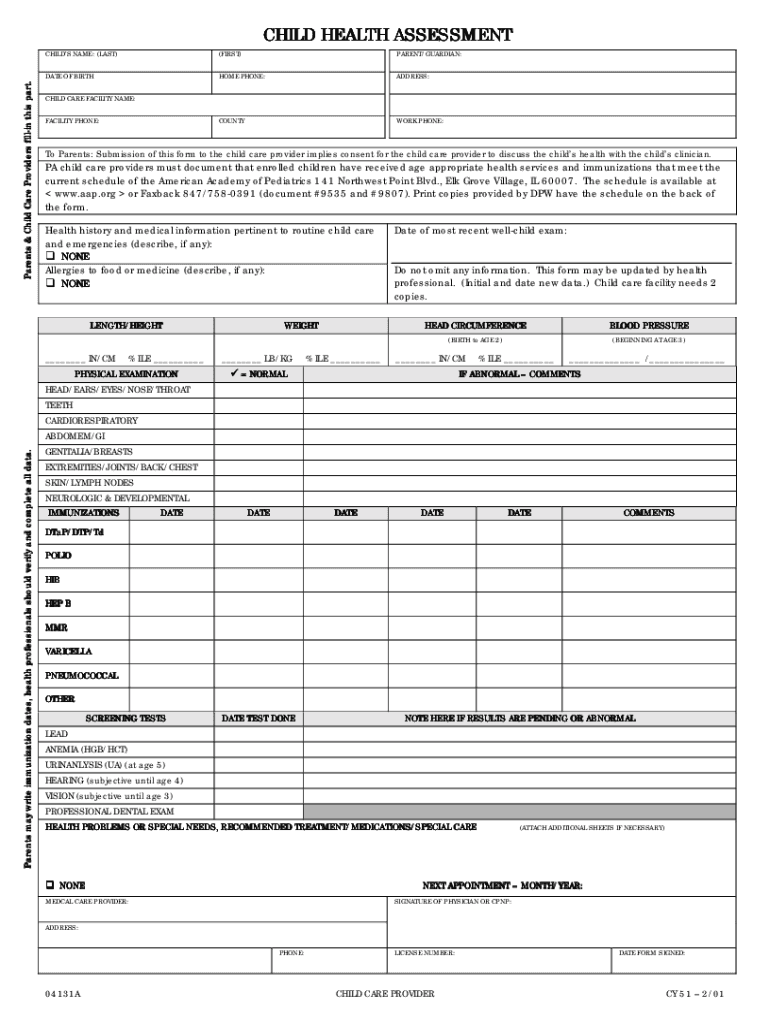
- Begin by entering the child's name, date of birth, and contact information for both parents/guardians. This ensures that all necessary parties are informed about the child's health.
- Fill in the child's care facility details, including the facility name and phone number. This is crucial for communication regarding the child's health status.
- Document any allergies or medical history relevant to routine care and emergencies. If there are none, simply indicate 'NONE' in the provided space.
- Complete the physical examination section by providing measurements such as height, weight, head circumference, and blood pressure. Ensure accuracy as these metrics are vital for assessing growth.
- List immunization dates and any screening tests performed. If results are pending or abnormal, make a note in the comments section.
- Finally, ensure that a healthcare provider signs off on the form and includes their license number before submission.
Start using our platform today to easily fill out your child’s health assessment form online for free!
Fill out child health assessment form online
It's free
It's free
Security and compliance
At DocHub, your data security is our priority. We follow HIPAA, SOC2, GDPR, and other standards, so you can work on your documents with confidence.
Learn more




