




Here's how it works

01. Edit your return slip sample online
Type text, add images, blackout confidential details, add comments, highlights and more.

02. Sign it in a few clicks
Draw your signature, type it, upload its image, or use your mobile device as a signature pad.

03. Share your form with others
Send return slip template via email, link, or fax. You can also download it, export it or print it out.
How to use or fill out return slip sample with our platform

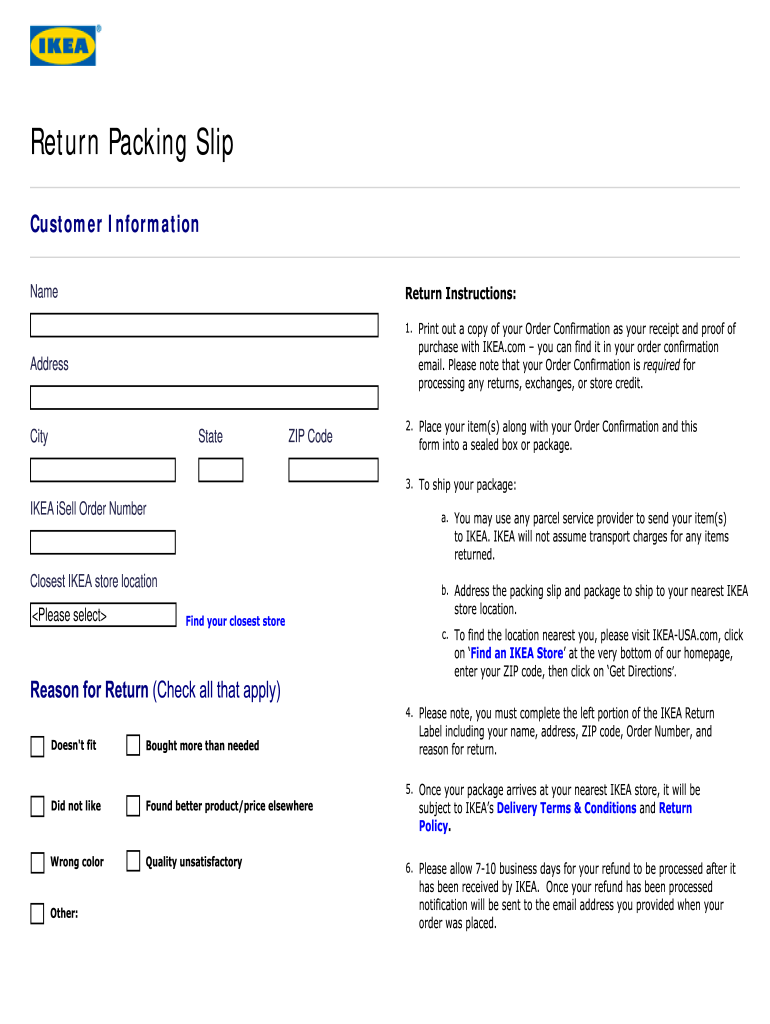
- Click ‘Get Form’ to open the return slip sample in the editor.
- Begin by entering your Customer Information. Fill in your Name, Address, City, State, and ZIP Code accurately to ensure proper processing of your return.
- Locate your IKEA iSell Order Number and input it in the designated field. This number is essential for tracking your return.
- Select the closest IKEA store location from the dropdown menu. This will help direct your package correctly.
- In the Reason for Return section, check all applicable boxes that describe why you are returning the item. This information is crucial for processing your return efficiently.
- Complete the left portion of the IKEA Return Label with your name, address, ZIP code, Order Number, and reason for return before sealing your package.
Start using our platform today to streamline your document editing and form completion for free!
Fill out return slip sample online
It's free
It's free
Security and compliance
At DocHub, your data security is our priority. We follow HIPAA, SOC2, GDPR, and other standards, so you can work on your documents with confidence.
Learn more




