




Here's how it works

01. Edit your national commission for certifying agencies ncca online
Type text, add images, blackout confidential details, add comments, highlights and more.

02. Sign it in a few clicks
Draw your signature, type it, upload its image, or use your mobile device as a signature pad.

03. Share your form with others
Send ncca accredited certification list via email, link, or fax. You can also download it, export it or print it out.
How to use or fill out National certification career association - NCCA Certifications with our platform

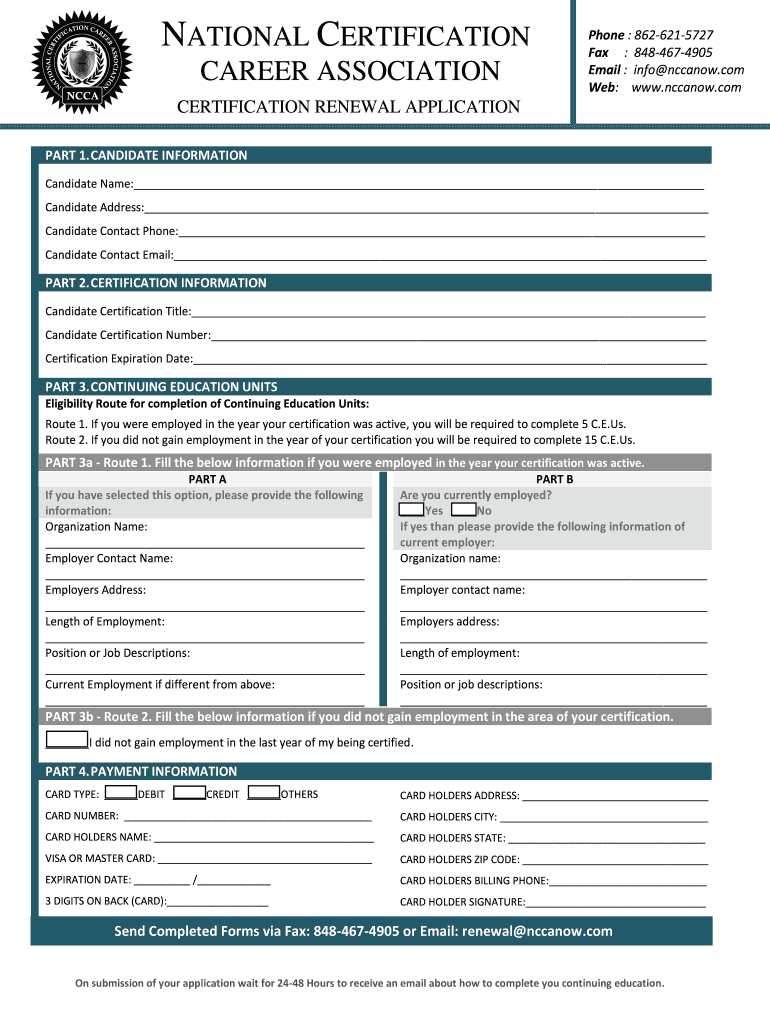
- Click ‘Get Form’ to open the National Certification Career Association - NCCA Certifications application in the editor.
- Begin with Part 1: Candidate Information. Fill in your name, address, contact phone, and email accurately to ensure proper communication.
- Move to Part 2: Certification Information. Enter your certification title, number, and expiration date as these details are crucial for processing your renewal.
- In Part 3: Continuing Education Units, select your eligibility route. If employed during your certification year, complete Route 1; otherwise, proceed with Route 2.
- For Route 1, provide detailed information about your previous employer and current employment if applicable. Ensure all fields are filled out completely.
- If you chose Route 2, simply indicate that you did not gain employment in the last year of certification.
- Complete Part 4: Payment Information by entering your card type and details carefully to avoid any payment issues.
- Review all sections for accuracy before submitting. Once satisfied, send the completed form via fax or email as instructed.
Start using our platform today to streamline your NCCA Certifications application process for free!
Fill out National certification career association - NCCA Certifications online
It's free
It's free
Security and compliance
At DocHub, your data security is our priority. We follow HIPAA, SOC2, GDPR, and other standards, so you can work on your documents with confidence.
Learn more




