01. Edit your form online
Type text, add images, blackout confidential details, add comments, highlights and more.

Type text, add images, blackout confidential details, add comments, highlights and more.

Draw your signature, type it, upload its image, or use your mobile device as a signature pad.

Send it via email, link, or fax. You can also download it, export it or print it out.
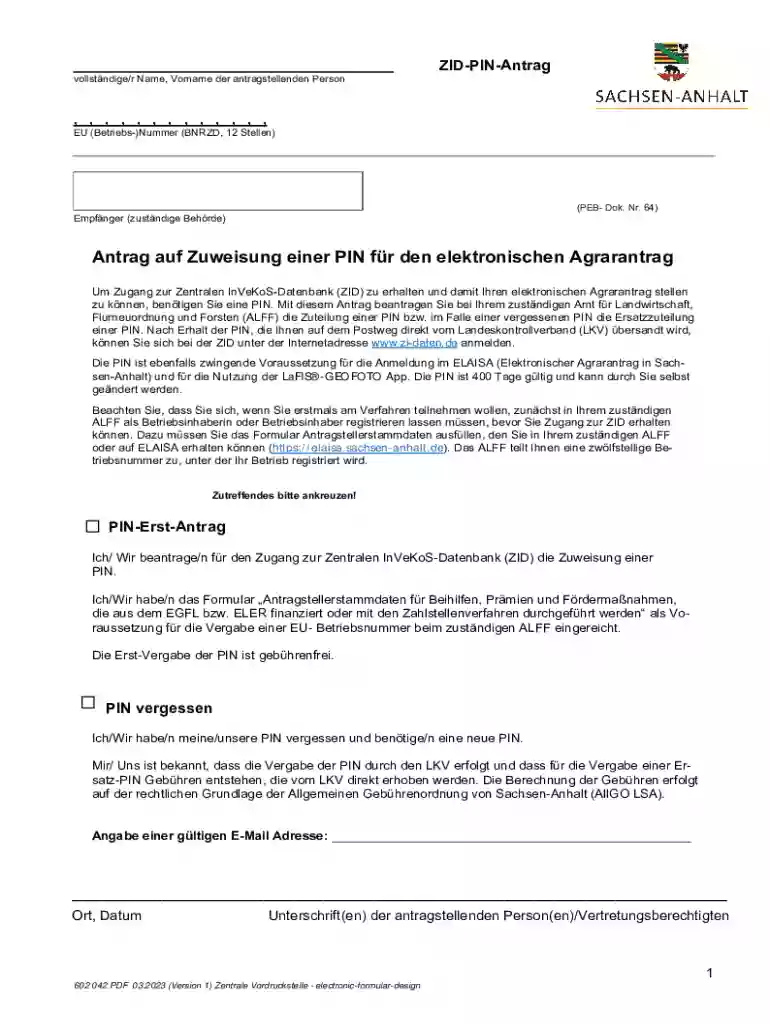
The "Zid-pin-antrag" is a specific fillable PDF form designed for accessing the Central InVeKoS Database (ZID), which is an essential tool for managing electronic agricultural applications. The form is primarily used to apply for a PIN needed to gain access to this database, serving as a gateway for farmers and agricultural professionals to interact with digital platforms related to agricultural management.
The Zid-pin-antrag form involves several specific steps and best practices to ensure proper completion and submission.
Download the Form: Access the form through the appropriate agricultural authority's website and download it to your device.
Open with Adobe Reader: Ensure you use the latest version of Adobe Reader to fill out the form, preventing potential compatibility issues.
Complete Required Sections: Fill out all necessary fields, including personal information and identification details, required for the PIN application.
Save and Review: Before submission, save the form locally and review all entries to ensure their correctness and completeness.
Submit the Form: Follow the submission guidelines, which may include sending the form via mail or submitting it in person at a local authority office.
Completing the Zid-pin-antrag form efficiently requires attention to detail and adherence to specified guidelines.
Personal Information: Carefully input your full name, address, and other identification details as requested.
PIN Request: Specify whether you are applying for a new PIN or replacing an existing one. Include any supporting documentation if replacing a forgotten PIN.
Registration with ALFF: Ensure you are registered with your local agricultural authority (ALFF), as this is often a prerequisite for processing the Zid-pin-antrag.
Fee Payment: If applicable, ensure any fees for replacement PINs are included with the submission.
Gathering and preparing all necessary documents is crucial for a successful Zid-pin-antrag submission.
The Zid-pin-antrag is primarily used by professionals and entities within the agricultural sector.


Applying for the Zid-pin-antrag requires meeting specific eligibility requirements.

Ensuring compatibility with the right software tools is essential for using the Zid-pin-antrag effectively.
Understanding the legal implications of using the Zid-pin-antrag is paramount.
By adhering to these detailed guidelines, users can efficiently complete and submit the Zid-pin-antrag, ensuring they meet all requirements for accessing the Central InVeKoS Database.
At DocHub, your data security is our priority. We follow HIPAA, SOC2, GDPR, and other standards, so you can work on your documents with confidence.