




Here's how it works



How to use or fill out panera bread printable menu pdf with our platform

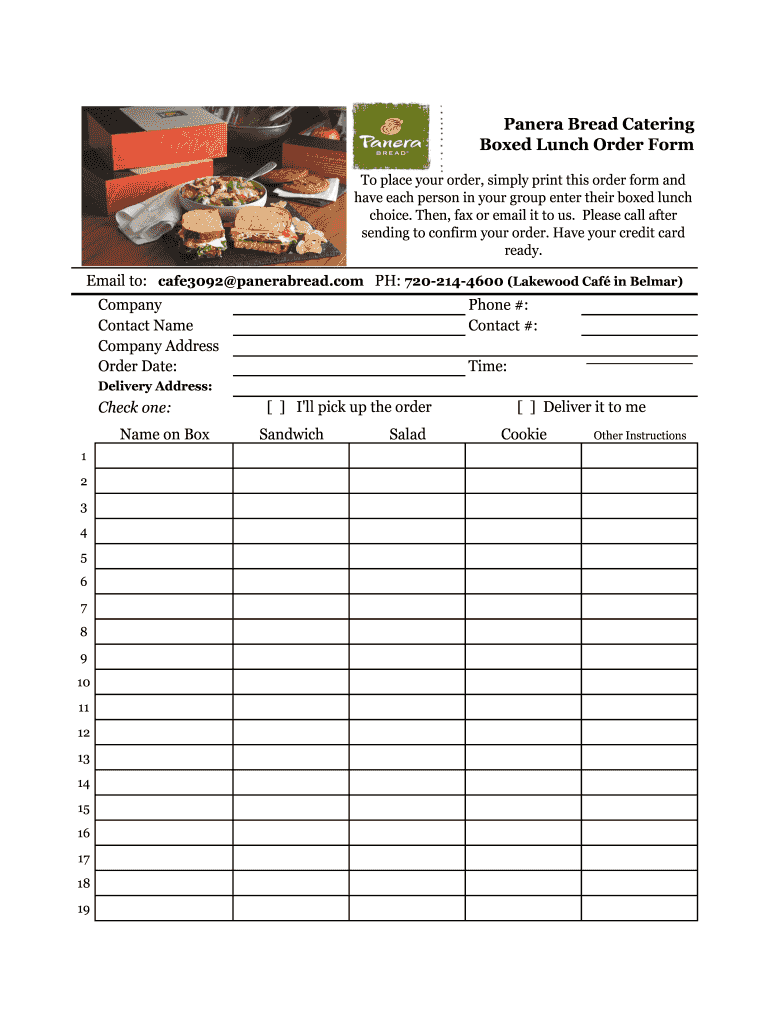
- Click ‘Get Form’ to open the Panera Bread Boxed Lunch Order Form in the editor.
- Begin by entering your company name and contact details in the designated fields. This ensures that Panera can reach you regarding your order.
- Fill in the order date and your phone number for confirmation purposes. Make sure to provide a delivery address if you choose delivery.
- Select whether you will pick up the order or require delivery by checking the appropriate box.
- Instruct each person in your group to indicate their boxed lunch choice by writing their name next to their selection from the menu options provided.
- Add any additional instructions in the 'Other Instructions' section, ensuring clarity for your order.
- Once completed, save your form and either fax or email it to Panera Bread at cafe3092@panerabread.com. Don't forget to call to confirm your order!
Start using our platform today for free and streamline your ordering process effortlessly!
It's free
Got questions?
Can I draw my eSignature to sign my panera menu pdf with prices?
Of course, electronically drawing your signature is appropriate, but only if you use a tool that complies with industry laws and regulations. Try DocHub, which ensures eSignature validity under ESIGN and UETA requirements. All you need to approve your panera menu pdf with prices electronically is an account with DocHub and an internet connection. When you open your document in our editor, click Sign and choose the Draw option.
How do you get panera lunch menu with prices pdf for my state?
If you are looking for a state-specific panera lunch menu with prices pdf sample, you will find it in our DocHub Forms & Templates catalog. Use the search field, enter your form’s name, and search through the results for your state. You can also filter out irrelevant results while searching our catalog by groups.
Do Panera sandwiches come with pickles?
Does Panera still give a free pastry on your birthday?
Why did Panera Bread change?
Security and compliance
At DocHub, your data security is our priority. We follow HIPAA, SOC2, GDPR, and other standards, so you can work on your documents with confidence.
Learn more




