






Definition and Purpose
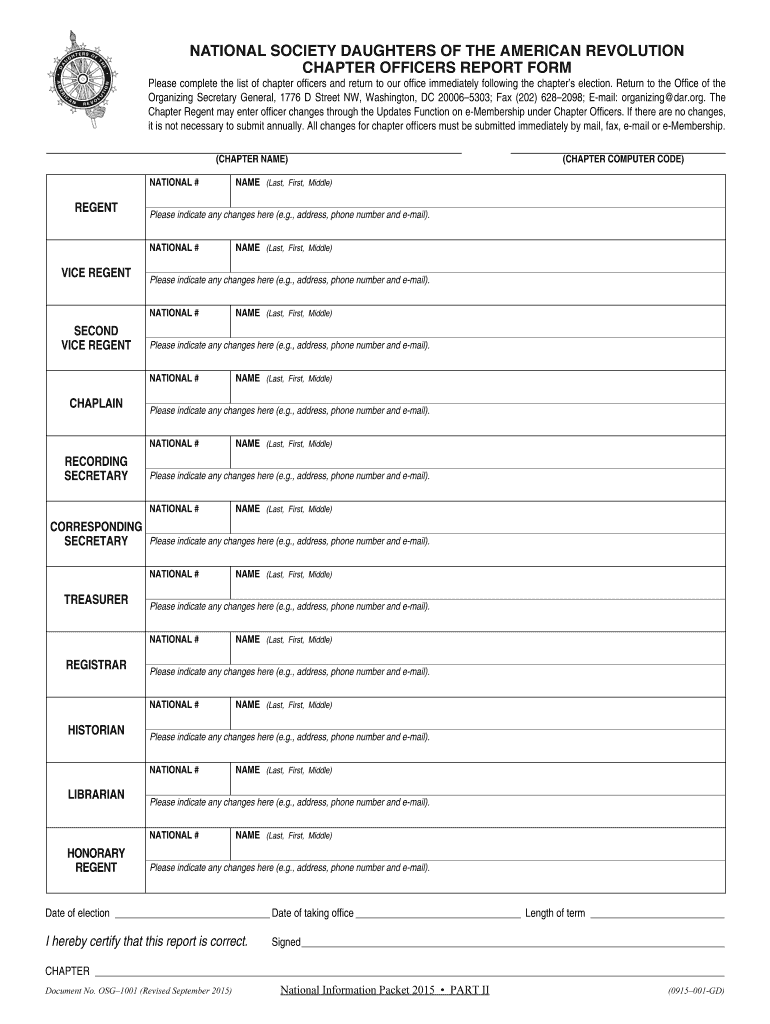
The Chapter Officers Report Form is a structured document primarily designed for chapter officers of the National Society Daughters of the American Revolution (NSDAR). It serves the critical function of reporting detailed officer information following elections. This form captures essential details for each officer position, facilitating accurate record-keeping and compliance with organizational protocols. Primarily, it ensures transparency and effective communication within the society by keeping track of leadership changes.
How to Use the Chapter Officers Report Form
Successfully navigating this form involves several essential steps. Understanding its layout and sections is crucial for accurate completion. Here's a step-by-step guide on using the form:
- Gather Information: Collect all necessary data for each officer position, including contact information, position title, and date of election.
- Fill Out Officer Details: Enter the officer's full name, position title, and contact details in the relevant sections.
- Review Requirements: Double-check for any additional information, such as name changes or additional roles held.
- Complete and Sign: Ensure that required fields are completed accurately, and sign where necessary.
- Submit the Form: Choose an appropriate submission method—online, mail, or in-person—based on the society’s guidelines.
Steps to Complete the Chapter Officers Report Form
Completing this form accurately is pivotal for its effective use. Below is a detailed guide on the completion process:
- Download or Obtain the Form: Access the form via the society's official website or request a physical copy through their administrative office.
- Prepare Necessary Information: Assemble all officer data before beginning to fill out the form.
- Follow the Layout: Start from the top, filling in general chapter information followed by individual officer details.
- Check Mandatory Fields: Identify fields that must be filled in for the form to be valid.
- Verification: Ensure that all information entered is accurate and up-to-date.
- Approval: Obtain necessary approvals or signatures from authorized chapter representatives.
Important Terms and Components
Understanding certain terms and components is crucial for accurately completing the form. Key terms and elements include:
- Officer Position: The role or title within the chapter (e.g., President, Secretary).
- Contact Information: Includes email addresses, phone numbers, and mailing addresses.
- Election Date: The specific date when the officer assumed their current role.
- Submission Deadline: The final date by which the form must be received by the society’s central office.
Form Submission Methods: Online, Mail, and In-Person
The form offers several submission options to accommodate various preferences and capabilities. Here’s a breakdown:
- Online: Submit electronically via the official society portal. This method is often preferred due to its convenience and speed.
- Mail: Send a physical copy to the society's designated mailing address. Ensure it is postmarked by the deadline.
- In-Person: Deliver directly to the society's administrative office, ensuring receipt confirmation.
Legal Use and Compliance
Utilizing the Chapter Officers Report Form in adherence to legal and societal guidelines is essential. Compliance ensures that the society maintains accurate and legally sound records. Non-compliance can lead to penalties or administrative issues, so following the prescribed procedures and deadlines is critical.
Filing Deadlines and Important Dates
Deadlines are critical to ensure prompt updates and record accuracy within the society:
- Initial Submission: Forms should be submitted within a specified timeframe following elections—usually within 30 days.
- Annual Updates: Any changes to officer positions or details might require an update to be submitted annually.
- Special Circumstances: In cases of interim elections or special appointments, adhere to special deadlines specified by the society.
Who Typically Uses the Form
This form is predominantly utilized by:
- Current and Incoming Officers: Those elected to hold chapter officer positions.
- Chapter Administration: Responsible for maintaining current and accurate chapter records.
- Society Officials: Utilize the forms to update central records and facilitate communication.
Understanding these blocks' intricacies ensures the form is utilized effectively, maintaining organizational efficiency and legal compliance.