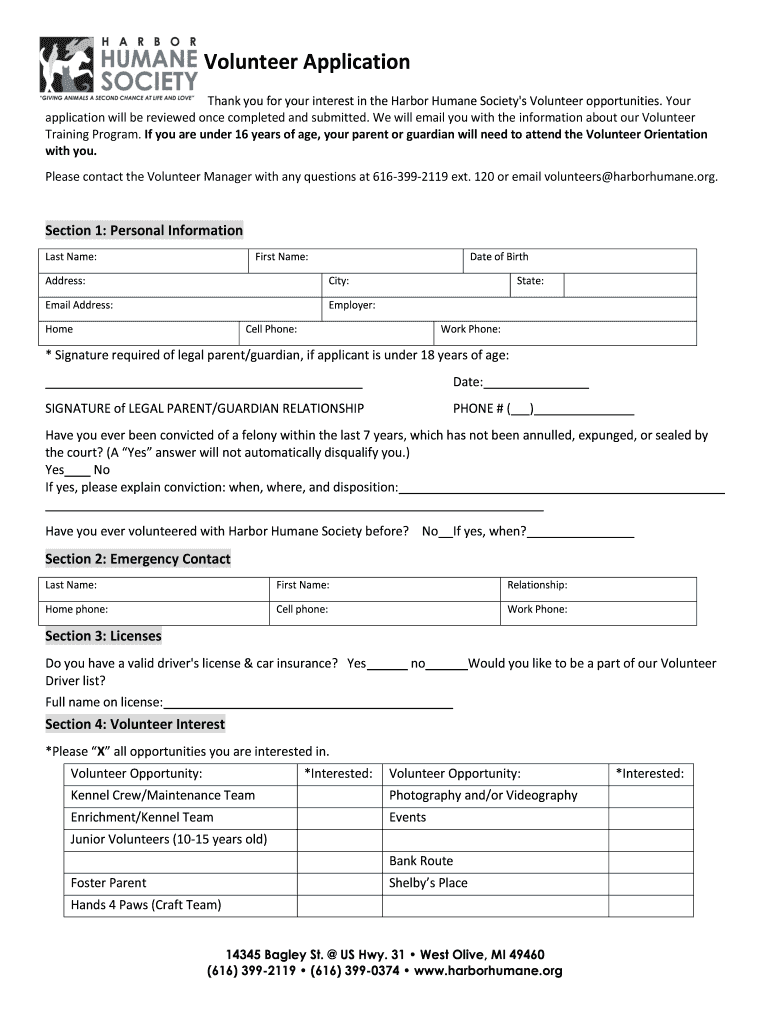
Harbor humane 2026

Get Form
harbor humane Preview on Page 1

Here's how it works

01. Edit your form online
Type text, add images, blackout confidential details, add comments, highlights and more.
02. Sign it in a few clicks
Draw your signature, type it, upload its image, or use your mobile device as a signature pad.
03. Share your form with others
Send it via email, link, or fax. You can also download it, export it or print it out.

How to use or fill out harbor humane with our platform

Form edit decoration
9.5
Ease of Setup
DocHub User Ratings on G2
9.0
Ease of Use
DocHub User Ratings on G2
  1. Click ‘Get Form’ to open the Volunteer Application in the editor.
  2. Begin by filling out Section 1: Personal Information. Enter your last name, first name, date of birth, address, city, state, email address, and phone numbers. If you are under 18, ensure a parent or guardian signs where indicated.
  3. Proceed to Section 2: Emergency Contact. Provide the contact details of someone who can be reached in case of an emergency.
  4. In Section 3: Licenses, indicate whether you have a valid driver's license and car insurance. Fill in your full name as it appears on the license if applicable.
  5. Move to Section 4: Volunteer Interest. Mark all volunteer opportunities you are interested in by placing an 'X' next to each option.
  6. Complete Section 5: Volunteer Shirt or Sweaters by selecting your desired sizes and quantities for T-shirts and sweatshirts.
  7. Finally, review all sections for accuracy before signing the Volunteer Waiver and Unconditional Release at the end of the form.

Start filling out your Volunteer Application today for free using our platform!

be ready to get more

Complete this form in 5 minutes or less

Get form

Got questions?

We have answers to the most popular questions from our customers. If you can't find an answer to your question, please contact us.
Contact us

Yes, electronically drawing your signature is acceptable, but only if you utilize a tool that complies with industry regulations and policies. Try DocHub, which guarantees eSignature validity under ESIGN and UETA requirements. All you need to eSign your harbor humane is an account with DocHub and an internet connection. When you open your document in our editor, click Sign and select the Draw tool.

You may easily fill out, modify, and even eSign your harbor humane utilizing DocHub. Create a new account and start your free trial. After that, you may add the file with the form and simply make all the necessary edits. No need to print on paper or use a third-party application to sign it, as you can put your electronic signature on your document faster via DocHub.

Security and compliance

At DocHub, your data security is our priority. We follow HIPAA, SOC2, GDPR, and other standards, so you can work on your documents with confidence.

Learn more
ccpa2
pci-dss
gdpr-compliance
hipaa
soc-compliance
be ready to get more

Complete this form in 5 minutes or less

Get form