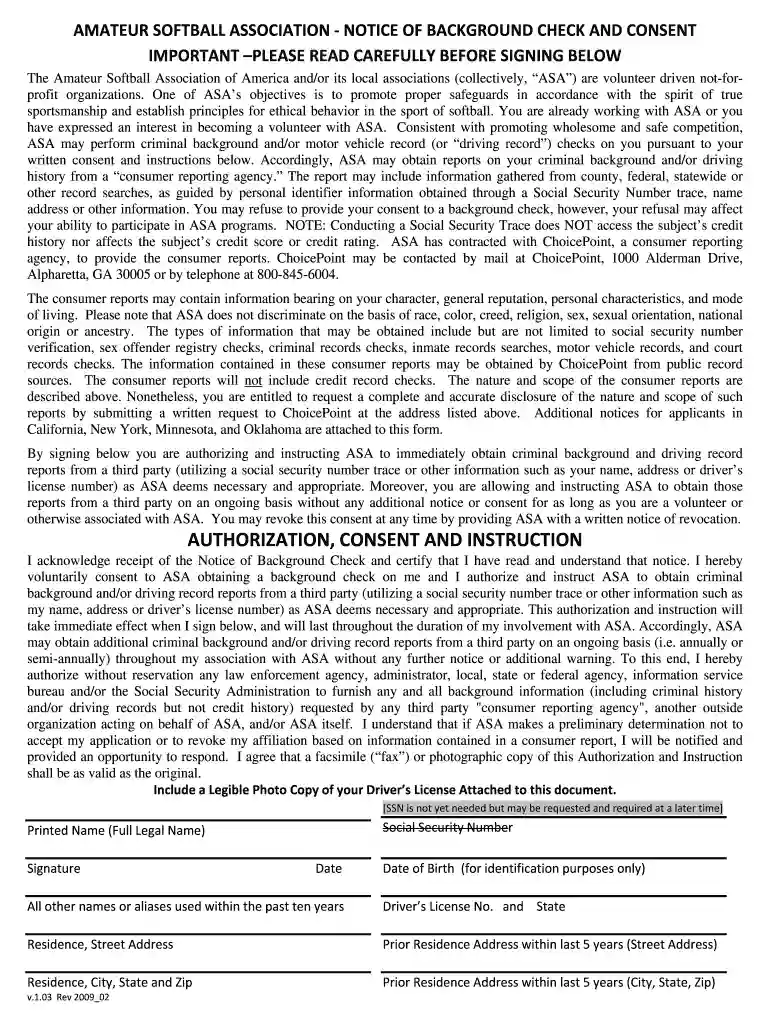
usa softball background check Preview on Page 1

Usa softball background check release form 2026

Here's how it works

  • 01. Edit your usa softball background check online

    Type text, add images, blackout confidential details, add comments, highlights and more.

  • 02. Sign it in a few clicks

    Draw your signature, type it, upload its image, or use your mobile device as a signature pad.

  • 03. Share your form with others

    Send asa background check via email, link, or fax. You can also download it, export it or print it out.

How to use or fill out usa softball background check release form with our platform

Form edit decoration
9.5
Ease of Setup
DocHub User Ratings on G2
9.0
Ease of Use
DocHub User Ratings on G2
  1. Click ‘Get Form’ to open the usa softball background check release form in the editor.
  2. Begin by reading the important notice carefully. This section outlines the purpose of the background check and your rights regarding consent.
  3. In the 'Authorization, Consent and Instruction' section, acknowledge receipt of the notice by checking the box and signing your name. This indicates your voluntary consent for ASA to conduct a background check.
  4. Fill in your personal information, including your full legal name, date of birth, and driver's license number. Ensure that all details are accurate for identification purposes.
  5. Provide your current residence address and any prior addresses from the last five years. This information is crucial for conducting thorough background checks.
  6. If applicable, indicate if you would like a copy of your background check information by checking the appropriate box and providing an address for correspondence.
  7. Finally, review all entered information for accuracy before submitting. Once satisfied, click ‘Submit’ to complete the process.

Start using our platform today to easily fill out your usa softball background check release form online for free!

be ready to get more

Complete this form in 5 minutes or less

Got questions?

We have answers to the most popular questions from our customers. If you can't find an answer to your question, please contact us.

Purpose: This document serves as a formal authorization for employers to perform background checks on an individual being considered for employment. The information obtained through these checks will be used solely for employment-related decisions and in accordance with applicable laws.
Completing the Form: The candidate fills out the form with their personal information, including name, address, date of birth, and other relevant details. They must also check the boxes indicating the types of background checks they consent to (e.g., criminal, credit, employment history).
Your background check status will be updated on your RegisterUSASoftball.com HomePlate. Most background checks will take 3-5 business days but can take up to 10 business days to complete. New: USA Softball only issues electronic ID cards.
Release. Before doing a background investigation, an employer or the background screening company must obtain a signed release from the applicant. The release form includes information such as applicant name, date of birth, social security number, address, educational history, employment history, and more.
A release is an agreement not to sue; it waives your right to sue and company and releases your employer from legal liability for claims you may have against it. A release may be as broad or as narrow as the parties agree to make it.

Security and compliance

At DocHub, your data security is our priority. We follow HIPAA, SOC2, GDPR, and other standards, so you can work on your documents with confidence.

People also ask

A background check authorization form is a release given to allow someone else to perform credit and criminal background checks. A person who is agreeing to have their information looked up must provide consent to the requesting party.

Related links

Background Checks - Mansfield Township

The cost of the background check is $13 and can be paid via credit card on the website during the process.Read more

Learn more
USA Campus Recreation and Wellness Policies and

Group photos, facility photos with participants in the background, and other photos that do not focus on one individual are allowed. ○ A photo release form mustRead more

Learn more
If you believe that this page should be taken down, please follow our DMCA take down process here