Nwmls forms 2026

Get Form
nwmls login Preview on Page 1

Here's how it works

01. Edit your nwmls login online
Type text, add images, blackout confidential details, add comments, highlights and more.
02. Sign it in a few clicks
Draw your signature, type it, upload its image, or use your mobile device as a signature pad.
03. Share your form with others
Send northwest mls forms via email, link, or fax. You can also download it, export it or print it out.

How to use or fill out nwmls forms with our platform

Form edit decoration
9.5
Ease of Setup
DocHub User Ratings on G2
9.0
Ease of Use
DocHub User Ratings on G2
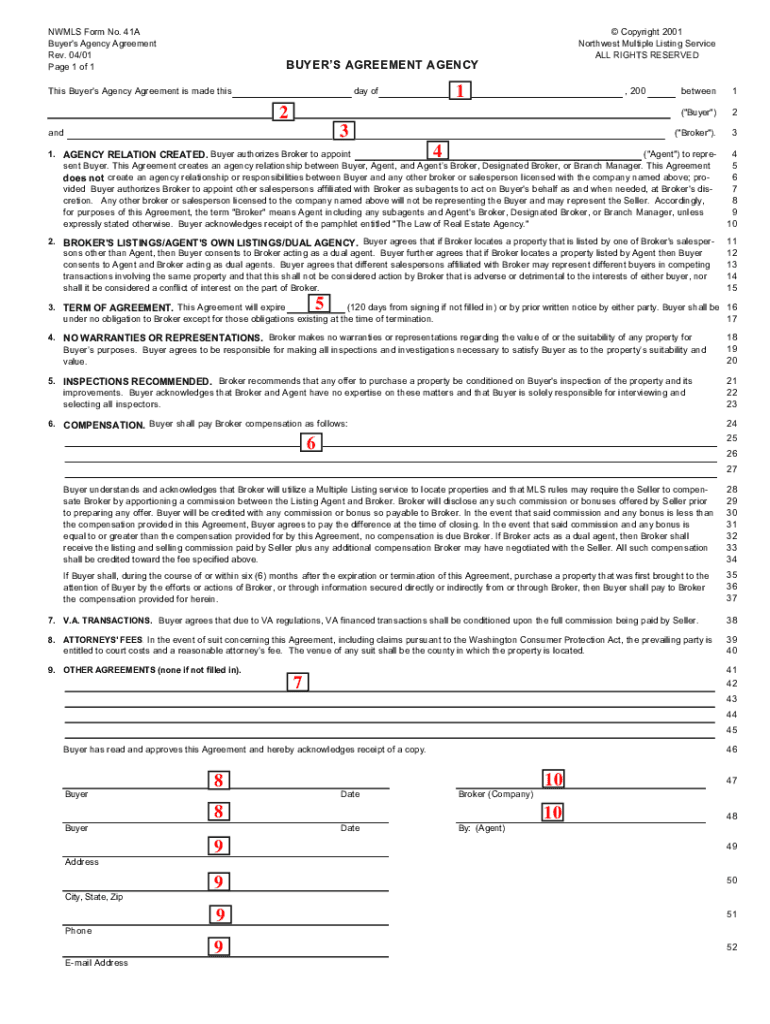
  1. Click ‘Get Form’ to open the Buyer Agency Agreement in the editor.
  2. Fill in the date of the agreement at the top of the form. This date will be used to calculate the term of your agreement.
  3. Insert the Buyer’s full name. If there are multiple buyers, include all names for clarity.
  4. Enter the name of your real estate company as licensed, ensuring accuracy for legal purposes.
  5. Provide your name as the agent who will be representing the buyer throughout this process.
  6. Specify the expiration date of this agreement in the designated field, noting any tail provisions regarding commission.
  7. Detail your compensation arrangement with the buyer in the compensation section.
  8. If applicable, include any other agreements you have with the buyer in that section.
  9. Ensure that both you and the buyer sign and date where indicated to make this agreement legally binding.
  10. Finally, fill in contact details for both parties, including addresses and phone numbers for effective communication.

Start using our platform today to streamline your nwmls forms completion for free!

be ready to get more

Complete this form in 5 minutes or less

Get form

Got questions?

We have answers to the most popular questions from our customers. If you can't find an answer to your question, please contact us.
Contact us

Upload your northwest multiple listing service forms to DocHub (once you’ve set up an account for this). If you need to complete fields in it, use proper tools from the top pane. For example, drop Signature Fields, assign each to a particular party, and click on Sign → Request signatures from others. Personalize your message for your recipients and click Send Request. You can also send your form by fax or as a Signing link instead of using email (you’ll find these options by navigating to the Menu → Send)

You may get and edit your nw mls forms online by using DocHub. Its simple yet feature-rich design enables you to begin effective work right after you register your account. Create your account and add your file, then our interface will guide you via our stress-free form completion experience.

Security and compliance

At DocHub, your data security is our priority. We follow HIPAA, SOC2, GDPR, and other standards, so you can work on your documents with confidence.

Learn more
ccpa2
pci-dss
gdpr-compliance
hipaa
soc-compliance