Treadmill log spreadsheet 2026

Get Form
treadmill log spreadsheet Preview on Page 1

Here's how it works

01. Edit your treadmill log spreadsheet online
Type text, add images, blackout confidential details, add comments, highlights and more.

02. Sign it in a few clicks
Draw your signature, type it, upload its image, or use your mobile device as a signature pad.

03. Share your form with others
Send treadmill log spreadsheet via email, link, or fax. You can also download it, export it or print it out.

Definition and Meaning of Treadmill Log Spreadsheet

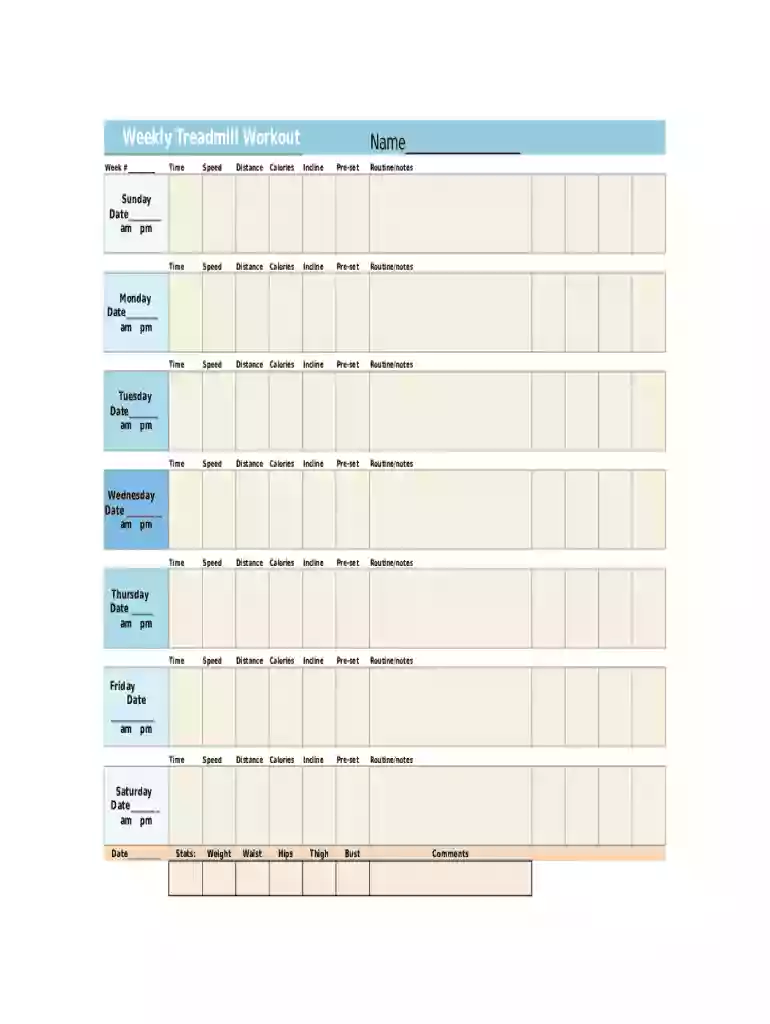
The treadmill log spreadsheet is a specialized tool designed to assist individuals in accurately tracking their treadmill workouts. It functions as a digital record-keeping form, enabling users to document essential fitness metrics. This includes information such as workout time, speed, distance covered, calories burned, and incline levels for each day of the week. By methodically recording these data points, users can monitor their progress and adjust their fitness regimen to achieve desired outcomes.

Key Elements of the Treadmill Log Spreadsheet

A treadmill log spreadsheet is comprehensive, encompassing various components that facilitate detailed monitoring of workout routines. Key elements include:

  • Personal Information Section: Captures basic details such as name and date to personalize the log.
  • Daily Workout Details: Allows users to log specifics of each workout, including the date, duration, speed, distance, and incline.
  • Calories Burned: Tracks the number of calories expended during each workout session.
  • Body Measurements: Provides optional fields to record body metrics such as weight and BMI, offering insights into physical improvements over time.
  • Notes Section: Offers a space for additional comments or observations about the workout, such as how the user felt or any adjustments made.

How to Use the Treadmill Log Spreadsheet

To maximize the effectiveness of a treadmill log spreadsheet, it's important to use it consistently and accurately. Here’s how:

  1. Record Personal Information: Start by entering your name and the week or date to ensure proper identification of the log.
  2. Log Daily Workouts: After each treadmill workout, fill in the details like time, distance, speed, calories burned, and incline directly into the spreadsheet.
  3. Update Body Measurements: Regularly update your body metrics to track physical progress over time.
  4. Add Notes: Use the notes section to jot down any specifics about the workout experience that could help inform future sessions.

Steps to Complete the Treadmill Log Spreadsheet

Completing a treadmill log spreadsheet involves a systematic approach to ensure no details are overlooked:

  1. Prepare the Spreadsheet: Open the document and familiarize yourself with its layout.
  2. Input Data Regularly: Make it a habit to update the spreadsheet immediately following each treadmill session.
  3. Consistent Updates: Dedicate time each week, perhaps on the same day, to review the entries and update long-term tracking sections like body measurements.
  4. Review Progress: Use the compiled data periodically to assess progress, identify trends, or make necessary adjustments to workout intensity or focus.

Who Typically Uses the Treadmill Log Spreadsheet

The treadmill log spreadsheet is versatile and can be utilized by a variety of users, including:

  • Fitness Enthusiasts: Those committed to maintaining or improving their fitness levels.
  • Athletes: Individuals who need to keep detailed records of their training sessions for performance analysis.
  • Personal Trainers: Professionals who use the spreadsheet to track clients' progress and tailor their workout programs accordingly.
  • Health Professionals: Practitioners monitoring patients' physical activities as part of a broader health management plan.
decoration image ratings of Dochub

How to Obtain the Treadmill Log Spreadsheet

Acquiring a treadmill log spreadsheet is a straightforward process:

  1. Download from Online Sources: Many websites offer free downloadable templates tailored for different fitness needs.
  2. Create Custom Spreadsheets: Use applications like MS Excel or Google Sheets to design a personalized log if specific features are required.
  3. Consult with Fitness Apps: Some digital fitness applications incorporate spreadsheet functionality to sync directly with workout data, providing a seamless data collection experience.

Examples of Using the Treadmill Log Spreadsheet

Real-world use cases of the treadmill log spreadsheet underscore its practical benefits:

  • Weight Loss Tracking: Individuals aiming to lose weight can use the log to correlate treadmill workouts with weight loss progress.
  • Endurance Building: For those training for marathons, the spreadsheet helps track incremental distance and pace improvements.
  • Rehabilitation Programs: Patients recovering from injuries utilize the log to safely monitor the increase in their physical activity over time.

Digital vs. Paper Version

The choice between digital and paper versions of the treadmill log spreadsheet depends on user preference and convenience:

  • Digital Version: Offers ease of use, automatic calculations, and the capability to store data in multiple devices or cloud services for easy access.
  • Paper Version: Certain users may prefer a tangible document for recording, allowing them to quickly jot down details without the need for electronic devices.

Software Compatibility and Integration

For users who prefer automated tools, treadmill log spreadsheets can integrate with various software platforms:

  • Fitness Apps: Many workout apps offer compatibility options where data can be directly imported into spreadsheets.
  • Data Management Software: Tools like Microsoft Excel, Google Sheets, and Apple Numbers provide templates or the ability to customize the treadmill log to suit individual needs.
  • Cloud Storage Services: Services like Google Drive and Dropbox facilitate easy sharing and access across different devices.

The treadmill log spreadsheet is a vital resource for those looking to improve their fitness routine through accurate tracking and analysis, supporting informed decision-making and personalized workout optimization.

be ready to get more

Complete this form in 5 minutes or less

Get form

Security and compliance

At DocHub, your data security is our priority. We follow HIPAA, SOC2, GDPR, and other standards, so you can work on your documents with confidence.
Learn more
ccpa2
pci-dss
gdpr-compliance
hipaa
soc-compliance
be ready to get more

Complete this form in 5 minutes or less

Get form