




01. Edit your form online
Type text, add images, blackout confidential details, add comments, highlights and more.

Type text, add images, blackout confidential details, add comments, highlights and more.

Draw your signature, type it, upload its image, or use your mobile device as a signature pad.

Send it via email, link, or fax. You can also download it, export it or print it out.
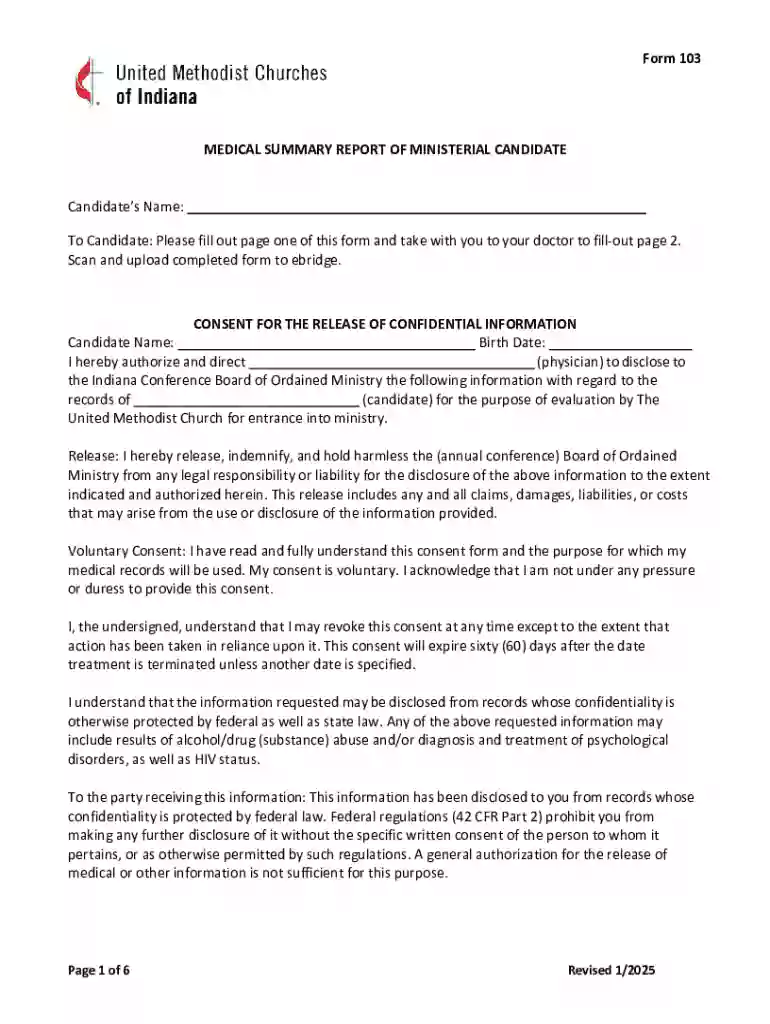
Form 103, known as the Medical Summary Report, is a crucial document for candidates seeking ministry within The United Methodist Church. This form serves as a comprehensive health assessment tool, capturing essential medical information about a candidate. The primary aim is to verify the candidate's physical fitness and overall health readiness for ministry. A physician's evaluation is included in the form, designed to ensure that candidates meet the health standards necessary for their intended roles. Understanding the purpose and structure of Form 103 allows candidates and their medical practitioners to accurately fulfill its requirements, which aids in a smooth application process for ministry roles.
Effectively completing Form 103 involves several steps that candidates and their chosen healthcare providers must understand. Initially, the candidate must authorize the release of personal medical information to the Indiana Conference Board of Ordained Ministry. This step is crucial, as it ensures the board has access to necessary health details. The form guides the physician on which health evaluations to conduct, based on U.S. Preventive Services Task Force recommendations. Candidates should ensure all sections are thoroughly completed to avoid delays in the application process. Adhering to these steps ensures the candidate's health status is accurately and comprehensively recorded, aligning with church requirements.
Acquiring Form 103 is a straightforward process, typically coordinated through The United Methodist Church's administrative offices or the designated online portal for ministry candidates. Candidates may directly request the form from the Indiana Conference Board of Ordained Ministry or access it via the church's official website. Additionally, contacting relevant church authorities ensures candidates receive the most up-to-date version of Form 103. Understanding the acquisition process is vital, as it begins the formal procedure of assessing a candidate's readiness for ministry roles.
Completing Form 103 involves a detailed process that requires both the candidate's input and a healthcare professional's assessment. Initially, candidates must fill out their personal information and consent sections. Subsequently, a physician will perform a comprehensive health evaluation and fill out the medical assessment portion of the form. This process involves various health checks and screenings as guided by established medical recommendations. Attention to detail is crucial, as any incomplete sections could result in delays or the need for further documentation. Following a structured approach to completing Form 103 ensures all necessary information is accurately captured and submitted for review.
Form 103 comprises several vital sections that must be completed to fulfill its requirements. These include the candidate's personal information, authorization for medical information release, and physician's health assessment. The health evaluation section must cover a range of health indicators and screenings, as specified by the form’s guidelines. Each component of the form plays a specific role in assessing the candidate's health readiness for ministry. By thoroughly addressing each element, candidates and their physicians provide a clear, comprehensive picture of the health status necessary for ministry qualifications.
Form 103 is predominantly used by candidates seeking ministry roles within The United Methodist Church. The form is specifically designed for individuals pursuing ordination or other significant positions within the church. Furthermore, it serves as a critical document for church committees responsible for assessing candidate eligibility based on health qualifications. Understanding the form's audience ensures that all involved parties are adequately prepared to meet the requirements set forth by the church’s governing bodies.
The legal and ethical use of Form 103 is paramount, given the sensitive nature of medical information involved. Candidates must provide voluntary consent for their medical data's release, ensuring compliance with privacy regulations. Physicians completing the form must adhere to ethical guidelines, conducting evaluations impartially and thoroughly. This adherence ensures that both candidates and evaluators maintain the integrity of the application process. By following legal and ethical considerations, all parties involved uphold the credibility and trust required in evaluating candidates for ministry roles.
Submitting Form 103 requires candidates to prepare several supporting documents that accompany their medical assessment. These may include identification documents, previous medical records, and any additional health evaluations deemed necessary by the physician. The comprehensive collation of these documents ensures that the form presents a complete and accurate record of the candidate's health status. Ensuring all required documentation is gathered and submitted alongside Form 103 prevents processing delays and re-evaluation requests.
We've got more versions of the Form 103 form. Select the right Form 103 version from the list and start editing it straight away!
At DocHub, your data security is our priority. We follow HIPAA, SOC2, GDPR, and other standards, so you can work on your documents with confidence.

Office of Academic Affairs Comments Form, Rev. 08/19. Form 103. 1. Comments Form. Candidate Name to respond to the:.Read more
Jan 1, 2026 NOTE: You must use Form 103 Long if: a. You are a manufacturer or processor; b. Your business personal property assessment is $150,000 or moreRead more


