Type text, add images, blackout confidential details, add comments, highlights and more.
02. Sign it in a few clicks
Draw your signature, type it, upload its image, or use your mobile device as a signature pad.
03. Share your form with others
Send sss e4 sample via email, link, or fax. You can also download it, export it or print it out.
How to use or fill out e4 form with our platform
Ease of Setup
DocHub User Ratings on G2
Ease of Use
DocHub User Ratings on G2
Click ‘Get Form’ to open the e4 form in the editor.
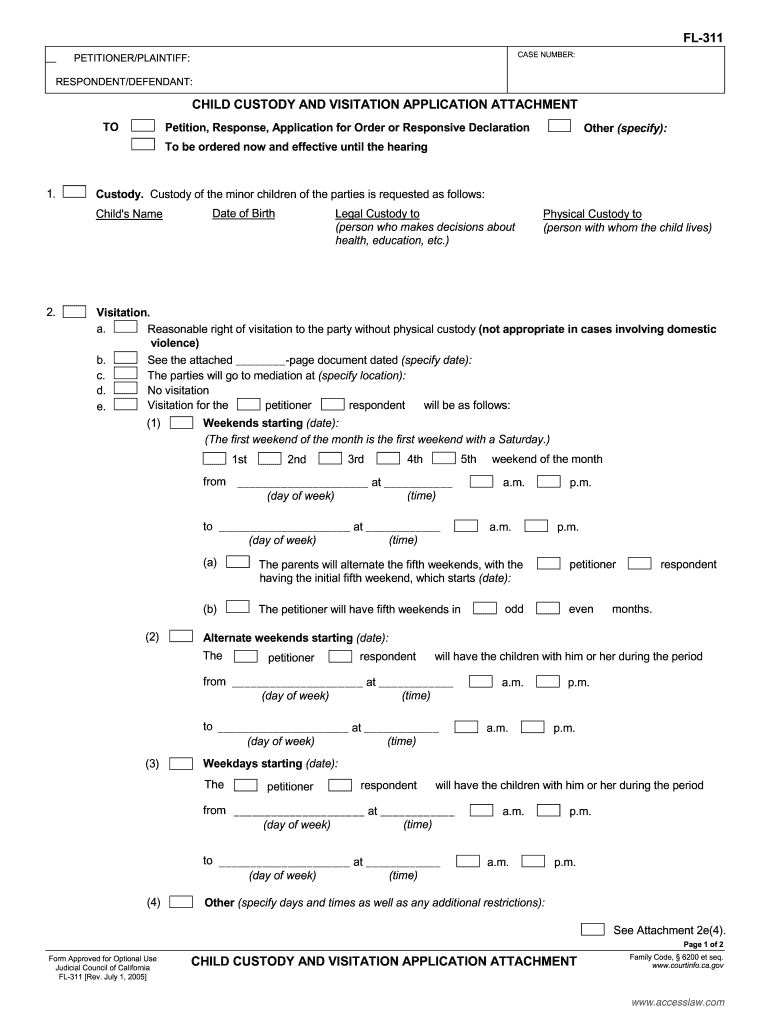
Begin by entering the case number at the top of the form. This is essential for tracking your application.
Fill in the names of the petitioner and respondent in their respective fields. Ensure accuracy as this information is crucial for legal identification.
In the custody section, specify each child's name and date of birth. Indicate who will have legal and physical custody by selecting the appropriate options.
Detail visitation rights, including any specific schedules or conditions. Use clear language to avoid misunderstandings.
If applicable, request supervised visitation by providing necessary details about the supervisor and their contact information.
Complete transportation arrangements for visitation, ensuring all parties are aware of drop-off and pick-up locations.
Review all entries for accuracy before saving or submitting your completed form through our platform.
Start using our platform today to fill out your e4 form easily and efficiently!
E4 form onlineSS Form e 4How to fill out e4 formSSS formsSSS downloadable formsSSS update information onlineSSS update information contact numberHow to change mobile number in SSS without account online
Security and compliance
At DocHub, your data security is our priority. We follow HIPAA, SOC2, GDPR, and other standards, so you can work on your documents with confidence.
Form E4: Transfers Out | Financial Planning, Budget
Mandatory Transfers Out are ones that are made to accounts in Fund FD806 for Debt Service for a bond or bank loan. List the Transfer To account number andRead more
Cookie consent notice
This site uses cookies to enhance site navigation and personalize your experience.
By using this site you agree to our use of cookies as described in our Privacy Notice.
You can modify your selections by visiting our Cookie and Advertising Notice.