




01. Edit your form online
Type text, add images, blackout confidential details, add comments, highlights and more.

Type text, add images, blackout confidential details, add comments, highlights and more.

Draw your signature, type it, upload its image, or use your mobile device as a signature pad.

Send it via email, link, or fax. You can also download it, export it or print it out.
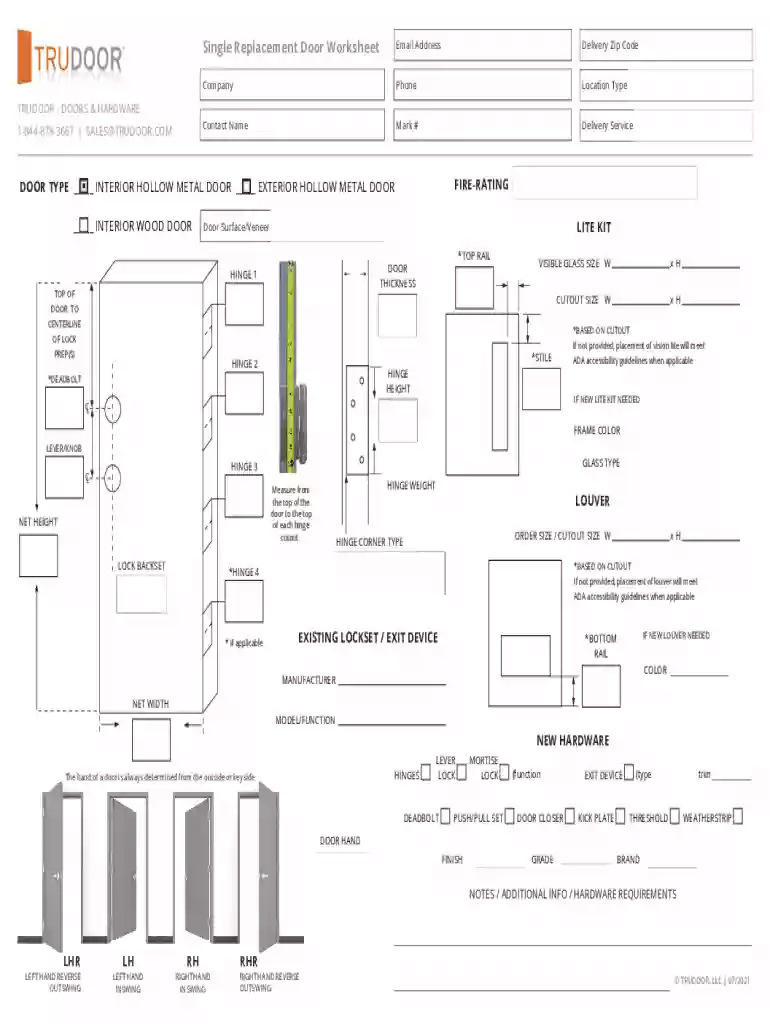
The Trudoor Replacement Door Worksheet is a specialized form used primarily for ordering single replacement doors from Trudoor. This worksheet is designed to collect essential information about the door specifications such as type, fire rating, dimensions, hardware requirements, and customization options. By gathering these details, the form ensures an accurate and efficient order process, reducing errors and potential miscommunications.
This worksheet serves as a critical tool in the documentation process for door replacement, allowing for precise communication of requirements between customers and manufacturers. It streamlines the ordering process, ensuring that each order is tailored to meet specific needs and preferences.
Using the Trudoor Replacement Door Worksheet involves several steps aimed at capturing all necessary details to fulfill an order accurately. Each field in the worksheet is designed to provide crucial information that aids in manufacturing and delivering the door as specified.
Customer Information: Begin by entering basic information such as your name, contact details, and address. This information ensures that the order is processed under the correct account and that there is a direct point of contact.
Door Specifications: Fill in the type of door you require. Options may include solid core, hollow core, metal, or other specific requests you might have.
Fire Rating Requirements: Indicate whether the door must adhere to certain fire safety standards by specifying its fire rating. This is essential for compliance with local building codes and safety regulations.
Dimensions: Provide the exact measurements needed for the door. Accurate dimensions are crucial to ensure the door fits properly within its intended space.
Hardware and Customization: Specify any hardware needs such as handles or locks, and note any customization preferences like color or finish. This segment allows you to customize your order to match specific aesthetic and functional requirements.
Completing the worksheet correctly involves detailed attention to each section, ensuring that all necessary information is accurately captured.
Review Requirements: Before filling out the form, review all requirements and gather any necessary documents or measurements.
Input Data Carefully: Use precise measurements and clear descriptions when defining specifications to avoid delays or errors in the ordering process.
Double-Check Details: Verify all entries for accuracy, especially dimensions and fire ratings, as these can significantly impact the product's performance and compliance.
Submit the Form: Once completed, submit the worksheet through the designated channels specified by Trudoor, whether it be online, by mail, or in person.
Follow Up if Necessary: After submission, maintain communication with Trudoor to track the order's progress and address any potential issues quickly.
Certain key elements are critical to the function and purpose of the worksheet. Understanding these elements will help in completing the form accurately.
Customer Information: Ensures proper identification and communication.
Door Specifications: Captures the basic type and construction of the door needed.
Fire Rating: Details essential for legal compliance and safety.
Dimensions: Critical for a proper fit within existing architectural frameworks.
Hardware Requirements: Specifies additional components that may be necessary for functionality or aesthetics.
The legal use of the Trudoor Replacement Door Worksheet emphasizes compliance with building codes and safety standards. It is essential for users to ensure their requests align with both federal and state regulations, particularly regarding fire safety and structural integrity.
Fire Safety Regulations: Ensure the indicated fire ratings meet local fire safety laws.
Building Codes: Verify that the door specifications adhere to regional building codes to prevent any legal issues.
To illustrate how the worksheet can be used, consider a few scenarios:
Residential Replacement: A homeowner requires a new front door with specific security features and aesthetic appeals to enhance curb appeal while complying with safety standards.
Commercial Application: A business needs to replace a set of doors in a high-traffic area, focusing on durability and fire resistance to meet corporate safety protocols.
Each example underscores the worksheet's utility in efficiently capturing and conveying necessary information for diverse applications.
At DocHub, your data security is our priority. We follow HIPAA, SOC2, GDPR, and other standards, so you can work on your documents with confidence.


Replacement of a non-original door is acceptable as long as the replacement door matches the existing configuration and is painted. Additional information
The NDE is ideal for office and suite entries, conference rooms, common area doors, resident units, and sensitive storage areas with cylindrical door prep.
spatial layout, interior security, window performance, door specifications, and daylighting. Interior guidelines help create spaces that are serene and minimize.


