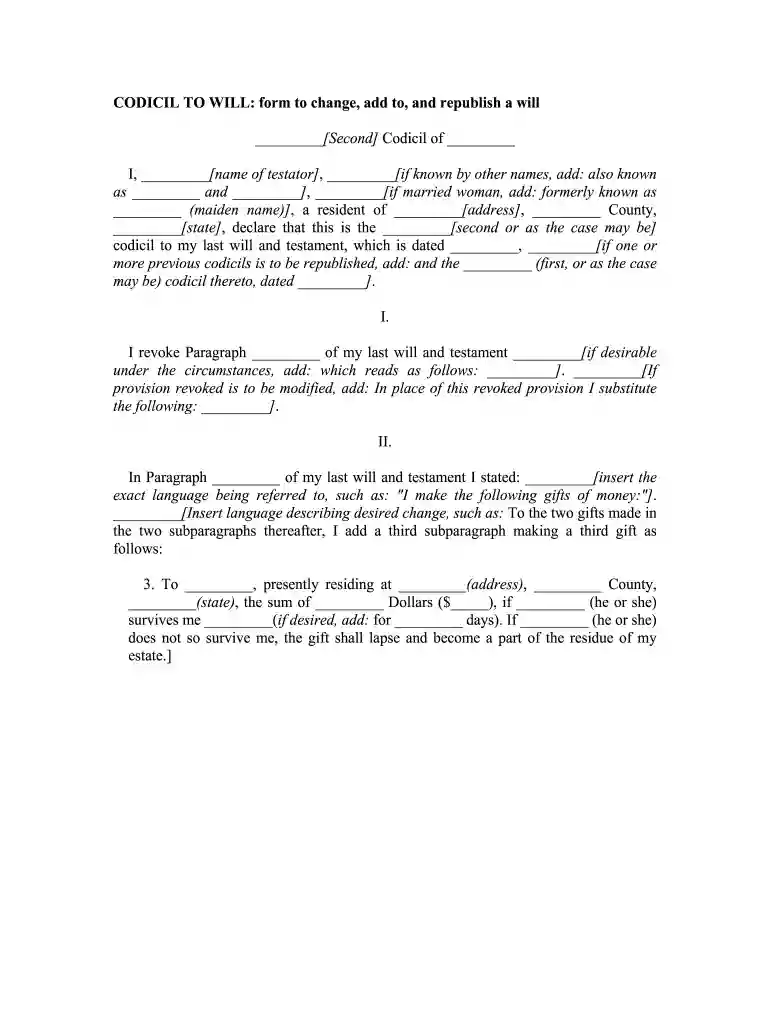
Florida codicil form 2026

Get Form
free fillable codicil form Preview on Page 1

Here's how it works

01. Edit your free fillable codicil form online
Type text, add images, blackout confidential details, add comments, highlights and more.

02. Sign it in a few clicks
Draw your signature, type it, upload its image, or use your mobile device as a signature pad.

03. Share your form with others
Send florida codicil form via email, link, or fax. You can also download it, export it or print it out.

How to use or fill out Florida Codicil Form with DocHub

Form edit decoration
9.5
Ease of Setup
DocHub User Ratings on G2
9.0
Ease of Use
DocHub User Ratings on G2
  1. Click ‘Get Form’ to open the Florida Codicil form in our editor.
  2. Begin by entering your name as the testator in the designated field. If you have any known aliases, include them as well.
  3. Fill in your address and county information accurately to ensure proper identification.
  4. Indicate which codicil this is (e.g., first, second) and provide the date of your last will and testament.
  5. In Section I, specify any paragraphs from your last will that you wish to revoke or modify. Clearly state the new provisions if applicable.
  6. For Section II, insert the exact language from your will that you are referencing and describe any changes or additions you want to make.
  7. Confirm and republish your will by filling in the date of your original will and any previous codicils if necessary.
  8. Finally, sign the document and have it witnessed according to legal requirements. Ensure witnesses also sign in the provided spaces.

Start using our platform today for free to complete your Florida Codicil form effortlessly!

be ready to get more

Complete this form in 5 minutes or less

Get form

Got questions?

We have answers to the most popular questions from our customers. If you can't find an answer to your question, please contact us.
Contact us
Below, you can view a free codicil to a will sample. Customize this template using Legal Templates document editor, and then download it as a PDF or Word file.
The codicil needs to be signed and dated by the will maker and witnessed by two people in the same way as the original. You dont have to use the same people who witnessed your will, but they must be over 18 and independent not a beneficiary or a spouse or partner of a beneficiary named in the will.
Creating a legally valid codicil requires careful attention to both content and execution requirements. The process involves several critical steps that must be completed according to your states specific laws to ensure the codicil will be recognized and enforced.
The legal validity of a codicil depends on following the same formalities required for wills in your state. This typically includes written documentation, proper witnessing, and sometimes notarization.
For a codicil to be legally binding, it must clearly reference the original will, detail the changes being made, and be executed with the same formalities as the original willincluding proper witnessing and, if required, notarization.

Security and compliance

At DocHub, your data security is our priority. We follow HIPAA, SOC2, GDPR, and other standards, so you can work on your documents with confidence.

Learn more
ccpa2
pci-dss
gdpr-compliance
hipaa
soc-compliance
be ready to get more

Complete this form in 5 minutes or less

Get form

People also ask

Does a Codicil Have to be docHubd? In short, no a codicil to a Will does not have to be docHubd. However, laws and requirements vary from state to state. A codicil does have to be signed in front of at least two witnesses who are not listed as beneficiaries, guardians, or executors in your Will.
Does a codicil need to be docHubd in Florida? No, a codicil does not need to be docHubd. A codicil only needs the proper testator and witness signatures. However, most codicils also have a self-proving affidavit attached, and that affidavit does require notarization.

how to write a codicil to a will in florida