Type text, add images, blackout confidential details, add comments, highlights and more.
02. Sign it in a few clicks
Draw your signature, type it, upload its image, or use your mobile device as a signature pad.
03. Share your form with others
Send civ format via email, link, or fax. You can also download it, export it or print it out.
How to use or fill out civ 100 with our platform
Ease of Setup
DocHub User Ratings on G2
Ease of Use
DocHub User Ratings on G2
Click ‘Get Form’ to open the civ 100 in the editor.
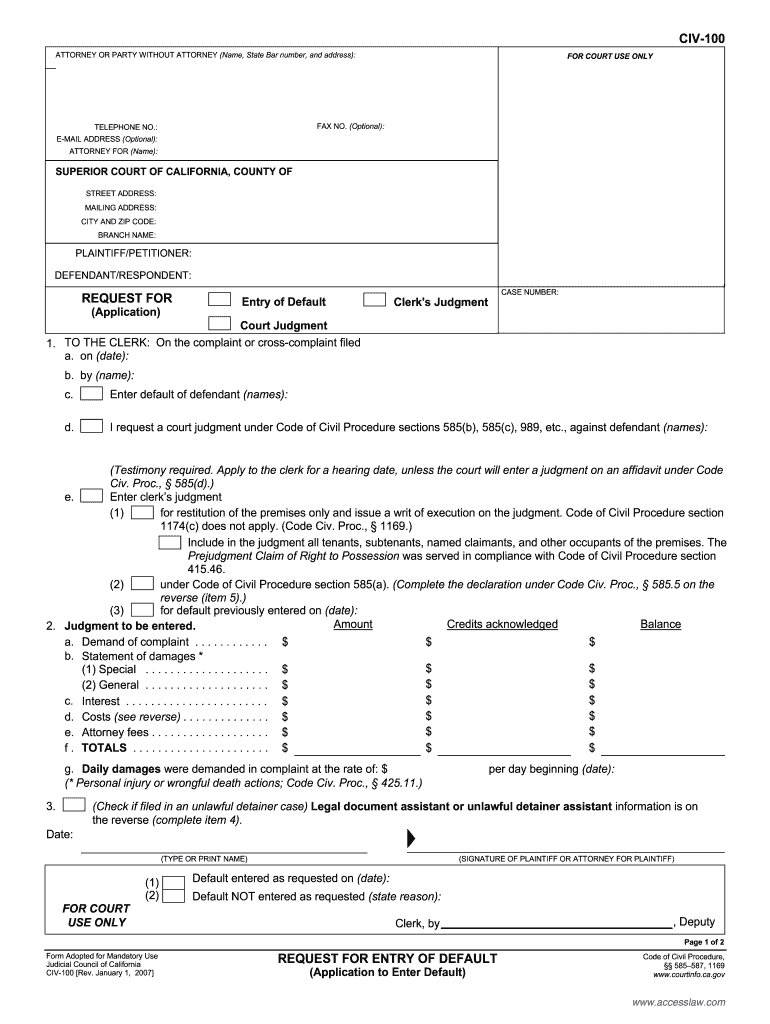
Begin by filling in your details as the attorney or party without an attorney. Include your name, State Bar number, address, and optional contact information such as fax number and email address.
Next, specify the court details including the Superior Court of California, County, street address, mailing address, city, and zip code.
Identify the parties involved by entering the names of the plaintiff/petitioner and defendant/respondent.
In the request section, indicate whether you are applying for entry of default or a clerk's judgment. Fill in relevant dates and names as required.
Complete sections regarding judgment amounts including demands from complaints and any applicable costs or attorney fees.
Finally, review all entries for accuracy before signing and submitting your form through our platform.
Start using our platform today to easily fill out your civ 100 form online for free!
CIV-100 instructionsCIV-100 sampleCIV-100 pdfCIV-110CIV-100 Request for DismissalCIV-100 Request for Entry of defaultCIV-100 fillable formCIV-100 instructions California
Security and compliance
At DocHub, your data security is our priority. We follow HIPAA, SOC2, GDPR, and other standards, so you can work on your documents with confidence.
Through this course students will develop a comprehensive understanding of civic knowledge, values, and skills, enabling them to actively participate in civicRead more
CIV-100 Request for Entry of Default (Application to Enter
Jan 1, 2023 (Testimony required. Apply to the clerk for a hearing date, unless the court will enter a judgment on an affidavit under. Code Civ.Read more
Cookie consent notice
This site uses cookies to enhance site navigation and personalize your experience.
By using this site you agree to our use of cookies as described in our Privacy Notice.
You can modify your selections by visiting our Cookie and Advertising Notice.