Mn dps statememt 2025

Get Form
onlineservices dps mn gov Preview on Page 1

Here's how it works

01. Edit your onlineservices dps mn gov online
Type text, add images, blackout confidential details, add comments, highlights and more.

02. Sign it in a few clicks
Draw your signature, type it, upload its image, or use your mobile device as a signature pad.

03. Share your form with others
Send online services dps mn gov via email, link, or fax. You can also download it, export it or print it out.

How to use or fill out mn dps statememt with our platform

Form edit decoration
9.5
Ease of Setup
DocHub User Ratings on G2
9.0
Ease of Use
DocHub User Ratings on G2
  1. Click ‘Get Form’ to open the mn dps statememt in the editor.
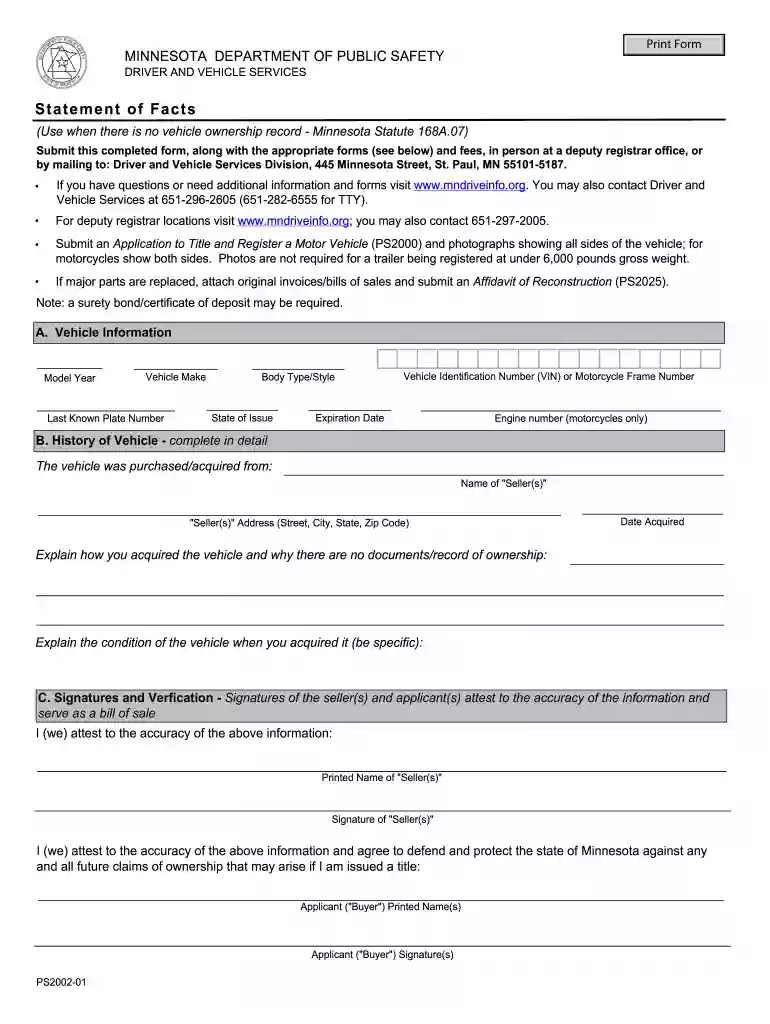
  2. Begin by filling out Section A: Vehicle Information. Enter details such as Model Year, Vehicle Make, Last Known Plate Number, Body Type/Style, State of Issue, and the Vehicle Identification Number (VIN). If applicable, include the Engine number for motorcycles.
  3. Proceed to Section B: History of Vehicle. Provide the name and address of the seller(s), along with the date you acquired the vehicle. Clearly explain how you acquired it and why there are no ownership documents available. Describe the condition of the vehicle at acquisition in detail.
  4. In Section C: Signatures and Verification, ensure that both seller(s) and applicant(s) print their names and provide signatures. This section confirms the accuracy of your information and serves as a bill of sale.

Start using our platform today to fill out your mn dps statememt online for free!

be ready to get more

Complete this form in 5 minutes or less

Get form

Got questions?

We have answers to the most popular questions from our customers. If you can't find an answer to your question, please contact us.
Contact us

Electronic document signing demands a software solution that works in compliance with data protection and eSignature laws. DocHub is a great tool for that, since it meets all the above mentioned requirements. Whatever method you prefer to sign your onlineservices dps mn gov login in DocHub, your electronic signature will be legally binding and court-admissible.

If you want to edit your dps mn gov online services on the internet easily, it does not matter what web browser you use. DocHub’s simple editing tools are accessible using any internet browser. Just open the appropriate tab within our editor, add your document, and fill it out without stress.

If your Minnesota drivers license has been expired for more than one year, but less than five years, you must pass a written test and a vision test before applying for a new license.
In 2023, Minnesota passed an important bill the Drivers License for All. This new legislation allows Minnesotans to get a standard state ID card, permit, or drivers license without needing to provide proof of legal presence. This is a huge step towards making roads and the community safer.
Minnesota Department of Public Safety.
be ready to get more

Complete this form in 5 minutes or less

Get form

People also ask

I acknowledge that the Commissioner of the Minnesota Department Public Safety will cancel and deny my privilege to drive if there is sufficient cause to believe that, after the abstinence date I have attested to above, I have consumed any drink or product containing alcohol or controlled substances.
REAL ID license applicants need: One proof of identity and two proof of residence REAL ID documents (PDF) Valid out-of-state drivers license or certified driving record. Your Social Security number - if you have one.

onlineservices dps