Type text, add images, blackout confidential details, add comments, highlights and more.
02. Sign it in a few clicks
Draw your signature, type it, upload its image, or use your mobile device as a signature pad.
03. Share your form with others
Send secu member access login via email, link, or fax. You can also download it, export it or print it out.
How to use or fill out ncsecu member sign with our platform
Ease of Setup
DocHub User Ratings on G2
Ease of Use
DocHub User Ratings on G2
Click ‘Get Form’ to open the ncsecu member sign in the editor.
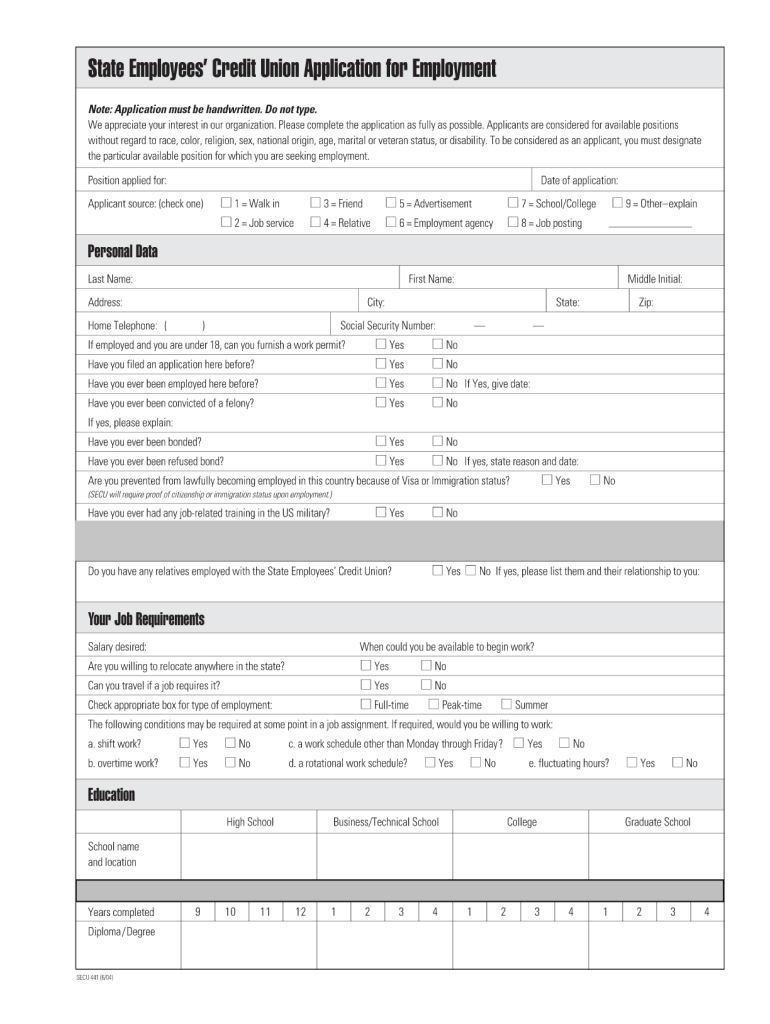
Begin by filling in the 'Position applied for' field. Clearly specify the job title you are interested in.
Next, enter the 'Date of application' to indicate when you are submitting your application.
In the 'Applicant source' section, check one box that best describes how you learned about this job opportunity.
Proceed to fill out your personal data, including your last name, first name, address, and contact information. Ensure accuracy for effective communication.
Complete the 'Your Job Requirements' section by indicating your salary expectations and availability to start work.
Finally, review all sections for completeness and accuracy before signing the application at the bottom of the form.
Start using our platform today to streamline your application process for free!
Who can join SECU. SECU membership is open to people employed through the State of North Carolina, related entities, and their family members.
Can you sign up for SECU online?
0:04 2:14 And your ZIP. Code. Get started by visiting sccu.com. See that yellow box that says log in andMoreAnd your ZIP. Code. Get started by visiting sccu.com. See that yellow box that says log in and enroll. Heres where youll start your sccu online banking enrollment click the arrow and choose enroll.
Who owns NC State Employees Credit Union?
The State Employees Credit Union is a credit union owned by North Carolina state employees.
What is North Carolina State Employees credit union?
At SECU, we are a member-owned cooperative based in North Carolina with a presence in all 100 counties. We have provided financial services to North Carolina state government employees and their families since 1937. We are the second-largest credit union in the United States, serving over 2.8 million members.
What is the difference between a federal credit union and a state credit union?
Deposits held at SECU are insured by the National Credit Union Administration (NCUA).
ncsecu org login access
SECU Member Access login account balanceSECU Mobile loginWww ncsecu org Mobile AppWww ncsecu org Mobile App sign inWww ncsecu org onlineSECU Member Access login account balance phone numberSECU User ID and passwordMember Access SECU
Security and compliance
At DocHub, your data security is our priority. We follow HIPAA, SOC2, GDPR, and other standards, so you can work on your documents with confidence.
What is the routing number for the NC State Employees Credit Union?
The SECU Mobile App is available for download in both the Apple Store and Google Play.
ncsecu org member access
Benefit Pay Days | My NC Retirement
If you wish to view your benefit payment history, follow these steps: Log in to ORBIT; Click on View Payment History; Click on the [year] you wish to viewRead more
Cookie consent notice
This site uses cookies to enhance site navigation and personalize your experience.
By using this site you agree to our use of cookies as described in our Privacy Notice.
You can modify your selections by visiting our Cookie and Advertising Notice.