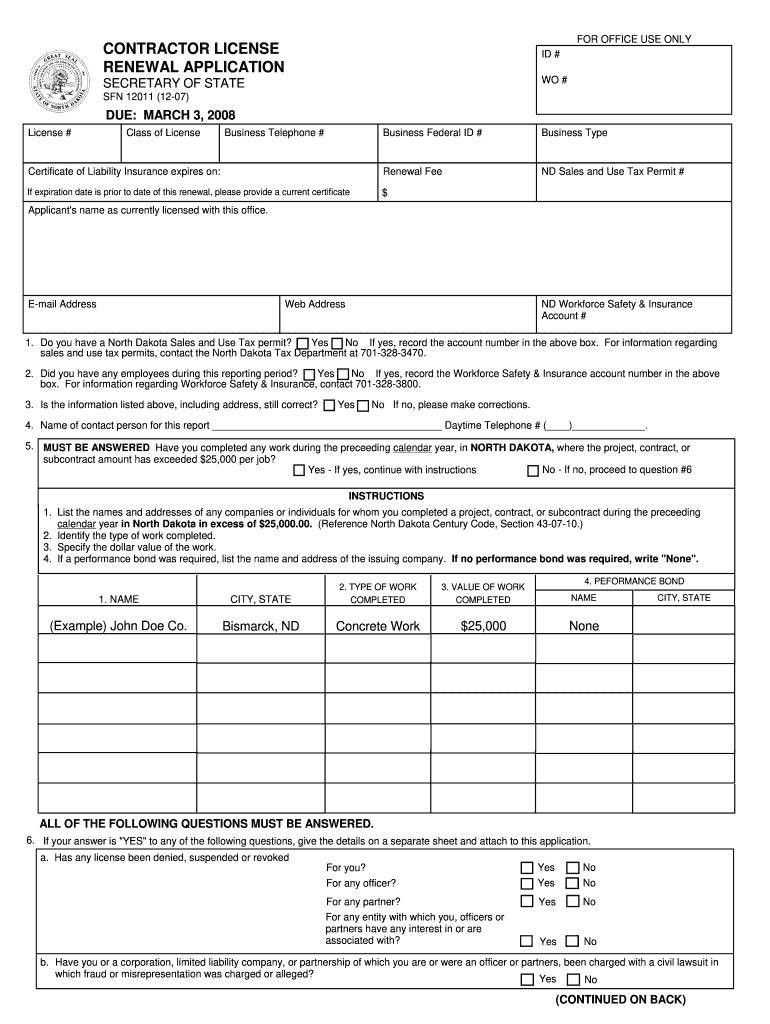
North dakota contractor license renewal 2026

Get Form
first stop nd login Preview on Page 1

Here's how it works

01. Edit your first stop nd login online
Type text, add images, blackout confidential details, add comments, highlights and more.
02. Sign it in a few clicks
Draw your signature, type it, upload its image, or use your mobile device as a signature pad.
03. Share your form with others
Send firststop sos nd gov via email, link, or fax. You can also download it, export it or print it out.

How to use or fill out north dakota contractor license renewal with our platform

Form edit decoration
9.5
Ease of Setup
DocHub User Ratings on G2
9.0
Ease of Use
DocHub User Ratings on G2
  1. Click ‘Get Form’ to open the North Dakota Contractor License Renewal application in the editor.
  2. Begin by filling in your ID number, license number, and class of license. Ensure that your business telephone number and federal ID are accurate.
  3. Provide the expiration date of your Certificate of Liability Insurance. If it has expired, attach a current certificate.
  4. Answer whether you have a North Dakota Sales and Use Tax permit. If yes, include the account number.
  5. Indicate if you had any employees during the reporting period and provide the Workforce Safety & Insurance account number if applicable.
  6. Confirm that all pre-filled information is correct. If not, make necessary corrections directly in the editor.
  7. Complete questions regarding previous work exceeding $25,000 and provide details as required.
  8. Sign and date the application at the bottom to certify that all information is true and complete before submitting it.

Start using our platform today for free to streamline your North Dakota contractor license renewal process!

be ready to get more

Complete this form in 5 minutes or less

Get form

Got questions?

We have answers to the most popular questions from our customers. If you can't find an answer to your question, please contact us.
Contact us

Sure, a typed name is accepted as a valid electronic signature when you add it to your document utilizing a compliant solution like DocHub. Simply import your firststop sos nd gov login to our editor, click Sign in the top tool pane → Create your signature → Type your name in the proper tab, and decide how it will appear on your document.

With a swift editing platform like DocHub, you do not require anything but a web browser and connection to the internet to modify your nd first stop on the internet swiftly. Add your file or get the appropriate form in DocHub’s catalog, open our editor with one click, and complete it digitally. To edit your forms anytime, sign up a free profile with DocHub.

Security and compliance

At DocHub, your data security is our priority. We follow HIPAA, SOC2, GDPR, and other standards, so you can work on your documents with confidence.

Learn more
ccpa2
pci-dss
gdpr-compliance
hipaa
soc-compliance
be ready to get more

Complete this form in 5 minutes or less

Get form