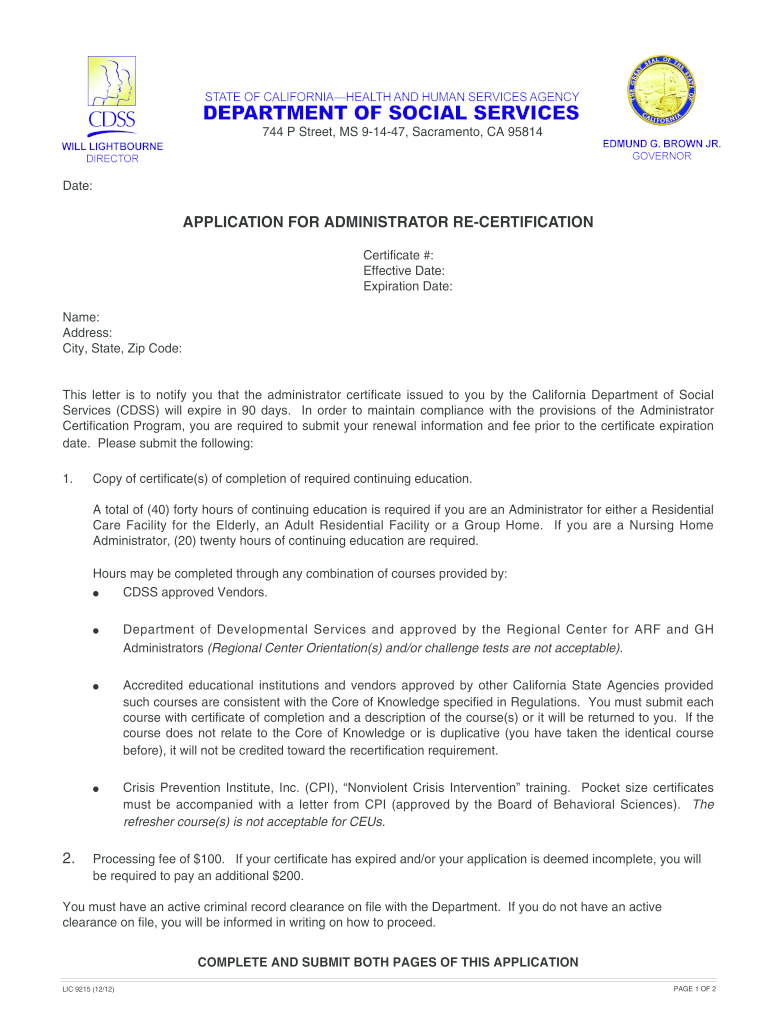
Lic 9215 form-2026

Get Form
lic 9214 Preview on Page 1

Here's how it works

01. Edit your lic 9214 online
Type text, add images, blackout confidential details, add comments, highlights and more.
02. Sign it in a few clicks
Draw your signature, type it, upload its image, or use your mobile device as a signature pad.
03. Share your form with others
Send lic forms via email, link, or fax. You can also download it, export it or print it out.

How to use or fill out lic 9215 form with our platform

Form edit decoration
9.5
Ease of Setup
DocHub User Ratings on G2
9.0
Ease of Use
DocHub User Ratings on G2
  1. Click ‘Get Form’ to open the lic 9215 form in the editor.
  2. Begin by entering your personal information in the designated fields, including your name, address, and certificate details. Ensure accuracy as this information is crucial for processing.
  3. In Section 1, indicate whether you currently possess or have previously held a license or certification. If yes, provide the type and number of the license.
  4. Proceed to Section 2 and answer if you hold or have held a government-issued facility license. Fill in the required details if applicable.
  5. For Section 3, confirm your employment status with a licensed community care facility. List any relevant facilities along with their license numbers.
  6. In Section 4, disclose any administrative or legal actions related to your licensure. Provide explanations and dates as necessary.
  7. Finally, ensure you sign and date the application at the bottom before submitting it to the California Department of Social Services.

Start using our platform today for free to complete your lic 9215 form effortlessly!

be ready to get more

Complete this form in 5 minutes or less

Get form

Got questions?

We have answers to the most popular questions from our customers. If you can't find an answer to your question, please contact us.
Contact us

Approving documents on a mobile device is fast, simple, and doesn’t require software installation when you have an account with DocHub. Sign in from any browser, complete your blank fields with your data, and click on Sign → Create your signature. You can draw your electronic signature just as you usually do on paper, add its image to your lic 9215 form, or type in your name and stylize its look. No matter what option you select, your paperwork will be valid.

If you use Chrome, there are two simple ways to modify your lic 9215 form online. First, go to the DocHub website, add your document, and modify it utilizing our toolbar. You may also set up our Chrome extension and modify any document by dragging and dropping it in your web browser window.

Step 1: Visit LICs official website. Step 2: Sign in using your credentials. Step 3: Download the Surrender Discharge Voucher (LIC Form No. 5074).
Form 602 is issued by the California Department of Social Services. The form was established as a way to help senior communities better understand the needs of potential residents in terms of medical assistance, nutritional needs, mental and physical capabilities and other care requirements.
Maturity Claims: Please submit your Discharged Receipt in Form No.3825 with original policy document atleast one month before the due date so that the payment is received before the due date of maturity claim.

Security and compliance

At DocHub, your data security is our priority. We follow HIPAA, SOC2, GDPR, and other standards, so you can work on your documents with confidence.

Learn more
ccpa2
pci-dss
gdpr-compliance
hipaa
soc-compliance
be ready to get more

Complete this form in 5 minutes or less

Get form

People also ask

Policies can be surrendered offline at an LIC branch or online via the LIC portal. Required documents include Form 5074, original policy bond, ID proof, PAN, and bank details. Once surrendered, the policy cannot be revived.
Step 1: Go to the nearest branch of LIC or visit the insurers official website. Step 2: Download or take a printout of the Surrender Discharge Voucher (LIC Form No. 5074) at the LIC office. Step 3: Complete the form and submit it along with the necessary supporting documentation.
Surrender your insurance policy In case you dont wish to continue the insurance policy, you can raise a request to surrender it. All you have to sign-in to your account. Once signed-in, select your policy from Your relations and proceed to surrender.
To fill out the LIC life certificate form, you need to provide accurate personal and policy-related details such as your name, policy number, and address. The form must be signed by an authorized official who will docHub that you are alive.

Related links