Type text, add images, blackout confidential details, add comments, highlights and more.
02. Sign it in a few clicks
Draw your signature, type it, upload its image, or use your mobile device as a signature pad.
03. Share your form with others
Send dag form via email, link, or fax. You can also download it, export it or print it out.
How to use or fill out dag 71 with our platform
Ease of Setup
DocHub User Ratings on G2
Ease of Use
DocHub User Ratings on G2
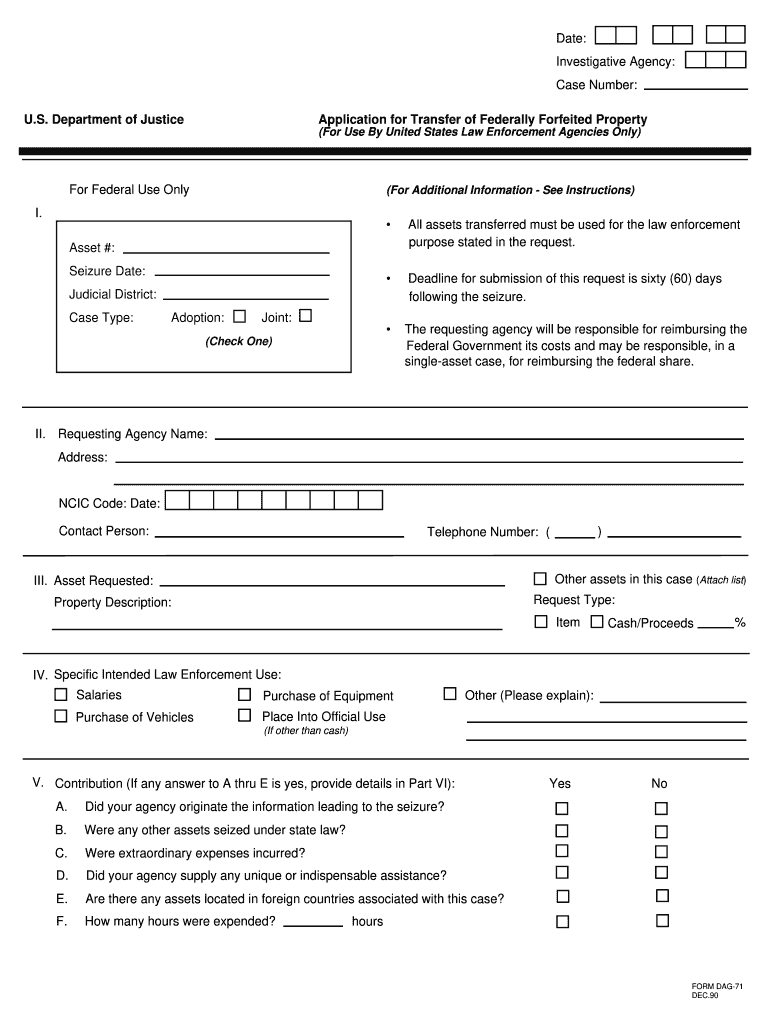
Click ‘Get Form’ to open the DAG-71 in the editor.
In Part I, enter the Asset Number, which refers to the federal investigative agency case number. This is crucial for tracking your request.
Proceed to Part II and provide all requested information. If you do not know the NCIC code, reach out to the federal agency handling your forfeiture.
In Part III, give a detailed description of the property. Ensure you check either 'Item' if requesting an asset or 'Cash/Proceeds' if asking for a percentage.
For Part IV, specify the intended law enforcement purpose for the requested property or funds. This ensures compliance with guidelines.
Complete Parts V and VI by answering all questions accurately and providing any additional information as needed.
Finally, ensure that both the agency head and legal counsel sign in Part VII to certify that all information is true and accurate.
Start using our platform today to streamline your DAG-71 form completion for free!
The DAG-71 further reinforces the interest of the federal government in ensuring that the money is used for law enforcement purposes by requiring the localRead more
This section of the DAG-71 form will be used to evaluate the Agencys contributions to the seizure and forfeiture of the requested asset. Accurately report allRead more
Cookie consent notice
This site uses cookies to enhance site navigation and personalize your experience.
By using this site you agree to our use of cookies as described in our Privacy Notice.
You can modify your selections by visiting our Cookie and Advertising Notice.