Type text, add images, blackout confidential details, add comments, highlights and more.
02. Sign it in a few clicks
Draw your signature, type it, upload its image, or use your mobile device as a signature pad.
03. Share your form with others
Send my optavia premier login via email, link, or fax. You can also download it, export it or print it out.
How to use or fill out optavia order form with our platform
Ease of Setup
DocHub User Ratings on G2
Ease of Use
DocHub User Ratings on G2
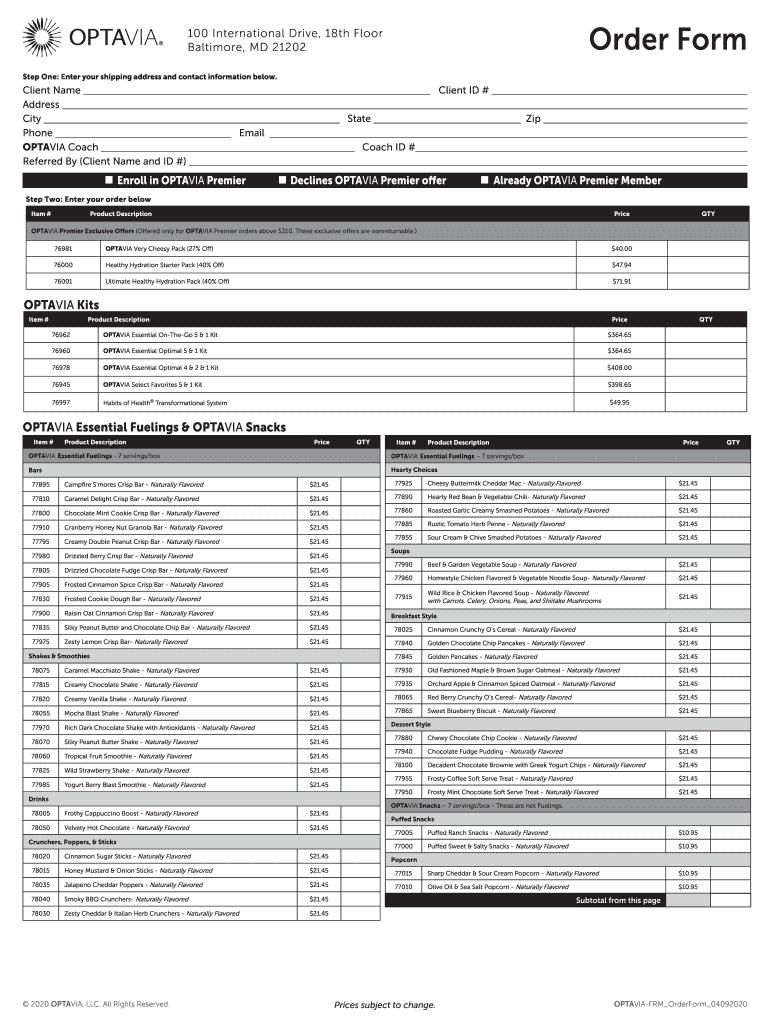
Click ‘Get Form’ to open the optavia order form in the editor.
Begin by entering your shipping address and contact information. Fill in your Client Name, Client ID, Address, City, State, Zip Code, Phone Number, and Email.
Next, specify your OPTAVIA Coach details by entering the Coach ID and the name of the person who referred you.
Indicate whether you would like to enroll in OPTAVIA Premier or decline the offer.
Proceed to enter your order details. For each item you wish to purchase, fill in the Item Number, Product Description, Price, and Quantity (QTY).
Review your selections for any exclusive offers available for OPTAVIA Premier orders above $310.
Finally, check all entries for accuracy before submitting your order.
Start using our platform today for free to streamline your optavia order process!
By signing this form, I believe the patient is a good candidate for surgery and would benefit from DocHub weight loss. I would be happy to see the patientRead more
Cookie consent notice
This site uses cookies to enhance site navigation and personalize your experience.
By using this site you agree to our use of cookies as described in our Privacy Notice.
You can modify your selections by visiting our Cookie and Advertising Notice.