How to Get Your Form I-20 - PDF Free Download 2026

Get Form
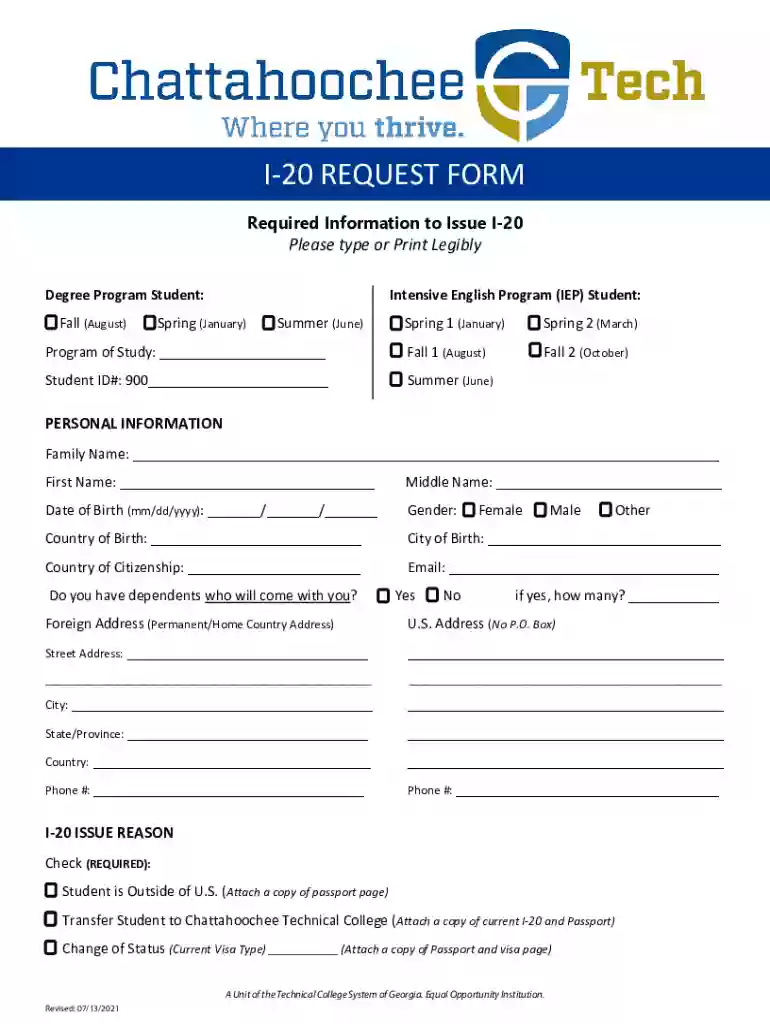
How to Get Your Form I-20 - PDF Free Download Preview on Page 1

Here's how it works

01. Edit your form online
Type text, add images, blackout confidential details, add comments, highlights and more.

02. Sign it in a few clicks
Draw your signature, type it, upload its image, or use your mobile device as a signature pad.

03. Share your form with others
Send it via email, link, or fax. You can also download it, export it or print it out.

Definition & Meaning

The Form I-20, also known as Certificate of Eligibility for Nonimmigrant Student Status, is a critical document needed by international students who wish to study in the United States. This form certifies that a student has been admitted to a U.S. educational institution and is legally eligible to apply for an F or M student visa. Without the Form I-20, an international student cannot proceed with their enrollment or legal stay in the United States for the purpose of education.

How to Obtain the Form I-20

To obtain Form I-20, students must first apply and be accepted into a Student and Exchange Visitor Program (SEVP)-approved school in the United States. Once accepted, the school will issue the Form I-20 through the Student and Exchange Visitor Information System (SEVIS). The process generally includes:

  1. Application and Acceptance: Apply to an SEVP-certified school and receive an offer of admission.

  2. Financial Proof: Demonstrate sufficient financial resources to cover tuition and living expenses for the duration of your studies.

  3. SEVIS Fee: Pay the SEVIS I-901 fee, which is mandatory before a Form I-20 can be issued.

  4. Receive Form I-20: The school will generate and send the Form I-20, often as a PDF for free download or through electronic procurement.

Steps to Complete the Form I-20

Once you have received your Form I-20, complete it with attention to detail. Here are the steps:

  1. Verify Information: Check that all personal information is accurate, including your full name, date of birth, and citizenship details.

  2. Sign the Form: Sign the Student Attestation section to confirm you understand your responsibilities as an international student.

  3. Attach Supporting Documents: Prepare necessary documents such as financial statements and a valid passport to accompany your form for visa processing.

  4. Visa Application: Use the Form I-20 to apply for your F or M student visa at the U.S. Embassy or Consulate in your home country.

Important Terms Related to Form I-20

Understanding key terms associated with Form I-20 will assist in navigating the process:

  • SEVP: The Student and Exchange Visitor Program monitors students and ensures compliance with U.S. laws.
  • SEVIS: The Student and Exchange Visitor Information System is the database that maintains information on nonimmigrant students.
  • DHS: The Department of Homeland Security oversees immigration laws and student visa compliance.

Legal Use of the Form I-20

Form I-20 must be used in strict adherence to U.S. immigration laws. It is a legally binding document that outlines:

  • Duration of Stay: States the period during which the educational program is expected to be completed.
  • Institutional Commitment: Confirms the student's acceptance into the school.
  • Compliance Requirements: Mandates reporting changes such as address, program switches, or immigration status alterations to SEVIS.

Key Elements of Form I-20

The Form I-20 includes several critical components:

  • Personal Information: Lists the student's name, date of birth, and country of citizenship.
  • Program Details: Specifies academic program, start and end dates, and the school’s information.
  • Financial Details: Includes information on cost of attendance and funding sources.

Required Documents

To successfully acquire and utilize a Form I-20, students must prepare the following documents:

  • Proof of Financial Capability: Bank statements or affidavits of support.
  • Identification: Copies of passport and photo ID.
  • Acceptance Letter: Formal acceptance from the educational institution.

Form Submission Methods

Schools usually provide the Form I-20 through different channels based on the student's location and preferences:

  • Online Download: Access the form as a PDF for easy electronic storage and sharing.
  • Mail: Receive a physical copy through postal services, especially relevant for initial visa applications.
  • In-Person: Collect directly from the institution for those already in the United States.

Application Process & Approval Time

The approval for a student visa after obtaining Form I-20 typically encompasses the following steps:

  1. SEVIS Registration: Complete the SEVIS enrollment through the SEVP portal.
  2. Interview: Schedule and attend a visa interview, showing your Form I-20 to a consular officer.
  3. Processing Time: Allow a few weeks for the visa process to complete; timing may vary based on applicants’ country.
be ready to get more

Complete this form in 5 minutes or less

Get form

Got questions?

We have answers to the most popular questions from our customers. If you can't find an answer to your question, please contact us.
Contact us
I-20s: Electronic or Original If you receive an electronically signed I-20, you must print out the I-20 and carry a physical copy when using it for travel or other official purposes. As always- be sure to keep all old I-20s for your records, but use the newest version for travel or other purposes. Understanding Your I-20 | Berkeley International Office Berkeley International Office immigration i20 Berkeley International Office immigration i20
The school official (called the Designated School Official or DSO) prints and signs the I-20 and then delivers it to the student. If a student needs to update or change information on the I-20, the DSO makes these requests through SEVIS and the document can be easily reproduced.
Yes, prior to the pandemic printing your own I-20 would have been a huge NO. The government told schools they were not to be transmitted electronically, and only the original, paper I-20 with the ink (pen-to-paper) signature of the DSO was valid.
Once the International Center receives your complete application, an advisor create a record for you in the US governments SEVIS (Student and Exchange Visitor Information System) database. Once your SEVIS record is created, the International Center will be able to create and print a Form I-20 for you.
Print Draft Form I-20 Go to the Student Information page. Click Print Draft I-20. An Open or Save option displays at the bottom of the Student Information page. Click Open. The DRAFT Form I-20 opens in PDF format. Click Print icon. Click Close on PDF copy.

Security and compliance

At DocHub, your data security is our priority. We follow HIPAA, SOC2, GDPR, and other standards, so you can work on your documents with confidence.
Learn more
ccpa2
pci-dss
gdpr-compliance
hipaa
soc-compliance