01. Edit your how to overturn a quit claim deed online
Type text, add images, blackout confidential details, add comments, highlights and more.
02. Sign it in a few clicks
Draw your signature, type it, upload its image, or use your mobile device as a signature pad.
03. Share your form with others
Send it via email, link, or fax. You can also download it, export it or print it out.
How to use or fill out quit claim deed with our platform
Ease of Setup
DocHub User Ratings on G2
Ease of Use
DocHub User Ratings on G2
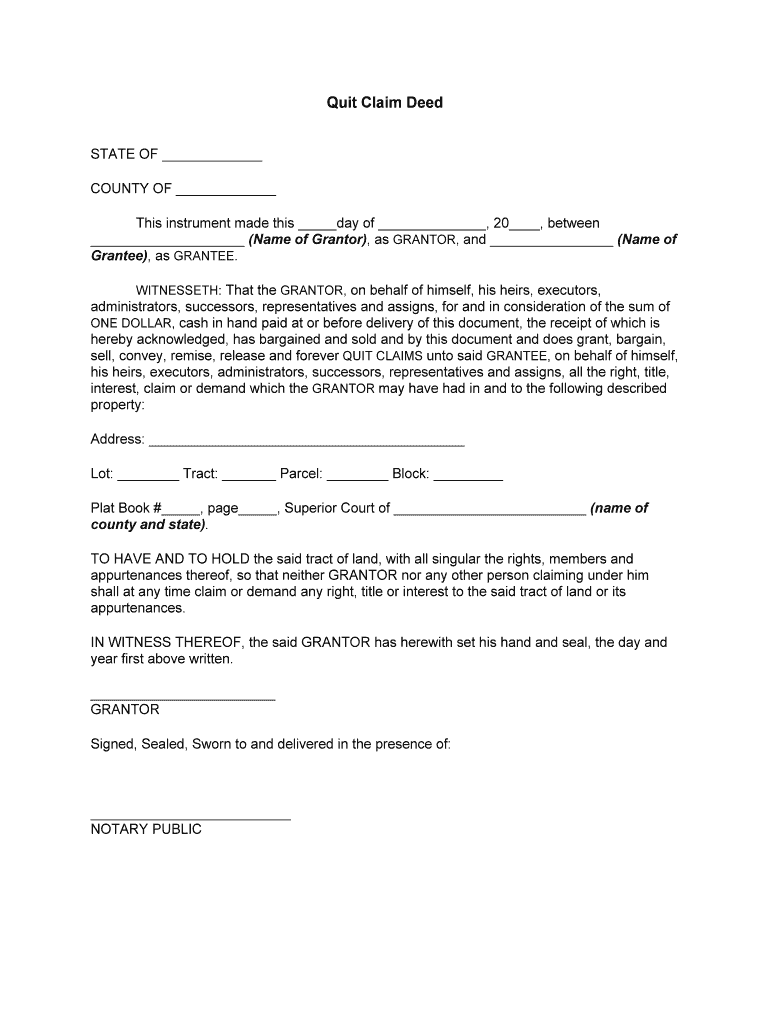
Click ‘Get Form’ to open the quit claim deed in the editor.
Begin by filling in the 'STATE OF' and 'COUNTY OF' fields at the top of the document. This specifies the jurisdiction where the deed is executed.
In the section for GRANTOR, enter the name of the person transferring their interest in the property. Ensure accuracy as this identifies who is relinquishing rights.
Next, fill in the GRANTEE's name, which is the individual receiving ownership. This section is crucial for establishing legal ownership.
Complete the property description fields: Address, Lot, Tract, Parcel, and Block. These details define what property is being transferred.
Finally, have the GRANTOR sign and date at the bottom of the document. A notary public must also sign to validate this transaction.
Start using our platform today to easily complete your quit claim deed online for free!
Form of quitclaim deed. Any conveyance of lands, worded in substance as follows: A.B. quitclaims to C.D. (here describe the premises), for the sum of (hereRead more
quitclaim deed | Wex | US Law | LII / Legal Information Institute
A document by which a grantor conveys his or her present interest, if any, in a given parcel of [wex:real property] to a grantee without representing,Read more
Cookie consent notice
This site uses cookies to enhance site navigation and personalize your experience.
By using this site you agree to our use of cookies as described in our Privacy Notice.
You can modify your selections by visiting our Cookie and Advertising Notice.