Type text, add images, blackout confidential details, add comments, highlights and more.
02. Sign it in a few clicks
Draw your signature, type it, upload its image, or use your mobile device as a signature pad.
03. Share your form with others
Send ireland form fill via email, link, or fax. You can also download it, export it or print it out.
How to use or fill out the Ireland form with our platform
Ease of Setup
DocHub User Ratings on G2
Ease of Use
DocHub User Ratings on G2
Click ‘Get Form’ to open it in the editor.
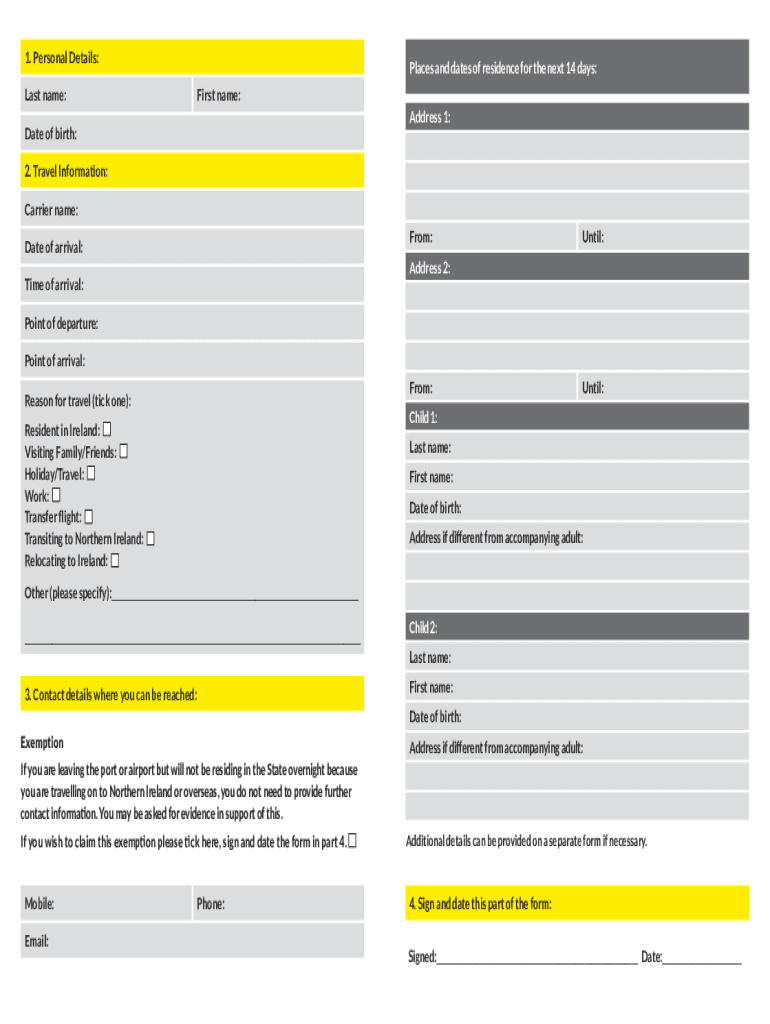
Begin by filling out Section 1, which includes your personal details. Enter your last name, first name, date of birth, and address for the next 14 days.
Proceed to Section 2 for travel information. Fill in the carrier name, points of departure and arrival, date and time of arrival, and reason for travel. If traveling with children, provide their details as well.
In Section 3, provide your contact details where you can be reached. If you are not staying overnight in Ireland, tick the exemption box and sign in Section 4.
Finally, review all entered information for accuracy before signing and dating the form in Section 4. Ensure that all required fields are completed.
Start using our platform today to easily complete your Ireland form online for free!
Ireland visa application form PDFIreland visa apply onlineHow to fill Ireland visa application formAVATS IrelandAVATS Ireland full formAVATS application formIrish Immigration loginIreland Visit visa application
Security and compliance
At DocHub, your data security is our priority. We follow HIPAA, SOC2, GDPR, and other standards, so you can work on your documents with confidence.
Ireland International Travel Information - Department of State
No visa required. U.S. citizens can enter visa-free for tourism or business stays of up to 90 days. VACCINATIONS: None. CURRENCY RESTRICTIONS FOR ENTRY:.
Cookie consent notice
This site uses cookies to enhance site navigation and personalize your experience.
By using this site you agree to our use of cookies as described in our Privacy Notice.
You can modify your selections by visiting our Cookie and Advertising Notice.