




01. Edit your form online
Type text, add images, blackout confidential details, add comments, highlights and more.

Type text, add images, blackout confidential details, add comments, highlights and more.

Draw your signature, type it, upload its image, or use your mobile device as a signature pad.

Send it via email, link, or fax. You can also download it, export it or print it out.
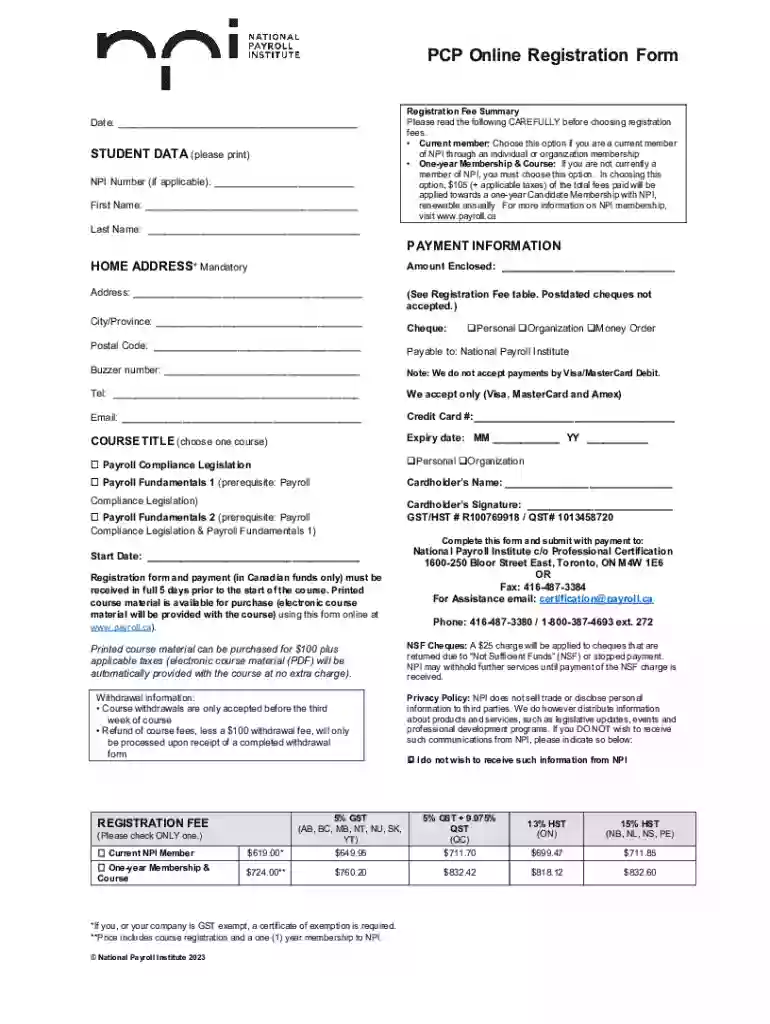
The PCP Online Registration Form is designed to facilitate the enrollment process for courses offered through the National Payroll Institute (NPI). It's a digital document that captures essential information from students, including their personal details, course selection, and payment information. The form serves as a comprehensive tool to streamline the registration process, ensuring all pertinent data is collected efficiently and accurately.
To utilize the PCP Online Registration Form, follow these steps:
Access the Form: Find the form on the NPI's official website. Ensure you are on a secure and official page to protect your personal information.
Fill in Personal Information: Enter personal details such as name, address, contact information, and any other required identification numbers.
Select Courses: Choose from the available course options provided by NPI. Ensure that you meet any prerequisites for the chosen courses before finalizing your selection.
Provide Payment Details: Complete the payment section, selecting the appropriate registration fee option and providing the necessary financial information.
Submit the Form: Once all fields are completed, review the information to avoid errors. Follow the instructions to submit the form, ensuring any required attachments, like proof of prior education, are included.
Familiarize yourself with these key terms to better understand the PCP Online Registration Form:
The PCP Online Registration Form consists of several critical components:
Here is a detailed process for completing this form:
Gather Necessary Documents: Ensure you have all required documents handy, such as identification and proof of payment methods.
Complete Each Section Carefully: Go through each section methodically, checking for accuracy in your entries, especially in the payment and course selection areas.
Double-check for Errors: Carefully review your completed form for any mistakes or missing information. Correct these before proceeding.
Submit and Confirm Submission: Follow the submission instructions, often involving clicking a "Submit" button and awaiting a confirmation email or message.
For ease of use, the PCP Online Registration Form is compatible with:
The registration process via the PCP Online Registration Form consists of several stages:
To complete the PCP Online Registration Form effectively, gather the following documents:
Failure to comply with registration policies may result in:
Once completed, you can submit your online registration form through:
Each method has its advantages and disadvantages and should be selected based on security and convenience preferences.
We've got more versions of the PCP Online Registraton Form form. Select the right PCP Online Registraton Form version from the list and start editing it straight away!
At DocHub, your data security is our priority. We follow HIPAA, SOC2, GDPR, and other standards, so you can work on your documents with confidence.
You can schedule an appointment online for many of our adult and pediatric primary and specialty care visits. Appointments: 1-888-824-0200
How to enroll Online + To become a PCC, you may request an application using the Provider Application Request Form. (617) 998-8974. call us at (800) 841-2900.


