Type text, add images, blackout confidential details, add comments, highlights and more.
02. Sign it in a few clicks
Draw your signature, type it, upload its image, or use your mobile device as a signature pad.
03. Share your form with others
Send how to get a dnr online via email, link, or fax. You can also download it, export it or print it out.
How to use or fill out Kentucky DNR form with our platform
Ease of Setup
DocHub User Ratings on G2
Ease of Use
DocHub User Ratings on G2
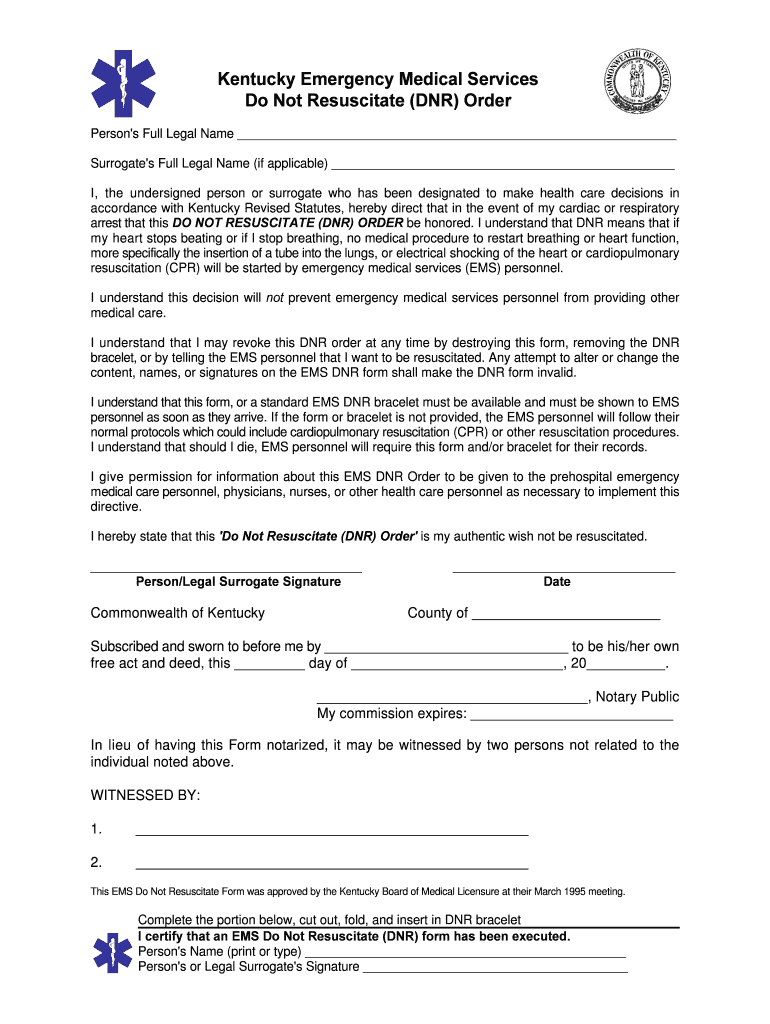
Click ‘Get Form’ to open the Kentucky DNR form in the editor.
Begin by entering the Person's Full Legal Name in the designated field. This is crucial for identifying the individual for whom the DNR order applies.
If applicable, fill in the Surrogate's Full Legal Name. This section is important if a surrogate has been designated to make health care decisions.
Review and understand the directives outlined in the form regarding resuscitation measures. Ensure you are comfortable with these instructions before proceeding.
Sign and date the form at the bottom where indicated. If notarization is required, ensure that a Kentucky Notary Public witnesses your signature or have two unrelated witnesses sign.
Detach and complete the bracelet insert at the bottom of the form, ensuring it is placed on your wrist or ankle for easy access by EMS personnel.
Start using our platform today to fill out your Kentucky DNR form online for free!
Kentucky dnr form pdfKentucky dnr form for childKentucky dnr form onlineKentucky EMS DNR formPrintable DNR formKentucky MOST formFree DNR formIndiana DNR
Security and compliance
At DocHub, your data security is our priority. We follow HIPAA, SOC2, GDPR, and other standards, so you can work on your documents with confidence.
Kentucky Emergency Medical Services Do Not Resuscitate
I understand that this form, or a standard EMS DNR bracelet must be available and must be shown to EMS personnel as soon as they arrive. If the form or braceletRead more
Technical and Regulatory Requirements for Enhanced In
Dec 23, 1998 Standard Form 298 (Rev. 8-98). Prescribed by ANSI Std Z39-18. Page 3. ABOUT ITRC. Established in 1995, the Interstate Technology RegulatoryRead more
Cookie consent notice
This site uses cookies to enhance site navigation and personalize your experience.
By using this site you agree to our use of cookies as described in our Privacy Notice.
You can modify your selections by visiting our Cookie and Advertising Notice.